HOW TO USE
21
20
Disconnecting the Blood Line and Dialyzer
1. Press the center of the blood pump door and
pull the tab to open the door.
2. Hold the arterial blood line just before the pump segment on the
bottom. Pull the blood line outwards while rotating the blood pump
counter-clockwise to remove the blood line.
3. Press the center of the air detector door and pull the tab to open
the door. Pinch the venous drip chamber and pull it out.
4. Disconnect and remove the arterial and venous blood lines.
Disinfection and Rinsing
Press the flashing "Disinfection" button to disinfect/rinse.
CleanCart cartridges, chemical substances, and/or heat disinfection can
be used to disinfect.
1. Press the "Disinfection" button.
2. Select the "Rinse" tab.
3. Press Descaling.
4. Press Confirm.
Note:
Descaling between treatments is to remove precipitated
material from the machine.
Note:
When descaling between treatments, the red concentrate
connector must remain connected to the acid concentrate
to perform the descaling process.
Descaling Between Treatments
WATCH VIDEO
Heat Disinfection with CleanCart Cartridges
CleanCart A and CleanCart C cartridges can be used
with the CleanCart disinfection function.
Note: Ensure that the bloodlines are removed
from the machine and all connections are
returned to their standby ports.
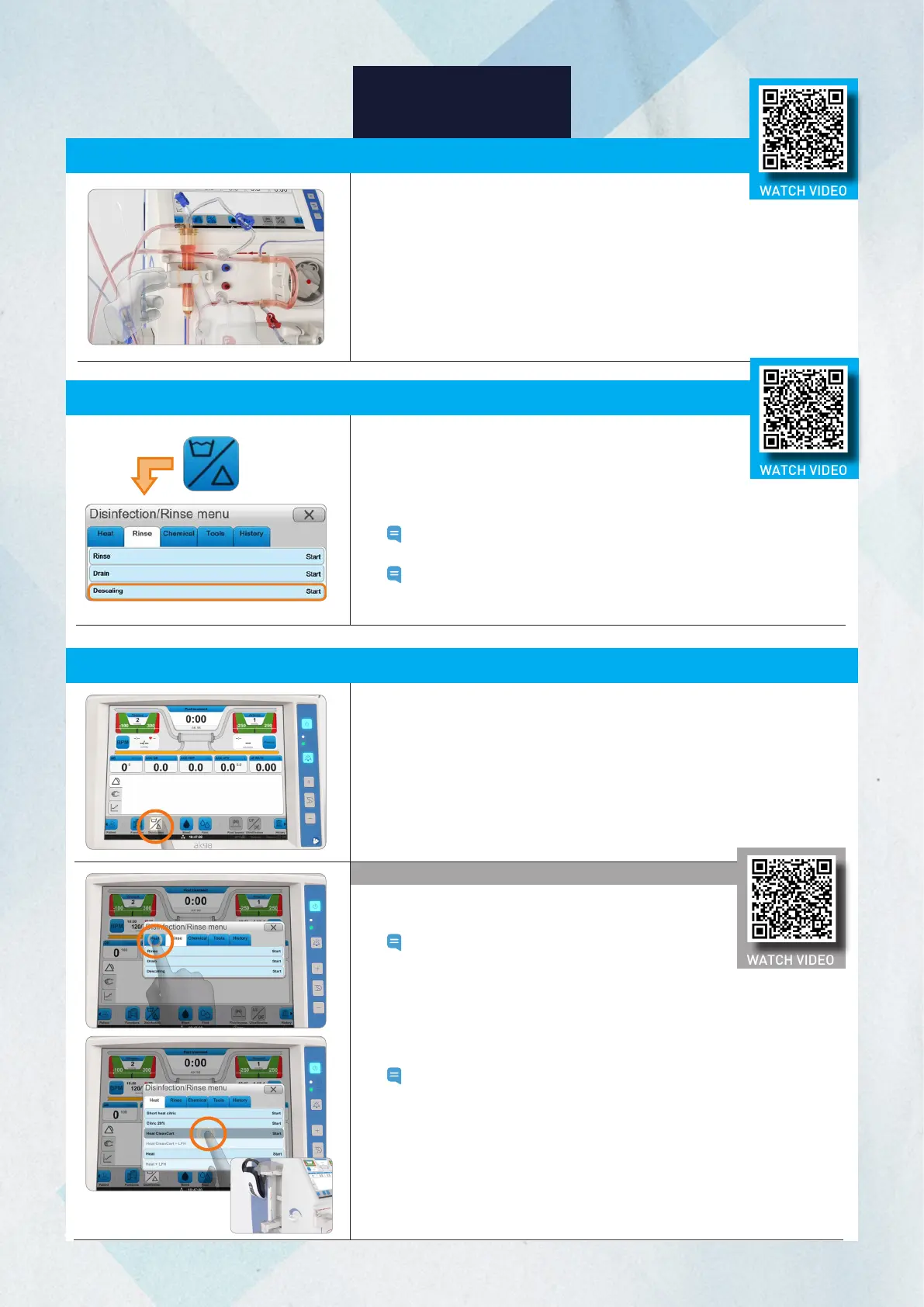
1. Select the "Disinfection" button.
2. Select the "Heat" tab.
3. Select the "Heat CleanCart" option and press Confirm.
Note: After ~1 minute, the machine will display the message
“CleanCart is not attached”.
4. Open the BiCart cartridge holder. Fold the lower latch out and down,
and fold the upper latch out and up, and pull out.
5. Attach the CleanCart cartridge, inserting the bottom first. Hold with
one hand underneath the lower latch while closing the upper latch to
secure the cartridge. The disinfection cycle will start.
WATCH VIDEO
WATCH VIDEO














 To Next Page