ADVANCED FUNCTIONS
35
34
How to add a second and subsequent phase of isolated UF
Second and subsequent isolated UF phases may be activated at any point during treatment.
The time and UF goal for the new phase must be added to the previous isolated UF time and UF goal to create a
cumulative amount. For example, if the first phase was set to 30 minutes and 0.5 L, and the second phase to be
set with the same values, the settings need to be 60 minutes and 1L, which is a total of two phases together.
The values set for the second and subsequent phases must be greater than the accumulated isolated time and
UF goal.
Isolated UF Deactivation
Press the Fluid button. Press Isolated UF, and deactivate isolated UF.
To stop UF before the set isolated UF goals are met, deactivate Isolated UF and change the time and volume to
values that have already been achieved (i.e., Isolated UF Accumulated Values).
If only isolated UF is being performed, the remaining treatment time must also be set to zero to get the
“Treatment time expired” message.
If “Value out of range. The value can’t be higher than X.XX L” appears, first set the Total UF and then the
Isolated UF goal.
Note:
The dialysate flow will not stop, as AK 98 needs dialysate to measure ultrafiltration. It is not possible nor
advisable to decrease dialysate flow rate or set it to zero.
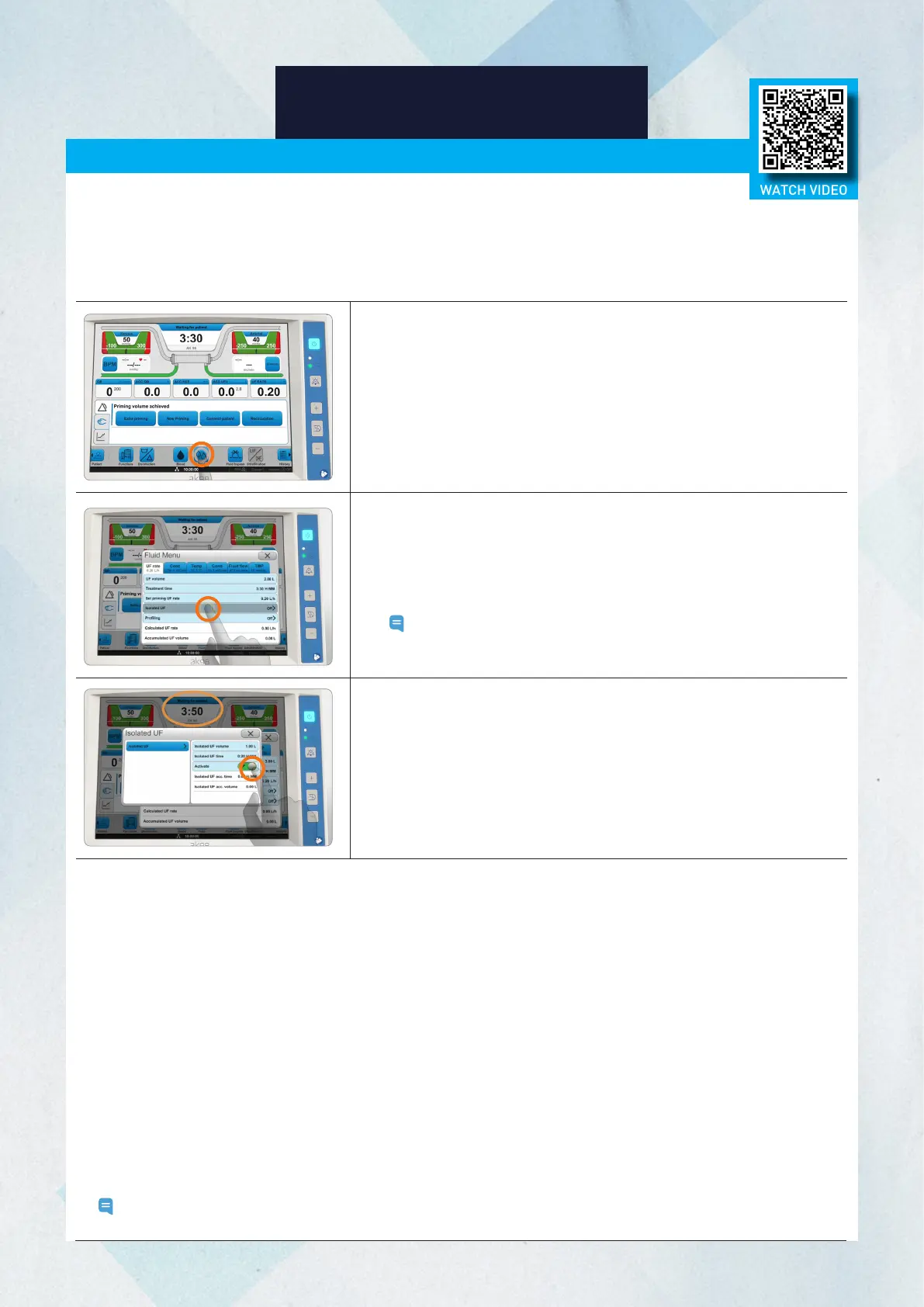
3. Press Isolated UF.
4. Press the Isolated UF volume button, and set the ultrafiltration goal
for the isolated UF step.
5. Press the Isolated UF Time button, and set the time for the Isolated
UF step.
Note: The values are added to the set diffusion values or, if the
other preset is used, the values will be taken from the set
time and UF goal values.
6. Press Activate.
7. Verify accuracy of total treatment time (time + Isolated UF time) and
total UF goal (UF volume + Isolated UF volume). Make adjustments,
as needed.
Isolated UF (Ultrafiltration)
During isolated UF, diffusion does not occur. Because the dialysate bypasses the dialyzer, the machine
only performs ultrafiltration. During isolated UF, because the dialysate bypasses the dialyzer, the blood
cannot maintain its temperature in the same way it does during diffusion. Since the UF rate is usually high during
isolated UF, a high blood flow rate, within acceptable limits for the patient, is recommended to prevent clotting in the
dialyzer and blood line. If dialysis (diffusion) is ordered after the isolated UF phase, when isolated UF is completed, the
machine will automatically switch to the diffusion phase. Follow your protocol / prescription order.
1. Press the Fluid button.
2. Set the treatment time and ultrafiltration goal for dialysis
(diffusion step).
WATCH VIDEO














 To Next Page