ADVANCED FUNCTIONS
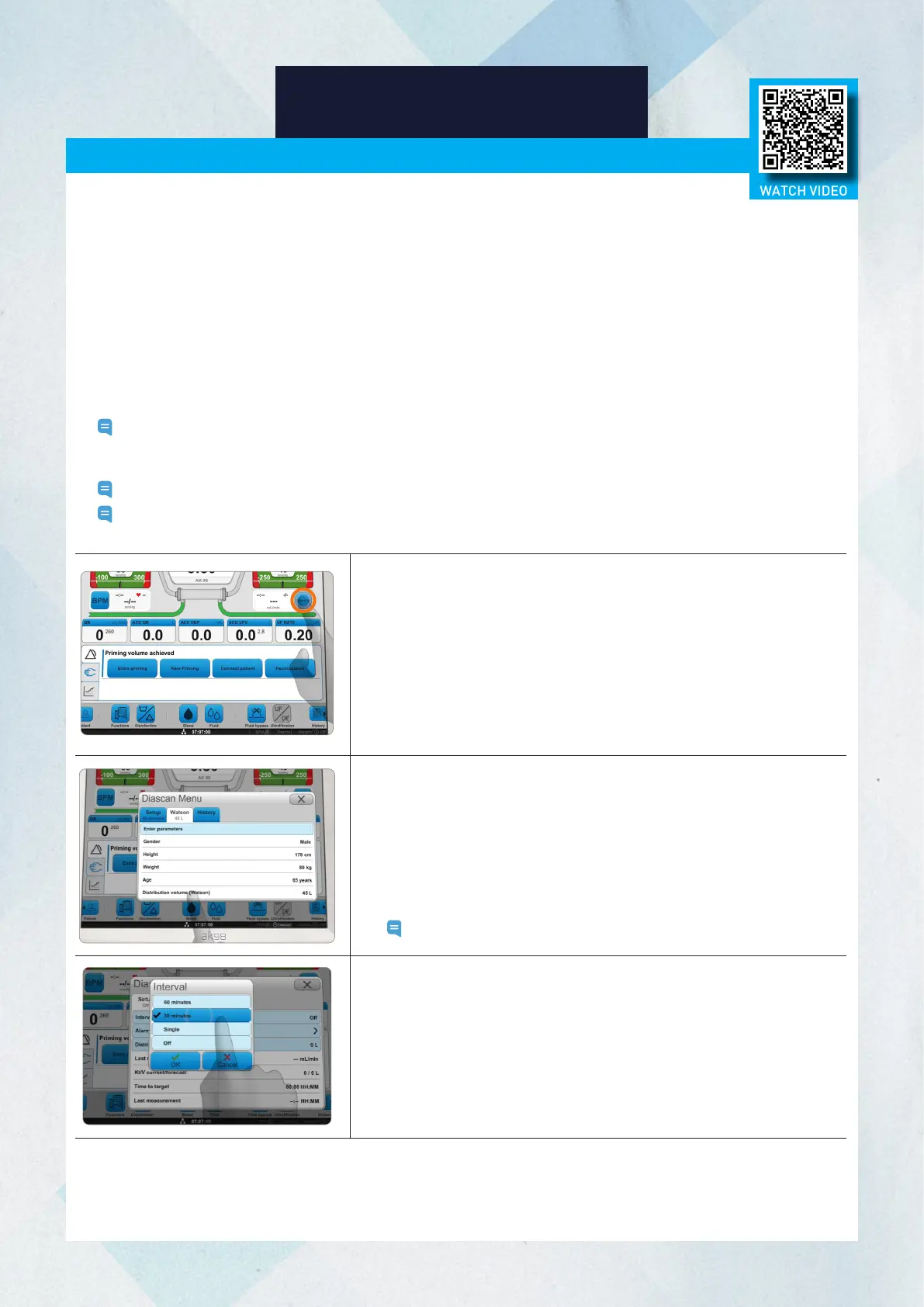
1. Press the Diascan button.
2. If you know the patient’s distribution volume, press Distribution
volume (manual) in the Setup tab and set the volume. If you need
to calculate the patient’s distribution volume, select the Watson
tab and press Enter Parameters.
3. Enter the patient’s information in the settings that appear on the
screen.
4. Select the Setup tab and press Interval.
Note: It is not necessary to activate the Alarm settings.
Diascan Function
The Diascan function shows the estimated clearance value and calculates whether the set Kt/V target and
minimum values can be reached at the end of treatment.
Diascan Mechanism
Since the molecular weights of urea and sodium are similar, the optional Diascan function enables non-invasive
automatic monitoring of the sodium clearance rate, which is considered to be similar to the urea clearance rate.
Kt/V Confirmation
AK 98 can calculate the Kt/V as a single measurement or at intervals. To measure Kt/V, the urea distribution
volume must be set. The distribution volume is the urea distribution volume (water in the body) in liters and is
estimated for each patient based on the patient's dry weight. The user sets the distribution volume on the machine.
Note: To get a reliable Kt/V value, enter the patient’s distribution volume accurately into the machine. Because
the Diascan measurement takes time, single measurements cannot be started with less than 30 minutes
of treatment time remaining.
Note: The Diascan function can be programmed via the presets to be activated automatically.
Note: It is also possible to enter the patient parameters (Watson) after treatment has started so that the Kt/V
calculation can be displayed.
Diascan Monitoring System
5. Select between 30 or 60 minute intervals to activate the
Diascan function.
6. Press Single to take a single measurement.
32
WATCH VIDEO














 To Next Page