ADVANCED FUNCTIONS
31
30
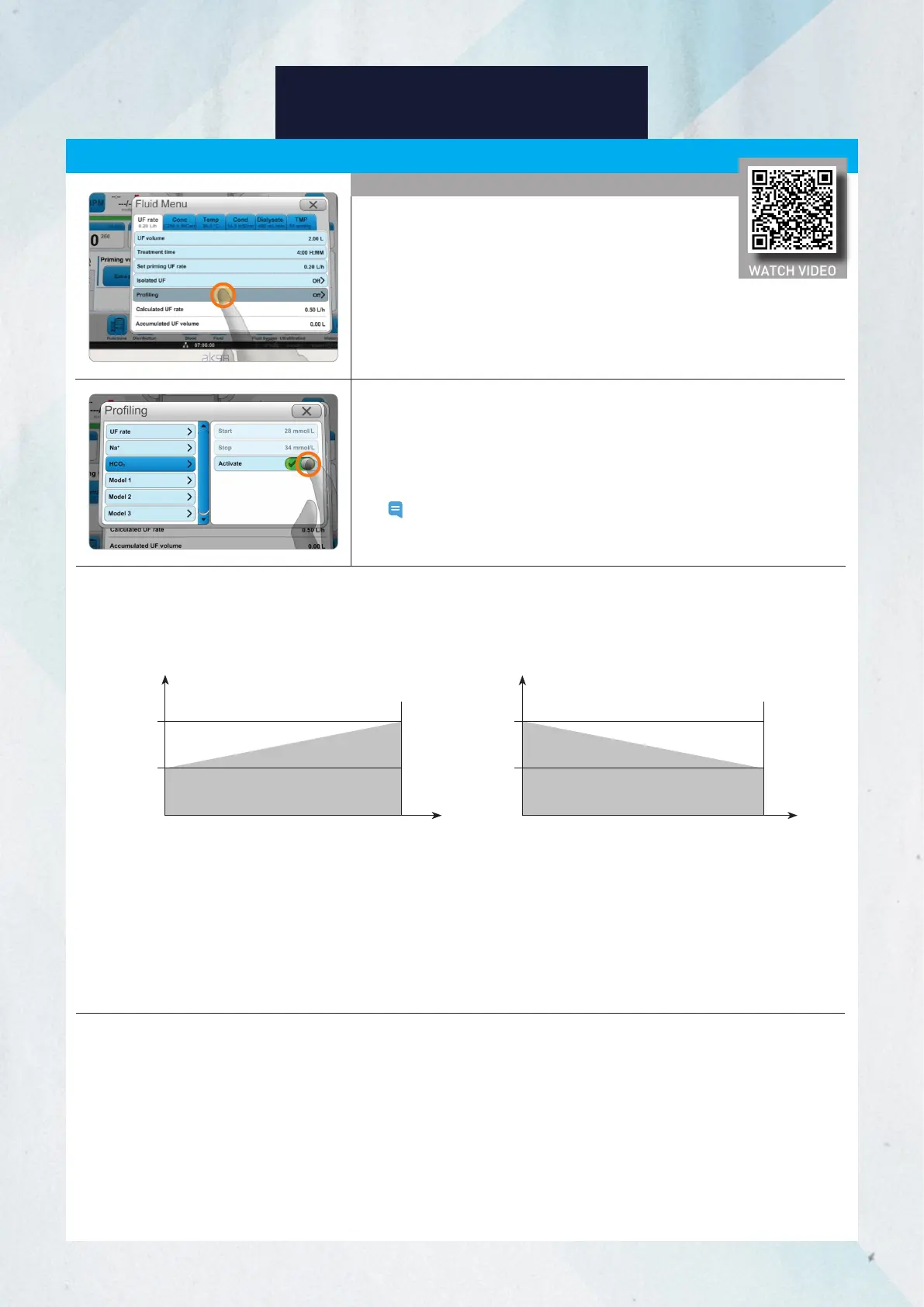
3. Press Profiling and press Sodium (Na
+
) or Bicarbonate (HCO
3
-
) to set
up profiling.
4. Set up the Start and Stop values.
5. Press Activate.
Note: You can create and use models by having an authorized
technician preset the values for each profile.
The sodium (Na
+
) or bicarbonate (HCO
3
-
) profiles may consist of increasing or decreasing concentrations in the dialysate.
If the treatment time changes during sodium and/or bicarbonate profiling, the profiling graph will not change.
Therefore, even if the treatment time decreases, it will not reach the preset stop value.
I
f sodium or bicarbonate profiling is deactivated during treatment, the machine will continue to run using the
values from the point when profiling stopped, adjust per physician order.
If profiling is reactivated without a change to the profiling parameters, the machine will continue to run from
the point when profiling was deactivated.
Example of linear graphs for sodium and bicarbonate profiles
Time
START
Concentration
Increase Decrease
Time
START
STOP
STOP
Concentration
Profiling (cont.)
Sodium, Bicarbonate Profiling
1. Press the Fluid button.
2. Select the UF rate tab or Cond tab.
WATCH VIDEO














 To Next Page