CONFIGURATION -
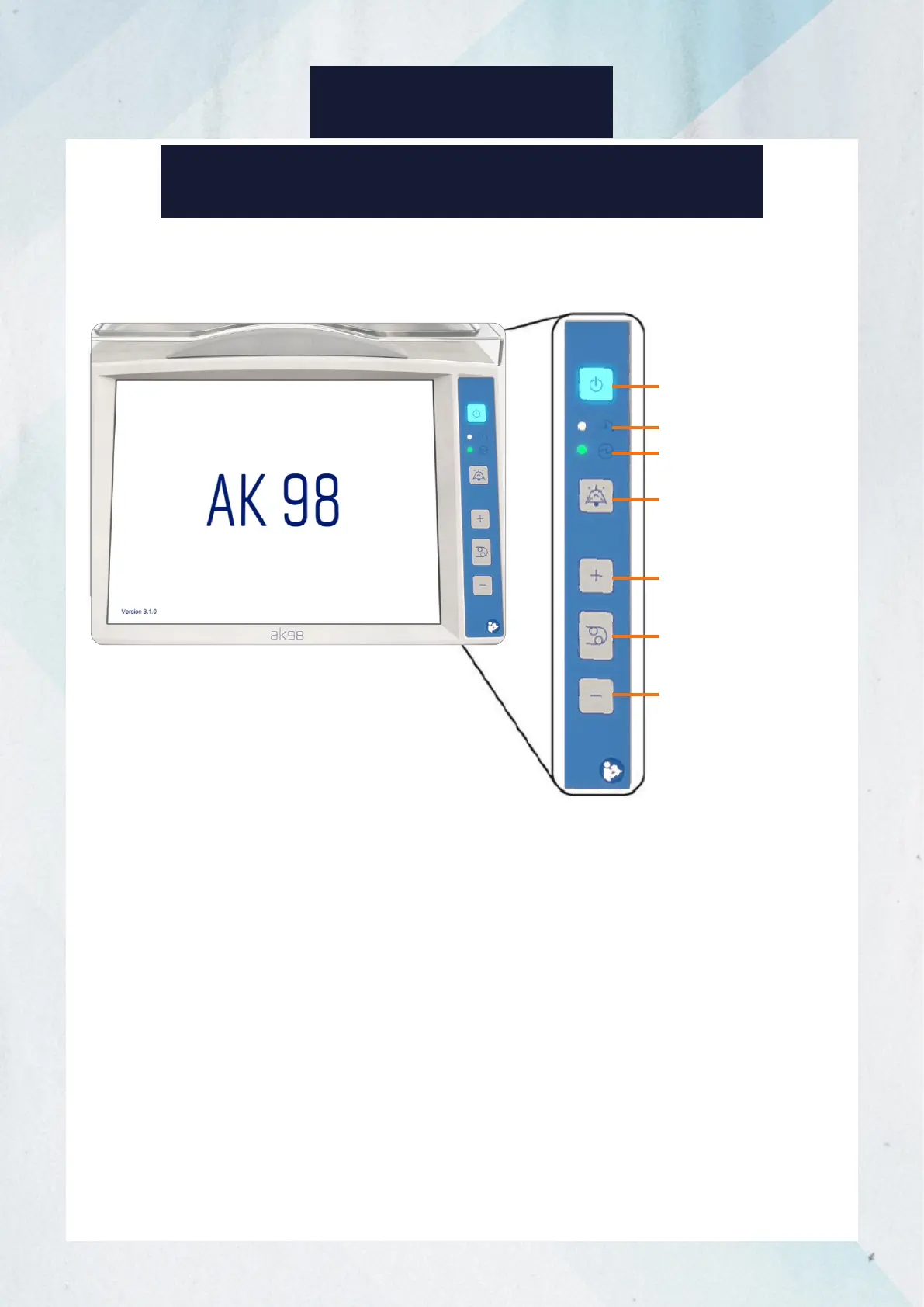
1. On/Off button: Press to turn the machine on or off. Press and hold for 3 seconds
while a disinfection program is running for the machine to automatically turn off
after the disinfection program is completed.
2. Schedule indicator: When lit blue, a rinse or disinfection program is scheduled to
begin automatically.
3. Main switch indicator: When lit green, the machine is connected to main power
supply and the main switch (behind the machine) is on.
4. Mute button: Press to mute alarm or attention sounds. Press and hold to turn
alarm and attention sounds back on.
5. Blood pump up button: Press to increase blood pump speed.
6. Blood pump button: Press to start or stop the blood pump.
7. Blood pump down button: Press to reduce blood pump speed.
BUTTONS ON THE OPERATOR’S PANEL
1. On/Off button
2. Schedule indicator
3. Main switch indicator
4. Mute button
5. Blood pump up
button
6. Blood pump button
7. Blood pump
down button
5














 To Next Page