ADVANCED FUNCTIONS
Profiling
You can define the treatment parameter pattern through profiling. Ultrafiltration rate (UF rate), sodium (Na
+
)
concentration, and bicarbonate (HCO
3
-
) concentration profiles can be used by the machine.
Profiling Settings/Activation
You may set up the profiling parameters immediately after the machine turns on and Function Check appears on
the machine’s status indicator. You may set up a model manually or select a preset model. You may set/adjust
profiles for sodium (Na
+
) concentration, bicarbonate (HCO
3
-
) concentration, and UF rate for each model. The UF
goal must be set up for treatment in order to use the ultrafiltration profile.
If UF goal or treatment time changes during active UF profiling, the profile parameters will change automatically.
Always check the UF profile settings if UF goal or treatment time changes when a UF profile is activated.
If the profile parameters have not changed and UF profiling reactivates, the UF profiling graph will change
automatically according to the remaining UF goal and treatment time.
Always check the UF profile settings after deactivating and reactivating a UF profile.
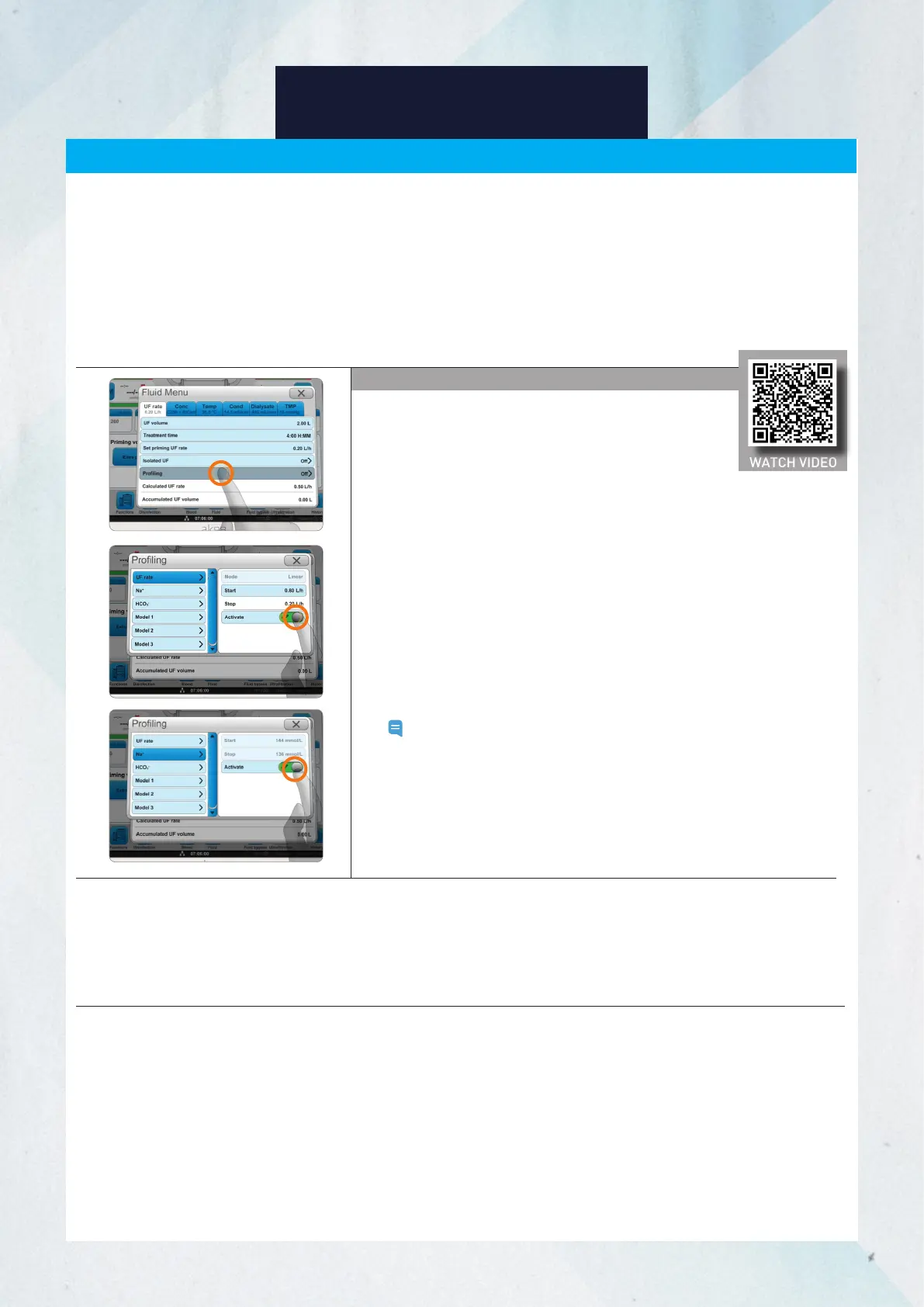
Ultrafiltration Profiling
1. Press the Fluid button.
2. Select the UF rate tab.
3. Press Profiling.
4. Press UF rate.
5. Press Mode.
6. Select the graph method (linear, step, or interval). If the
profile is step or interval, select the number of steps or
intervals according to the prescription.
7. Press OK.
8. Select the Start value for the UF rate. The Stop value for
the UF rate will be automatically calculated in relation to
the starting value.
9. Press Activate.
10. Change or set the profiles for Na
+
or HCO
3
-
, if applicable.
Note: You can create and use models by having an
authorized technician preset the values for each
profile.
Profiling
29
WATCH VIDEO














 To Next Page