OTHER FUNCTIONS
39
38
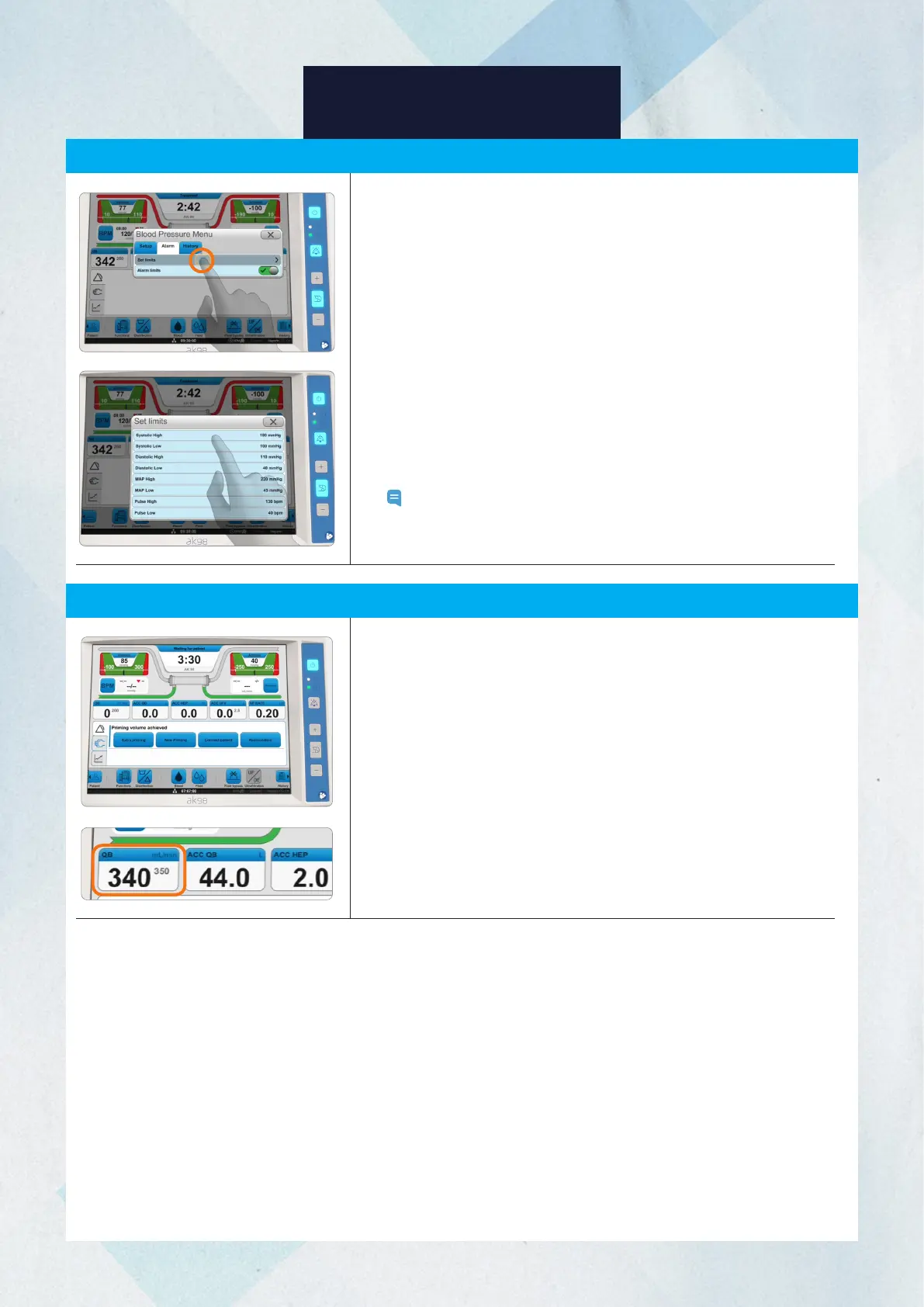
If allowed, you may set upper and lower limits for alarms for the pulse,
systolic, diastolic, and mean blood pressure. An alarm will occur when
the value is outside the set alarm limits.
1. Press the BPM button.
2. Select the Alarm tab.
3. Press Set Limits.
4. After selecting the alarm limit that you wish to set, enter the alarm
limit value.
5. Press OK.
6. Repeat Steps 4 and 5 for all alarm limits that you wish to set. Close
the limit setup menu.
7. Press the Alarm Limit Activate button for the alarm limit to activate
the new settings.
Note: All treatment parameters and alarm limits are reset to the
default values when the machine is restarted and a new
treatment is started.
Blood Pressure Measurement (BPM) Alarm Limit Setting
Actual Blood Flow
The actual blood flow, also referred to as the compensated blood flow,
is calculated from the blood pump rotations and the pump segment
diameter and compensated with the pre-pump arterial pressure.
The actual blood flow is shown in large bold text in the QB treatment
overview field, while the set blood flow rate is shown in small gray text.














 To Next Page