38
>>> NAVIGATIONAL MODE
> D
> GB
> F
> I
> E
> P
> NL
> DK
> S
> N
> FIN
> TR
> GR
> PL
> CZ
> H
> SK
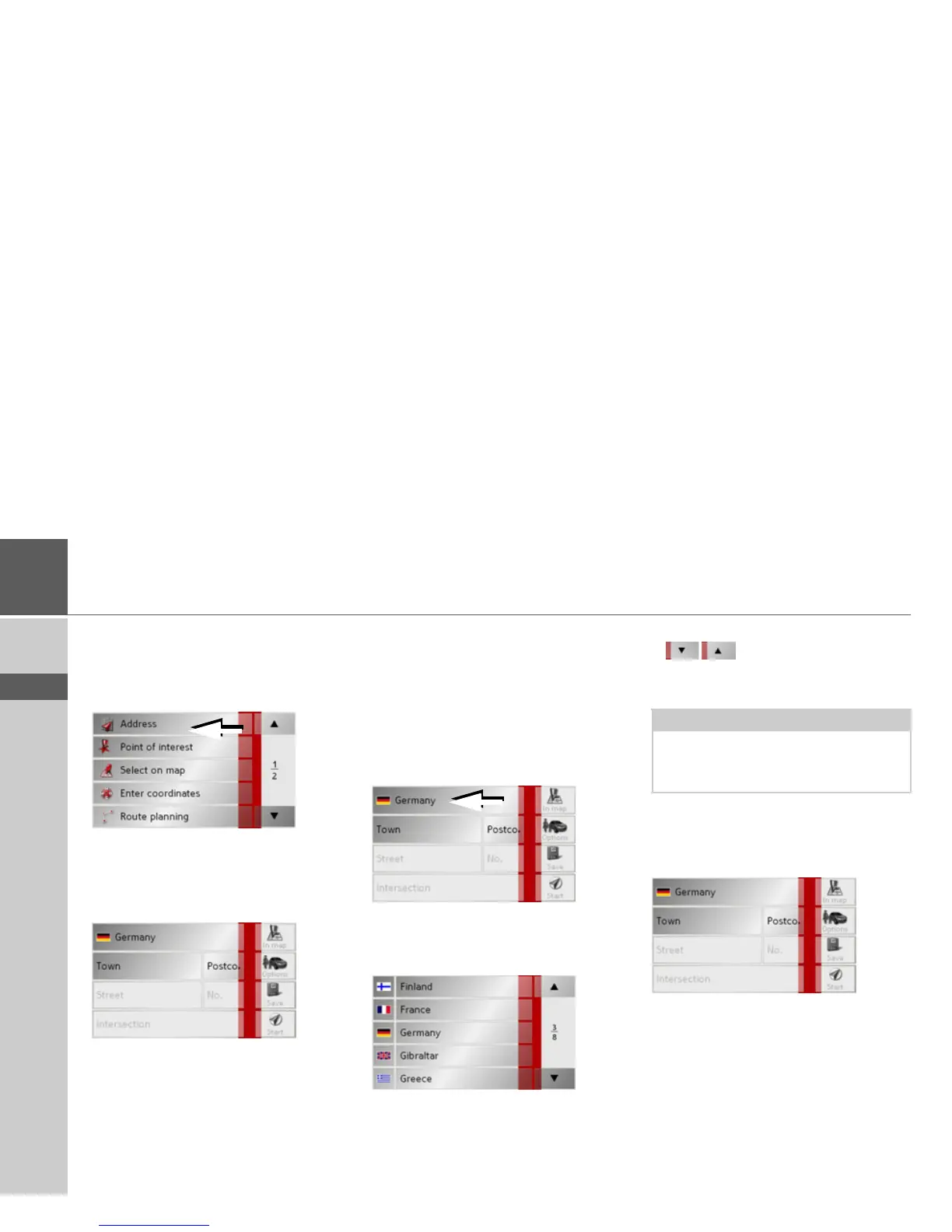
Navigation menu: Address
A selection window for specifying the
des-
tination is opened from the Navigation
menu
by pressing the Address key.
> In the navigation menu, press the
Ad-
dress
button.
The selection window for the address ap-
pears.
Selecting a country
The
Country button offers you all the
countries available on the memory card
for navigation. A country is adopted auto-
matically in the address input menu after
selection. If a destination country has al-
ready been entered, it appears in the first
line and is therefore active.
> Press the destination
Country key to ac-
cess the selection list of countries.
The selection list appears.
> Press the key of the country you want.
> If necessary, press the arrow keys
on the right-hand edge of
the screen to scroll through all the des-
tination countries available.
Select address and start
You can enter the exact destination ad-
dress in the address entry screen.
The following details can be entered in the
address window:
•Town
• Postcode
• Street and building number
• Intersecting roads as an aid to orienta-
tion
Note:
Information regarding the various coun-
tries is displayed by pressing the flags in
front of the country designations.



 To Next Page