51
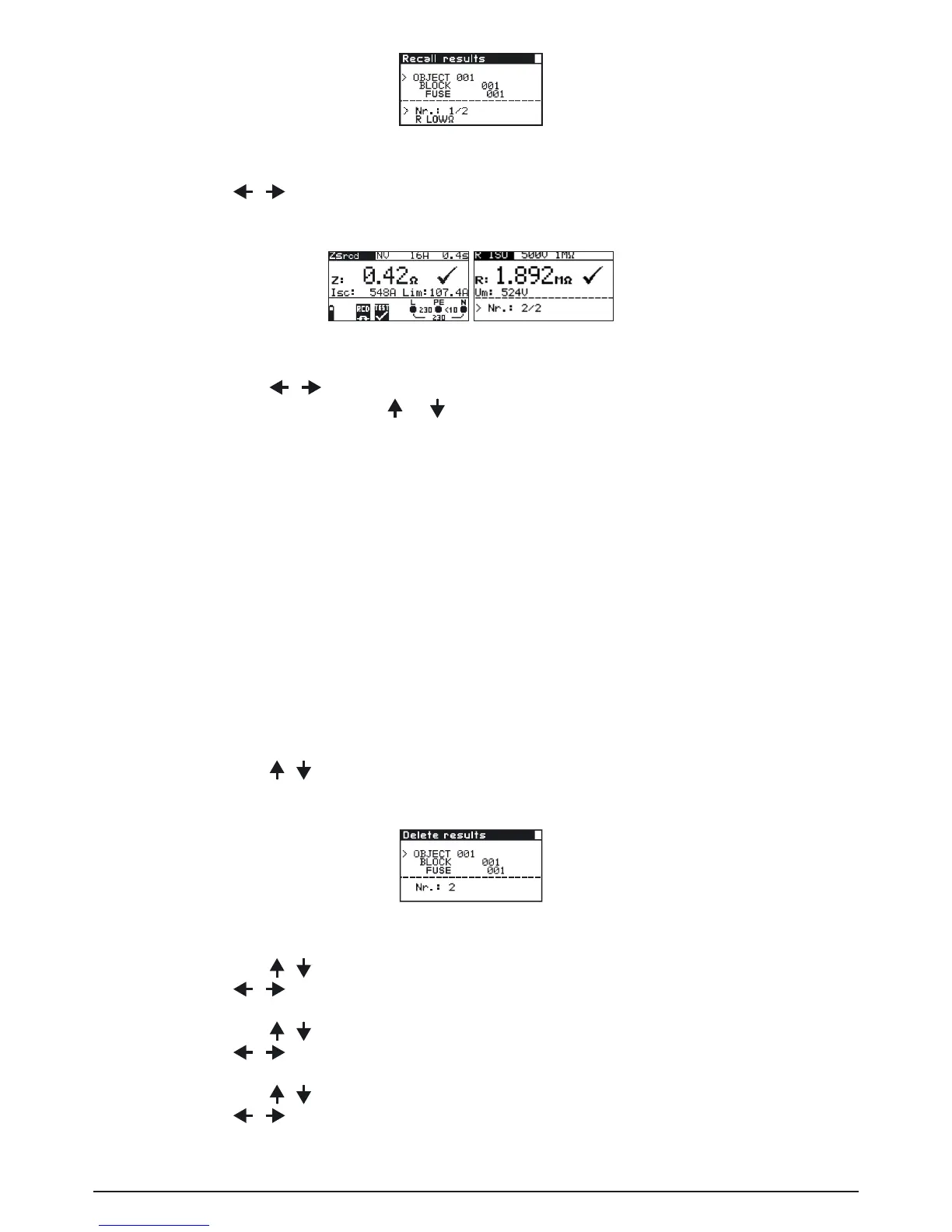
Fig. 6.5: Recall results menu
Use the / keys to select the function for which you want to view results. Press the
TESTkeytoconrm.
Fig. 6.6: Examples of recall results menu
By using the / keys other saved results can be viewed under the same object,
block and fuse items. Press or to return to RECALL RESULTS menu.
Note:
No measurement results can be recalled if the switch is set to „V~“.
Exit the memory recall: Use the „MEM“ key (several times) or the selector switch.
6.3 Deleting measurement results
When deleting results the following actions can be taken:
- Individual results can be deleted
- Results under the same structure item can be deleted
- All saved results can be deleted
- Exit the menu by turning the selector switch or by using the „MEM“ key
How to delete individual saved results:
Step 1 To enter the Memory menu press the MEM key.
By using the / keys set cursor to DELETE RESULTS. Press the TEST key, the fol-
lowing menu is displayed:
Fig. 6.7: Delete results menu
Step 2 By using the / keys set cursor to OBJECT line.
Use the
/ keys to enter the desired element OBJECT xx.
By using the
/ keys set cursor to BLOCK line.
Use the / keys to enter the desired element BLOCK xx.
By using the
/ keys set cursor to FUSE line.
Use the
/ keys to enter the desired element FUSE xx.
In No. line the number of saved results is displayed.



 To Next Page