54
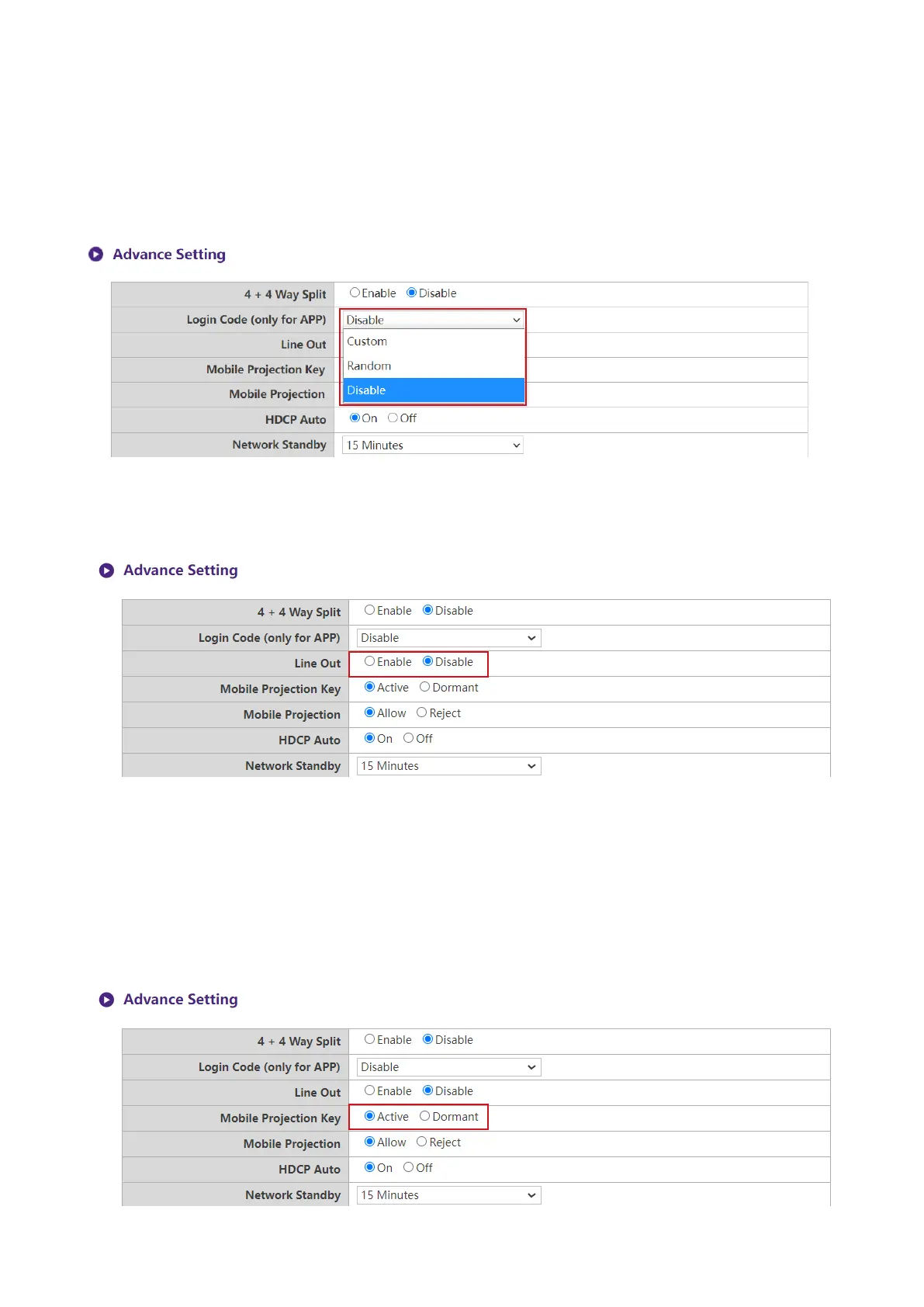
Login Code (only for APP) allows you to set a login password for connections by mobile
devices which will appear on the guide screen. The default setting for this eld is Disable which
means that no login password is needed for mobile devices to connect to the Host. To set a custom
login password for mobile devices, select Custom and then enter the password you want in the
eld to the right of the Login Code (only for APP) eld. To set an automatically generated login
password select Random.
Line Out is a port that allow user to connect to speaker through 3.5mm audio jack. When Line
Out is set to Enable, the HDMI 1 and HDMI 2 will not output the audio signal. When Line is set to
Disable, the audio will be output according to projected screen and active HDMI port.
Moblie Projection Key is a special feature design for meeting Host to allow or forbid BYOD
device to start their presentation. This feature is used for highly condential needed meeting with
BenQ designated InstaShow TX Buttons to prevent the wireless presentation being sniffed by
malicious hackers.
When Moblie Projection Key is set to Active, the company IT can press Moblie Projection
button at the RX Host’ I/O Panel to allow all clients(include BYOD and mobile devices) to join
into presentation via InstaShare and wireless display protocols or just allow TX buttons. When
Moblie Projection Key is set to Dormant, the Moblie Projection Key is locked to set.
set.



 To Next Page