Connecting External Equipment20
Connecting Multiple Displays in a Daisy-chain
Conguration
You can interconnect multiple displays to create a daisy-chain conguration for
applications such as a video wall.
Maximum 25 displays (5x5) can be used in a DVI daisy-chain conguration. For VGA daisy-chain,
Maximum 9 displays can be used.
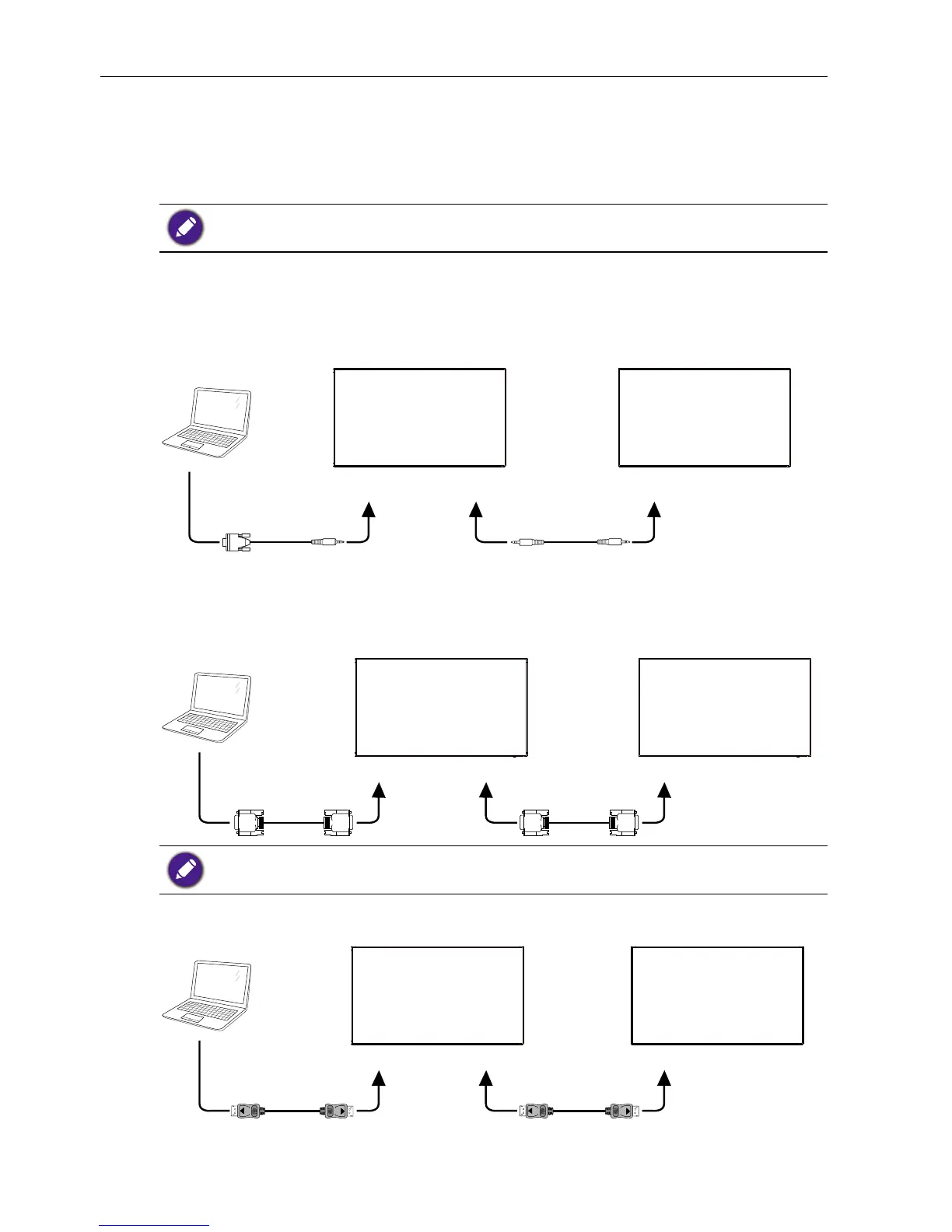
Display control connection
Connect the RS232 OUT connector of DISPLAY 1 to the RS232 IN connector of
DISPLAY 2.
RS-232C INRS-232C OUTRS-232C IN
RS-232C
PC
DISPLAY 1 DISPLAY 2
Digital video connection
Connect the DVI OUT / DVI-I OUT connector of DISPLAY 1 to the DVI IN connector of
DISPLAY 2.
PC
DVI
DVI IN DVI/DVI-I OUT DVI IN
DISPLAY 1 DISPLAY 2
DVI Daisy chain to 5*5 without splitter, DVI with HDCP up to 7th.
Connect the DP OUT connector of DISPLAY 1 to the DP IN connector of DISPLAY 2.
PC
DP
DP IN DP OUT DP IN
DISPLAY 1 DISPLAY 2



 To Next Page