Pixel Defect Policy86
Pixel Defect Tolerances
In order to qualify for repair due to pixel defects during the warranty period, a PDP / TFT
panel in a Benq Plasma / LCD- display must have pixel or sub-pixel defects exceeding the
tolerances listed in the following table.
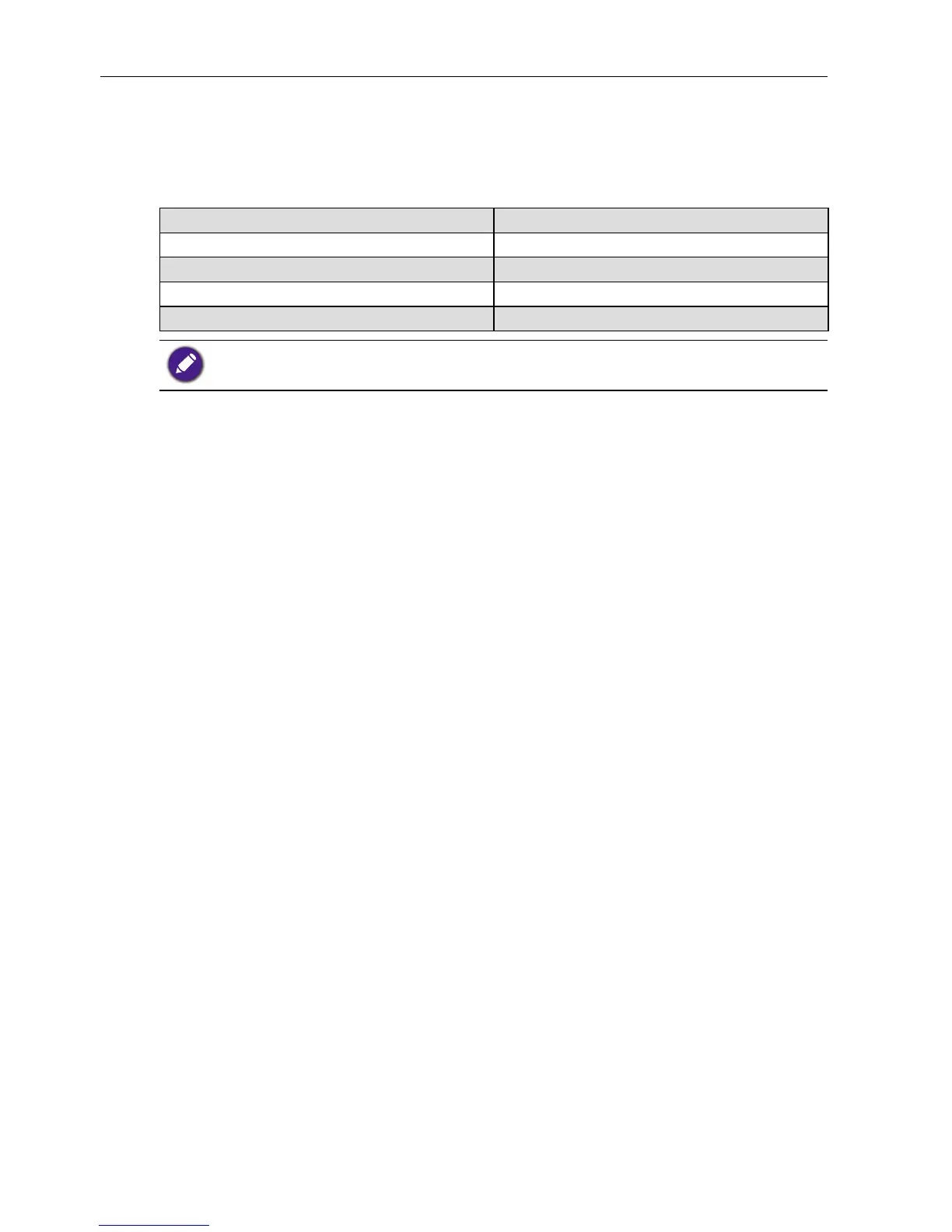
BRIGHT DOT EFFECT ACCEPTABLE LEVEL
1 lit sub pixel 2
BLACK DOT EFFECT ACCEPTABLE LEVEL
1 dark sub pixel 10
TOTAL DOT DEFECTS OF ALL TYPES 12
* 1 or 2 adjacent sub pixel defects = 1 dot defect
MURA
Dark spots or patches may occasionally appear on some liquid crystal display (LCD)
panels. This is known within the industry as Mura, which is a Japanese term for
“unevenness.” It is used to describe an irregular pattern or area in which uneven screen
uniformity appears under certain conditions. Mura is a result of the deterioration of the
liquid crystal alignment layer and is most commonly caused by long-term operation under
high ambient temperatures. It is an industry- wide phenomenon and Mura is not
repairable. It is also not covered by our warranty terms.
Mura has been around since the introduction of LCD technology and with screens getting
bigger and in operation 24/7, many displays are running in low light conditions. This all
adds to the possibility of Mura affecting displays.
HOW TO SPOT MURA
There are many symptoms of Mura and also multiple causes. Several of these are listed
below:
• Impurities or foreign particles in the crystal matrix
• Uneven distribution of LCD matrix during manufacturing
• Non-uniform luminance distribution of the backlight
• Panel assembly induced stress
• Flaws within the LCD cells
• Thermal induced stress - high temperature operation over long periods of time
HOW TO AVOID MURA
Although we can not guarantee the complete eradication of Mura every time, in general
the appearance of Mura can be minimized by these methods:
• Lower the backlight brightness
• Use a screen saver
• Reduce the ambient temperature around the unit



 To Next Page