Connecting External Equipment 21
DP Daisy chain to 15*10 without splitter. DP 1.2 up to 3840x2160@60Hz. DP with HDCP up to
7th.
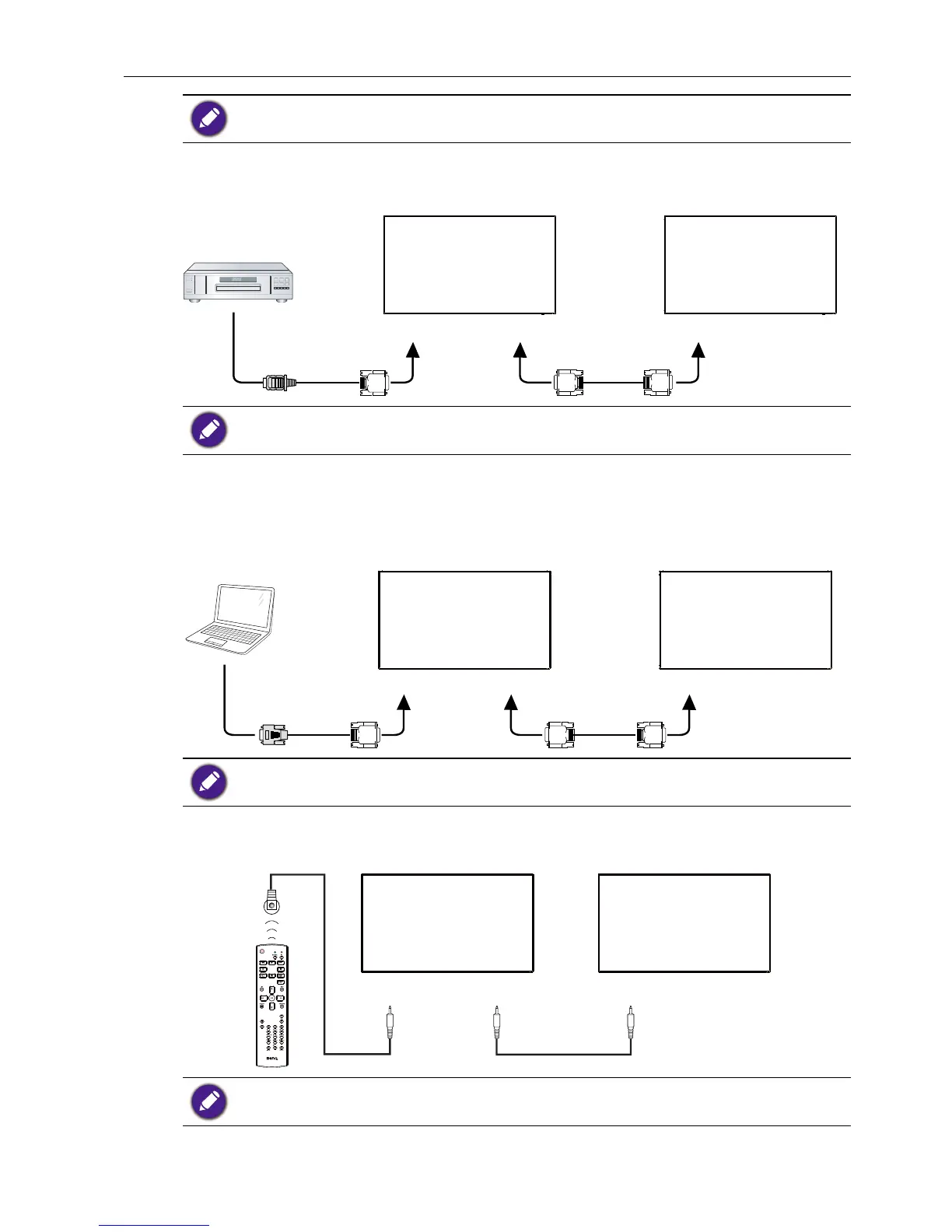
Connect the HDMI OUT connector of DISPLAY 1 to the DVI IN connector of DISPLAY
2.
DVD / VCR / VCD
HDMI
DVI IN DVI OUT DVI IN
DISPLAY 1 DISPLAY 2
HDMI up to 3840x2160@30Hz, HDMI with HDCP up to 7th.
Analog video connection
Connect the DVI OUT /DVI-I OUT connector of DISPLAY 1 to the DVI-I IN connector
of DISPLAY 2.
PC
DVI-I
DVI-I IN DVI/DVI-I OUT DVI-I IN
DISPLAY 1 DISPLAY 2
Analog Daisy chain to 3*3 without splitter.
IR connection
IR IN IR OUT IR IN
DISPLAY 1 DISPLAY 2
External
IR Receiver
1. This display’s remote control sensor will stop working if the IR IN is connected.
2. IR loop through connection can support up to 9 displays.



 To Next Page