Introduction 13
English
Video source inputs
You can connect an external analog video device (like a VCR or TV game
console) to the TV’s Composite Video (AV) or S-Video input, and select the
AV2 (for Composite Video input) or AV2-S (for S-Video input) as the input
source respectively to view analog video. See "Connecting the Composite
Video input" on page 25 and "Connecting the S-Video input" on page 26.
If the video source device supports it, you could alternatively connect it using
the Component Video inputs and select
AV1 as the input source for the best
possible analog video picture. See "Connecting the Component Video input"
on page 26.
Of the analog video signal types mentioned above, Component Video offers the
best quality.
Graphic source inputs
You can connect the D-Sub output of a PC to the TV’s PC D-Sub input. For
better picture quality, you can alternatively connect the DVI output (if
available) of the PC to the TV’s HDMI/DVI input using a DVI to HDMI
adaptor cable. If your device supports HDMI output, you can also use the
HDMI input on the TV for connection.
Select the
PC, DVI or HDMI input respectively to view the display. See
"Connecting the PC D-Sub input" on page 27, "Connecting the DVI input" on
page 27 and "Connecting the HDMI input" on page 28.
In order to fully utilize the high-definition capability of this TV, you should adjust
the output resolution of the source device (for example, DVD player or PC) to
closely match the native resolution of the TV. For example, 720p for Component/
HDMI video or 1360 x 768 pixels for PC video. For information on how to adjust
output resolution, please refer to the documentations of the device.
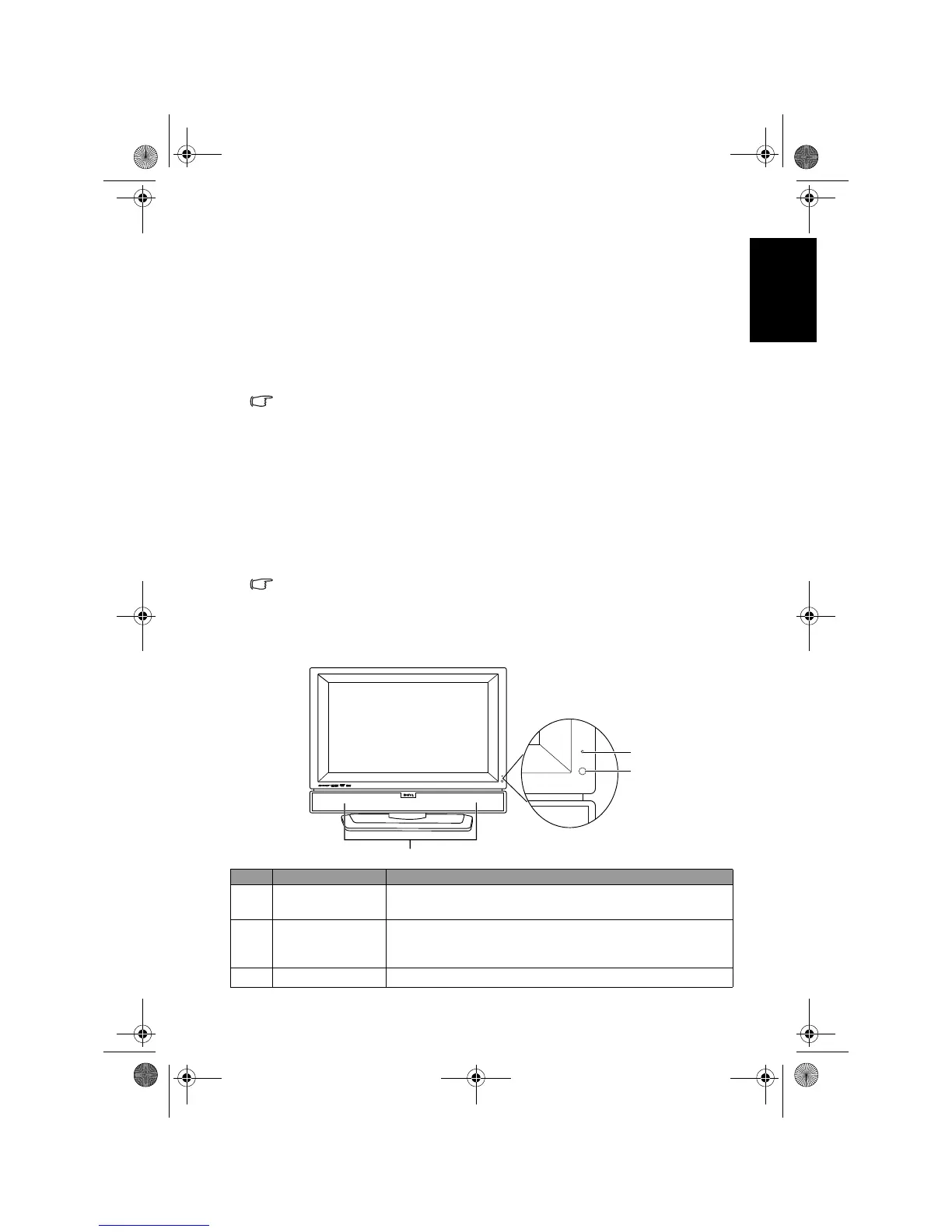
Front view
No. Name Description
1 Power indicator
• Lights up green when the TV is powered on.
• Lights up red when the TV is in standby mode.
2
Remote control
sensor window
Receives command signals from the remote control. Do
not obstruct the sensor by placing any objects in front of
it, which will hinder the reception of signals.
3 Speakers Left and right speakers for reproducing stereo audio.
1
2
3
V32B_V37B_EN.book Page 13 Wednesday, January 23, 2008 10:55 AM



 To Next Page