Connecting audio and video inputs26
English
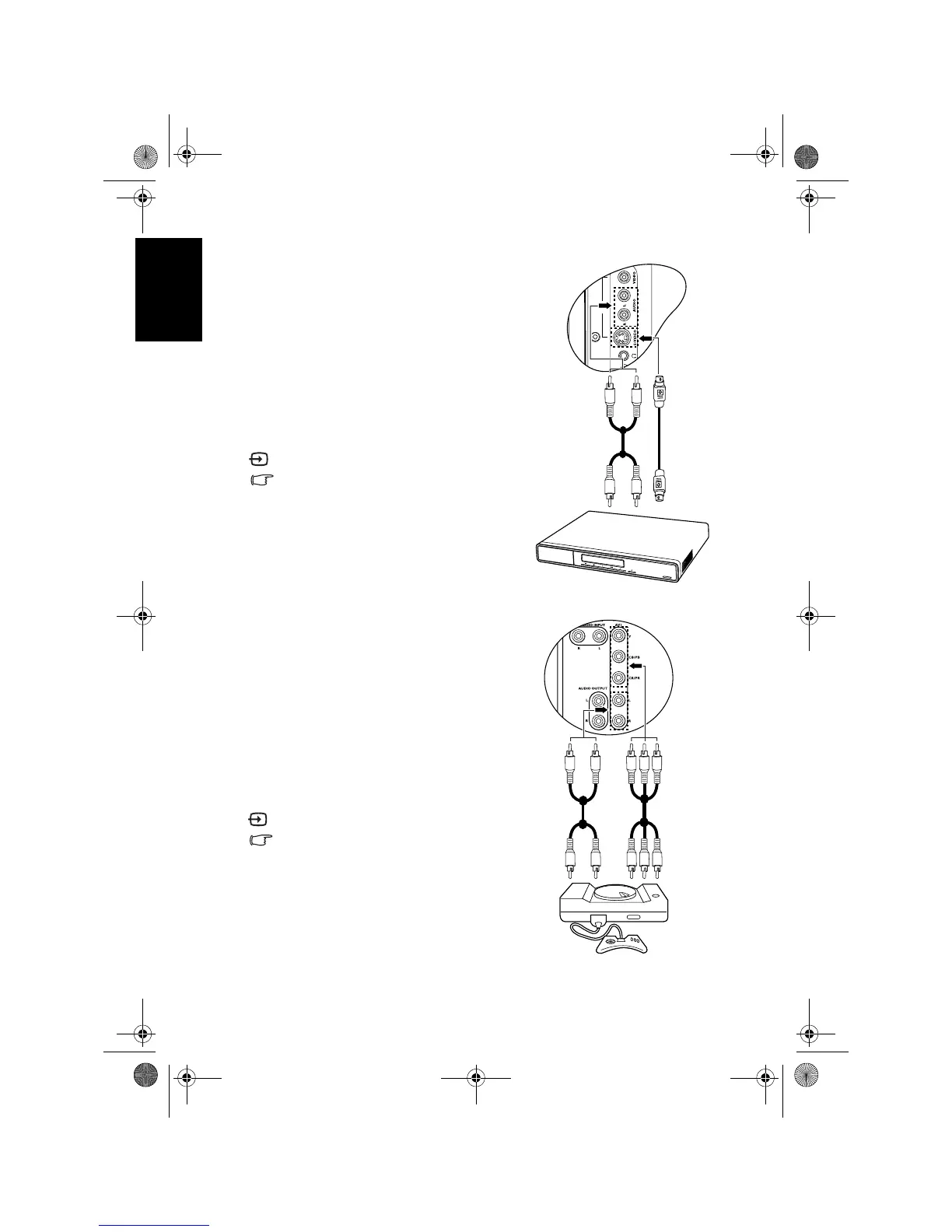
Connecting the S-Video input
Connecting the Component Video input
1. Connect the S-Video output of your
output equipment (like a DVD player) to
the TV's
AV2 S-VIDEO terminal using an
S-Video cable (not provided). Pay
attention to the alignment of the plugs on
the S-Video cable when inserting so as not
to damage any pins.
2. Connect the S-Video audio output of the
output equipment to the TV’s
AV2 AUDIO
L
(white)/R (red) input terminals using a
suitable RCA type audio cable.
To view video image from this input, press
INPUT and select AV2-S.
You should not connect both a composite
Video and an S-Video from the same
device; just one or the other. If you have
the choice, use the S-Video instead of
composite Video as an S-video signal
provides a higher quality signal to that of
composite Video.
1. Connect the Component Video output of
your output equipment (like a TV game
console) to the TV's
AV1 Y, CB/PB and
CR/PR terminals using a Component
Video cable (not provided). A Component
Video cable consists of three plugs: green
(Y), blue (C
B/PB) and red (CR/PR).
2. Connect the Component Video audio
output of your output equipment to the
TV’s
AV1 L (white)/R (red) input
terminals on the TV using a suitable RCA
type audio cable.
To view video image from this input, press
INPUT and select AV1.
Of the analog video signal types,
Component Video offers the best quality.
Ensure that the colors of the plugs and
terminals match when making connection.
For best display results, set the output
resolution of the Component Video source
device to 720p.
See "Supported Component Video input
signal resolutions" on page 48 for
supported resolutions.
Audio cable
S-Video
cable
DVD
player
TV game
console
Component
Video cable
Audio
cable
V32B_V37B_EN.book Page 26 Wednesday, January 23, 2008 10:55 AM



 To Next Page