OSD (On-Screen Display) menu30
English
OSD (On-Screen Display) menu
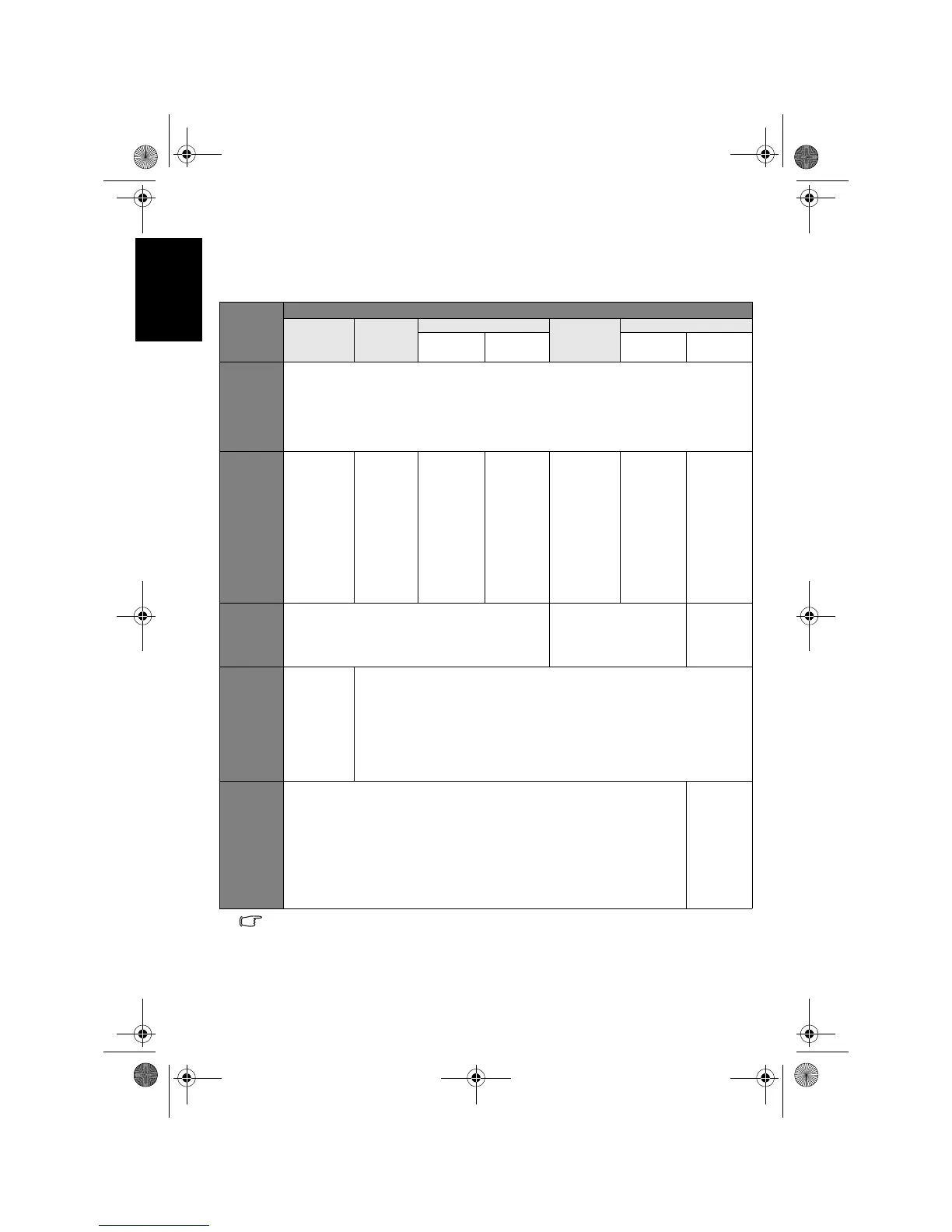
OSD structure
• The available menu items are dependent on the input source being selected.
Unavailable items will be greyed out (as indicated by the grey items in the table
above) or not displayed.
• Settings under different input sources can be adjusted independently. For
example, the Picture settings for the AV1 input will not affect the Picture
settings for the AV2 (or AV2-S) input.
OSD
Menu
Input signal type
ATV AV1
AV2 (AV2-S)
PC
HDMI/DVI
NTSC
video
PAL video PC mode
Video
mode
Audio
• Volume
• Balance
• Sound Type
• Steady Sound
• Surround
• Speaker Out
• Advanced Audio Settings
Picture
• Picture
Mode
• Contrast
• Brightness
• Color
• Sharpness
• Color
TEMP.
• Backlight
• NTSC Tint
• Picture
Mode
• Contrast
• Brightness
• Color
• Sharpness
• Color
TEMP.
• Backlight
• Picture
Mode
• Contrast
• Brightness
• Color
• Sharpness
• Color
TEMP.
• Backlight
• NTSC Tint
• NTSC
Setup
• Picture
Mode
• Contrast
• Brightness
• Color
• Sharpness
• Color
TEMP.
• Backlight
• Contrast
• Brightness
• Color
TEMP.
• Backlight
• Auto Adjust
• Frequency
• Phase
• H. Position
• V. Position
• Contrast
• Brightness
• Color
TEMP.
• Backlight
• Picture
Mode
• Contrast
• Brightness
• Color
• Sharpness
• Color
TEMP.
• Backlight
Senseye
• Black Extension
• ACE
• Noise Reduction
(Not available)
• Black
Extension
• ACE
• Noise
Reduction
TV
• Auto
Installation
• Manual
Installation
• Program
Edit
• Favorite
Channels
• Child Lock
(Not available)
Setup
• Language
• Sleep Timer
• ECO
• HDMI/DVI Input
• Blue Screen
• Reset All Settings
• Language
• Sleep
Timer
• ECO
• HDMI/
DVI Input
• Blue
Screen
• Reset All
Settings
V32B_V37B_EN.book Page 30 Wednesday, January 23, 2008 10:55 AM



 To Next Page