Connecting audio and video inputs 27
English
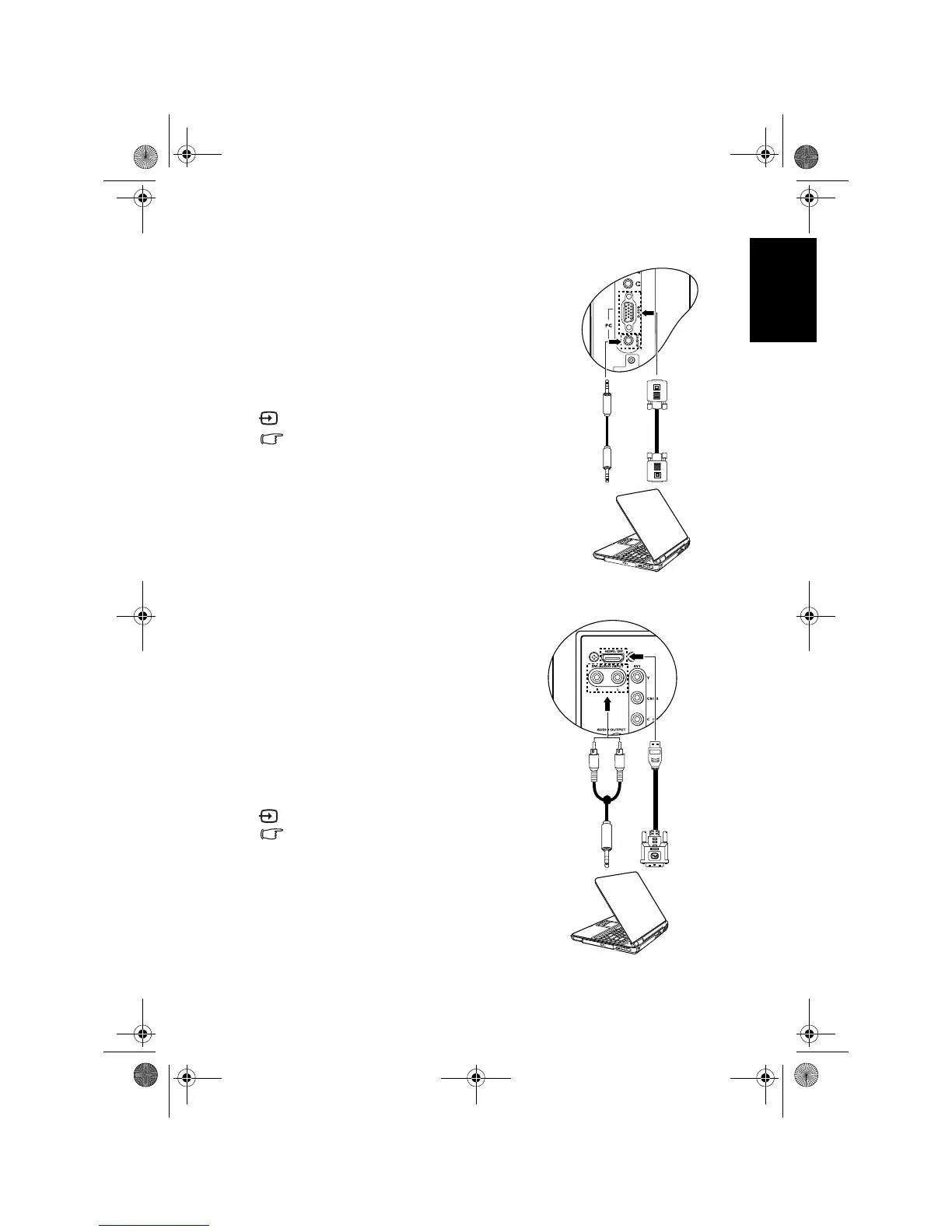
Connecting the PC D-Sub input
Connecting the DVI input
1. Connect the D-Sub video output of your
PC to the
PC D-SUB terminal on the TV
using a mini D-Sub (15-pin) cable (not
provided).
2. Connect the audio output of your PC to
the
PC AUDIO IN terminal on the TV using
an appropriate 3.5mm-diameter Mini-jack
stereo audio cable (not provided).
To view video image from this input, press
INPUT and select PC.
When you connect the TV to a PC, you
should adjust the resolution in the display
properties of the computer to closely
match the native resolution of the TV (for
example, 1360 x 768 pixels).
See "Supported PC (D-Sub/DVI) input
signal resolutions" on page 48 on other
supported resolutions and "Setting up
appropriate output resolution on PC" on
page 49 on how to set up PC video output.
1. Connect the digital video output of your
output equipment (like a PC or DVD
player) to the
HDMI/DVI terminal on the
TV using a DVI to HDMI adaptor cable
(not provided).
2. Connect the DVI audio output of your
output equipment to the
DVI-AUDIO
INPUT L/R
input terminals on the TV
using a suitable RCA type audio cable.
3. Set the type of DVI input according to the
device connected. See "HDMI/DVI Input"
on page 43.
To view video image from this input, press
INPUT and select DVI.
When connected to a PC, you should
adjust the resolution in the display
properties of the computer to closely
match the native resolution of the TV (for
example, 1360 x 768 pixels). See
"Supported PC (D-Sub/DVI) input signal
resolutions" on page 48 on other
supported resolutions and "Setting up
appropriate output resolution on PC" on
page 49 on how to set up PC video output.
PC
Audio
cable
Mini D-Sub
cable
DVI to HDMI
adaptor
cable
PC
Audio
cable
V32B_V37B_EN.book Page 27 Wednesday, January 23, 2008 10:55 AM



 To Next Page