24
Pattern Selection
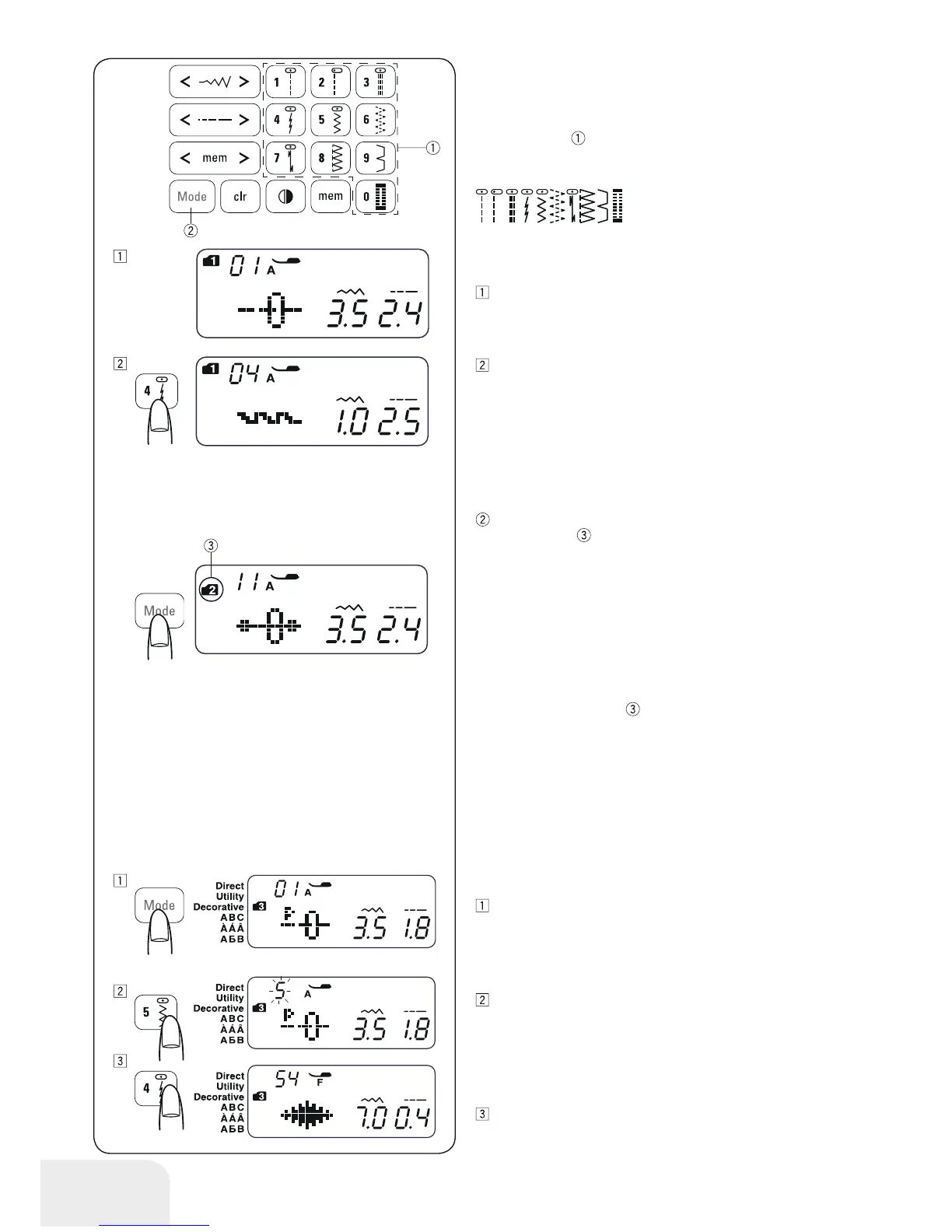
•Mode 1
You can select the following stitch patterns directly by pressing
the pattern keys
.
• Mode 2 – 6
To select stitch patterns in mode 2–6, first press the mode button
to select your desired mode. Each time you press the mode
button, the folder
indicated on the left side of the screen will
change, and the mode changes as follows:
Mode 1 : Direct pattern selection
Mode 2 : Utility stitch pattern selection
Mode 3 : Decorative stitch pattern selection
Mode 4 : Number and letter selection
Mode 5 : European accented letter selection
Mode 6 : Russian (Cyrillic) letter selection
The number on the folder
indicates the selected mode num-
ber. To refer to the modes and their available stitch patterns for
this sewing machine, please check the Stitch overview in the
drawer or stitch reference on page 70.
Enter the 2-digit number of the desired stitch pattern with the
corresponding number button.
Example: To select stitch pattern 54 in mode 3.
Example: To select stitch pattern 4 in mode 1.
When the power switch is turned on, the direct pattern
selection (mode 1) is set automatically.
Press the pattern key 4 to select the stitch pattern 4.Now
pattern 4 in mode 1 is selected.
Turn on the power switch . Turn the power switch on. Press
the mode button twice to select mode 3.
Press the number button on the touch panel. First press key
5 and then press key 4.
Now pattern 54 in mode 3 is selected.
0123456789



 To Next Page