14
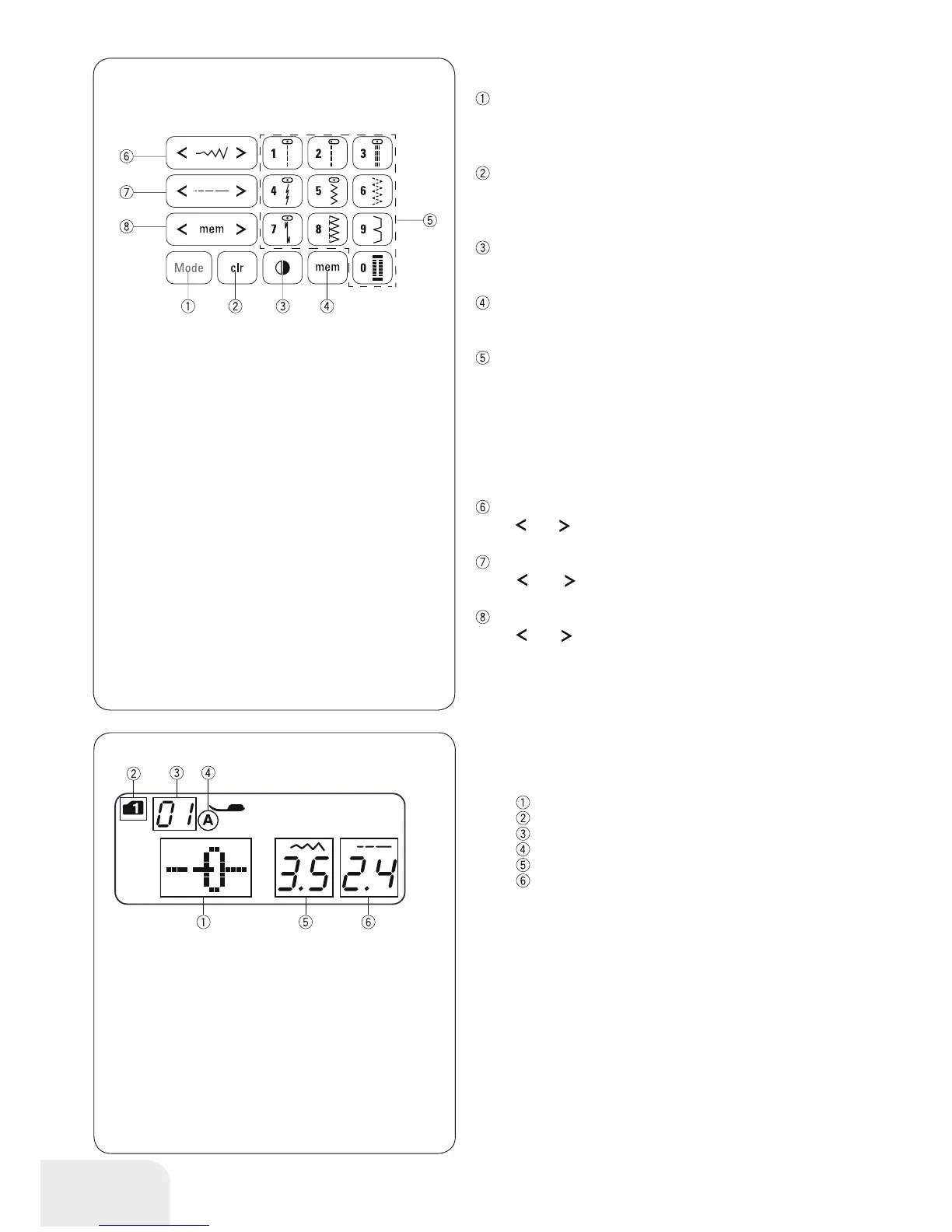
Mode button
When the power switch is turned on, the direct pattern selection
(mode 1) is set automatically.
Press the mode button to change the mode. Refer to page 24.
Clear button
Press the clear button to clear the memorized stitch pattern.
Press and hold the clear button until the buzzer beeps to clear
all memorized stitch patterns. Refer to page 62.
Mirror Image button
Press the mirror image button to flip the selected stitch pattern
horizontally. Refer to page 58.
Memory button
Press the memory button to memorize the selected pattern.
Refer to page 56.
Number button (Refer to page 24)
• Direct pattern selection
You can select the stitch patterns from 01 to 10 directly in mode
1 (direct pattern selection mode).
• Numeric pattern selection
Enter a 2-digit pattern number to select the desired stitch pat-
tern in mode 2 to 6.
Stitch width button
Press “
” or “ ”, to change the stitch width. Refer to page 29,
32.
Stitch length button
Press “
” or “ ”, to change the stitch length. Refer to page
29.
Cursor
Press “
” or “ ”, to move the cursor to check or edit the pat-
tern combination. Refer to page 62.
Touch Panel
LCD Display
The LCD display shows the following information when the
machine is turned on.
Stitch pattern
Mode
Stitch pattern number
Type of presser foot
Stitch width
Stitch length



 To Next Page