29
• Adjusting the needle position
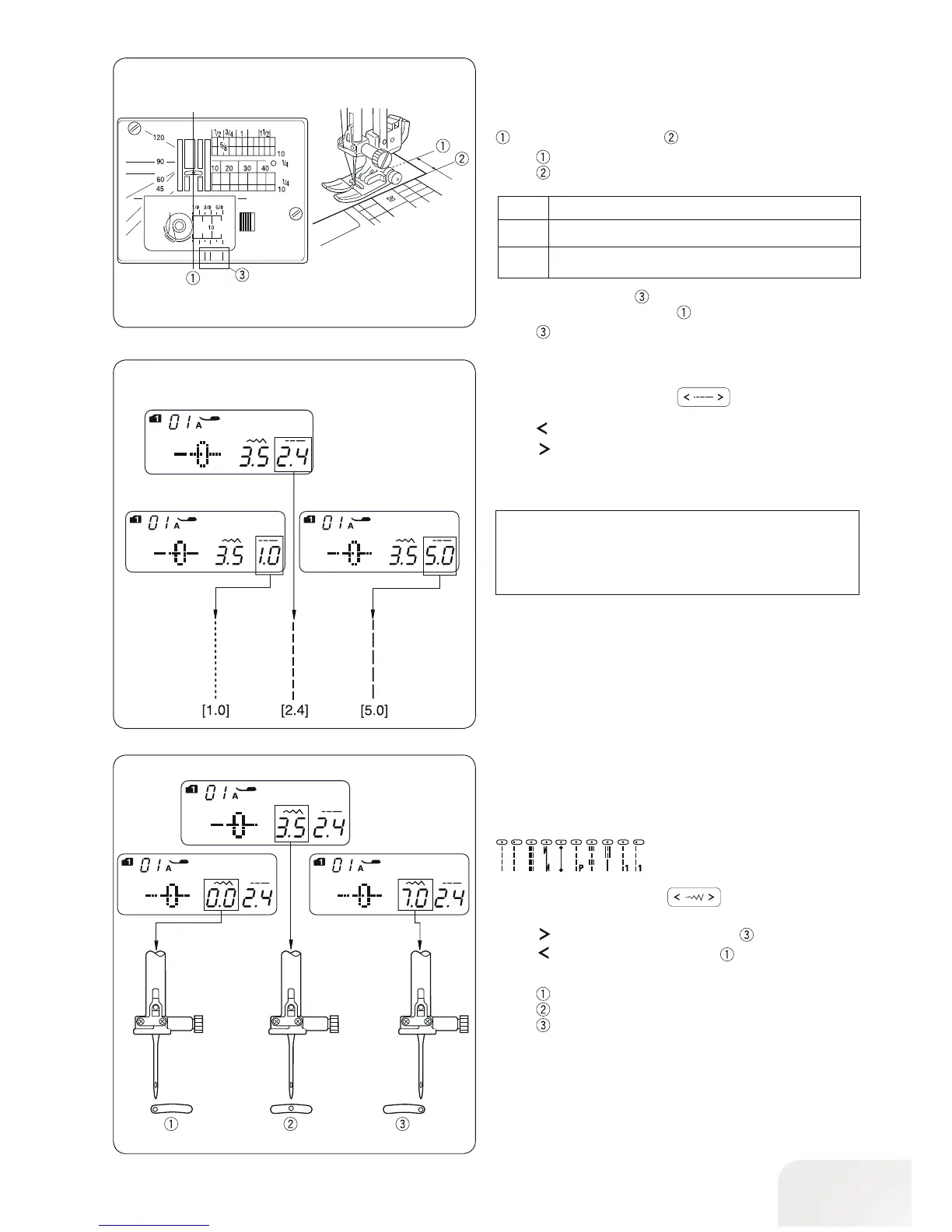
The needle position can be adjusted for straight stitch patterns
01–03, 07 (Mode 1 and 2), 11 (Mode 2) and 01−03, 59–60
(Mode 3).
Press the stitch width button
to change the needle
position.
Press “
“ to move the needle to the right .
Press “
“ to move the needle to the left .
Left (0.0)
Middle (3.5)
Right (7.0)
• Adjusting the stitch length
Press the stitch length button to change the stitch
length.
Press “
“ to decrease stitch length.
Press “
“ to increase stitch length.
The stitch length can be varied from 0.0 to 5.0.
•Stitch plate
The seam guides on the stitch plate and the hook cover help
you to measure seam allowance. The numbers on the stitch
plate indicate the distance between the center needle position
and the edge of the fabric .
Center needle position
Edge of the fabric
Distance
(cm)
Number
Distance
(inch)
10 20 30 40 1/2 5/8 3/4 1 1 1/2
1.0 2. 0 3.0 4.0
1/2 5/8 3/4 1 1 1/2
————
—————
The front seam guides are marked at 1/8˝, 3/8˝ and 5/8˝
from the center needle position
.
Front seam guides
PLEASE NOTE:
Reverse stitch cannot be longer than 4.0 mm.



 To Next Page