19
Preparation
Double Needle
► touch the «Security Program» icon
► touch the appropriate needle icon (double needle) in the
Security Program screen
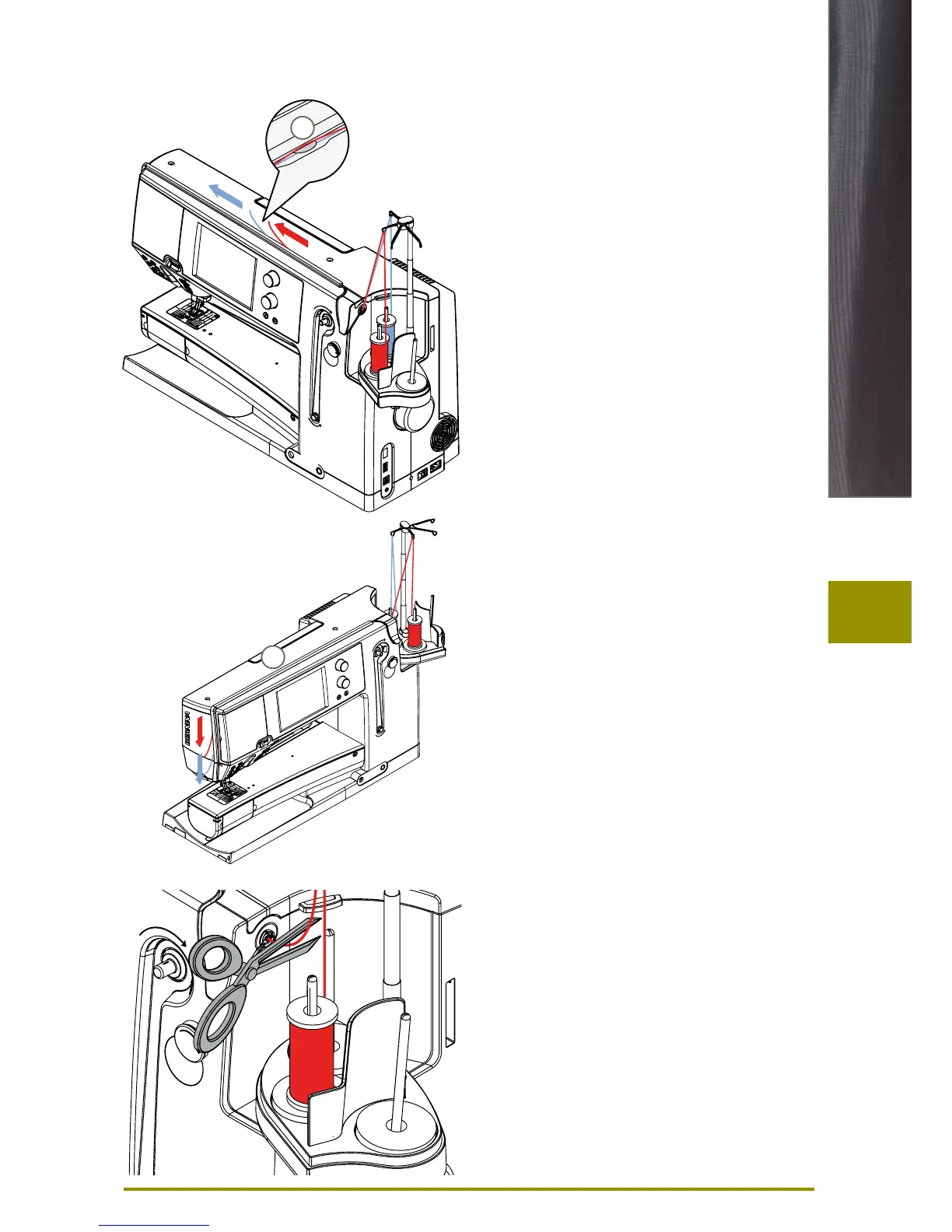
► place a thread spool on the center spool pin and one on
the rear spool pin and thread the corresponding guides
on the telescopic rod
► insert the two threads together into the threading slit,
guiding the thread of the rear spool pin behind the
thread-tension disc A while guiding the thread of the
center spool pin in front of the tension disc A. Then
guide the two threads through the thread guide at the
needle clamp
► touch the icon «Manual Threading» on the threading
animation screen. Next touch the illuminated automatic
threading button
► using the manual threader in your accessory kit,
manually thread the left needle and then the right
needle
Triple Needle
► in the Security Program select triple needle
► place a thread spool on each spool pin and thread the
respective guides on the telescopic rod
► thread as usual, guiding the thread from the rear and
center spool pin in the threading slit to the rear of
thread tension disc A and the thread from the front
spool pin in front of the tension disc A
Double/Triple Needle
Changing the thread
► cut the spool thread before the pre-tension and pull out
of the sewing computer to front near the needle
A
A



 To Next Page