37
Setup Program
Display
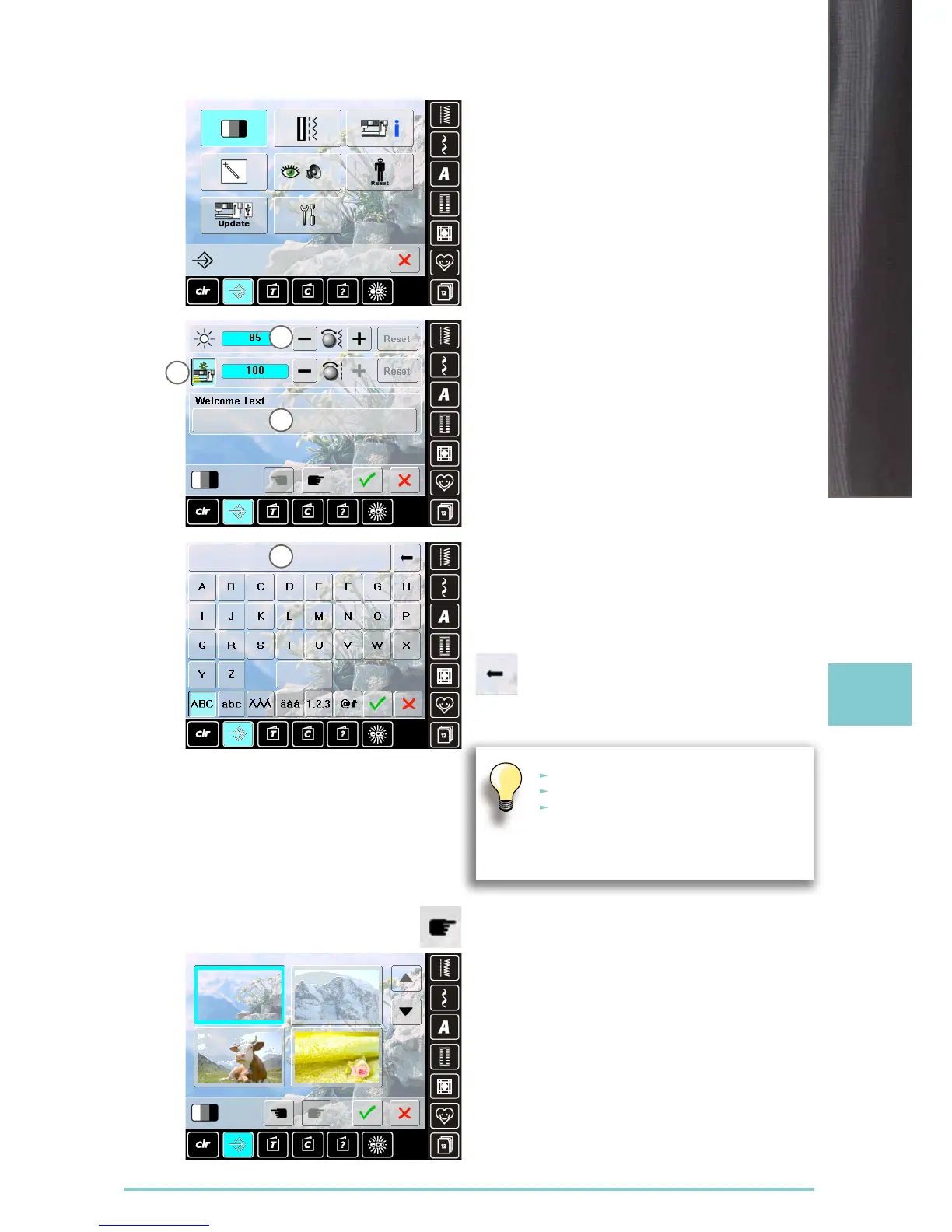
Brightness
► turn stitch width knob or touch the «+» or «-» icon the
brightness 1 of the screen is altered
► alterations are indicated by the number in the bar and
the blue background of the «+» or «-» icons
► the basic settings are indicated by a dark bar
Sewing Light
► when icon 2 is active, the sewing light is on
► when the icon is inactive, the sewing light is off
► the brightness can be set with the stitch length knob or
the «+» or «-» icon
Welcome Text
► create or change Welcome Text 3
► space bar is at the bottom of the letter keys
► welcome text 4 appears in the text icon above the letter
keys
► touch the text icon = text entered is completely deleted
► text entered is deleted from right to left
Wallpaper
Select desired screen wallpaper.
► choose from different images
► use the scroll icons to browse the wallpaper variants
► default image = edelweiss
► «ABC» all in upper case (standard)
► «abc» all in lower case
► «1,2,3» numbers and mathematical
character
► «Ä À Á», «ä à á» and
«@ #» upper and lower special characters
1
2
3
4



 To Next Page