39
Setup Program
Needle Stop Adjustment
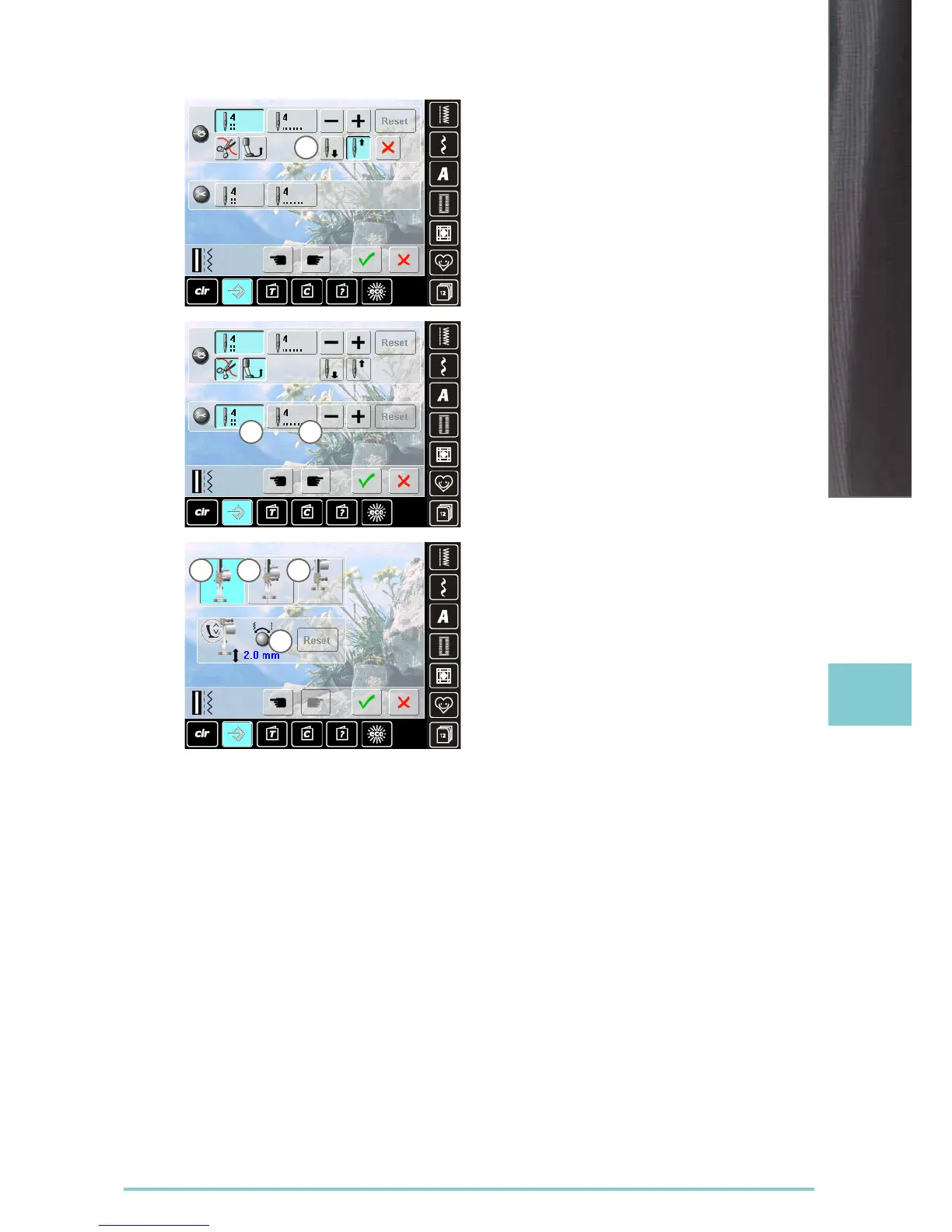
► if the automatic thread cutter and the «raise presser
foot» function are switched off when securing, the
needle stop position 7 can be selected
► standard = sewing computer stops with the needle up
while the presser foot stays down after securing
► touch «Needle down» icon
► the sewing computer stops with the needle down after
securing
Automatic Thread Cutter and Securing
Stitches
► the number and type of securing stitches before the
thread is cut can be programmed
► touch function 8 for securing stitches in place or function
9 for forward securing stitches
► two to six securing stitches can be programmed
► standard = no securing stitches programmed
Presser foot position when needle stop
down
► with activated icon 1, the presser foot remains down
when the sewing computer stops
► with activated icon 2, the presser foot is raised enough
to pivot the fabric (hover position)
► with activated icon 3, the presser foot is raised into its
highest position
Hover position of presser foot
► the stitch width and stitch length multi-function knobs
can be used to set the clearance from 0mm to 7mm in
maximum (standard clearance is 2mm)
► the set value, i.e. the clearance between the fabric and
the presser foot, is displayed in icon 4
8 9
7
1 2 3
4



 To Next Page