2
OPERATION
22
EN
DASHBOARD OPERATING INSTRUCTIONS
MAIN PARTS
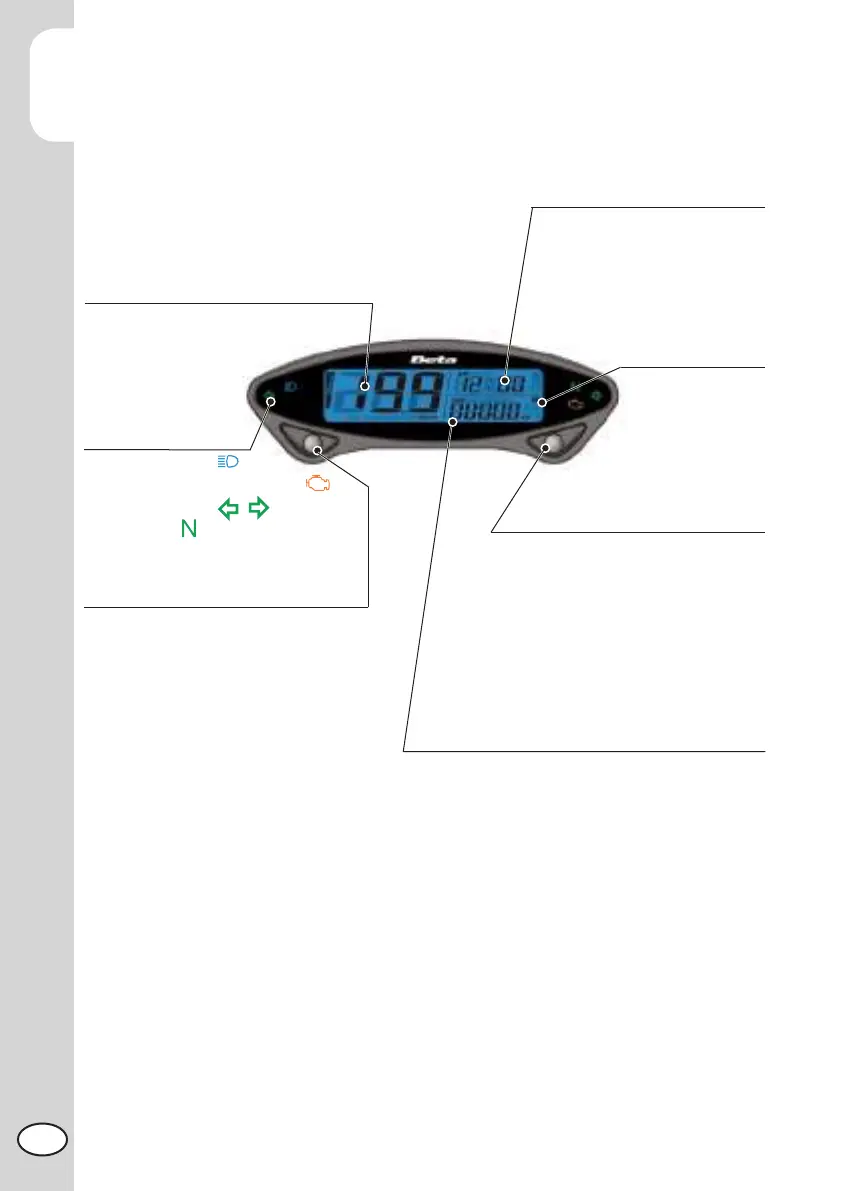
Indicator lights
High beam light (Blue)
MIL (Engine management system fault)
Turn indicators (Green)
Neutral (Green)
Odo meter
Display range: 0~99999 km (miles), reset automatically
after 99999 km (miles).
Display unit: 1 km (mile).
Trip meter
Display range: 0~9999.9 km (miles),
reset automatically after 999.9 km (miles).
Display unit: 0.1 km (mile).
Select button
Press the Select button in the main screen to
switch between 12/24 hour mode, speedometer
record, topwatch , and MAX record.
Time
Clock: 12/24 MODE
Stopwatch: According to setup distance
to record the testing time.
Speed Log: Average speed and max
speed record.
Battery
Inner Battery Level:
Display range: 4 levels.
Adjust Button
Press the Adjust button in the main screen
to switch between ODO, TripA/B,
Total Hour meter, Hour meter A/B.
Press and hold the Adjust button for 3
seconds in Trip A/B screen to reset.
Press and hold the Adjust button for 3
seconds in Hour meter A/B screen to reset.
Speedometer
Display range: 0~360km/h (0~225 MPH)
Display unit: km/h or MPH


 To Next Page