28
Chapter 3 Calibration
Calibrating the FlightHawk-AV Analyzer
For best results, set the frequency and calibrate the Bird Site Analyzer
immediately before taking measurements.
Note: Use a precision open, short, load (OSL) calibration standard or
“Calibration Combo” for accurate measurement results.
Note: When using an extension cable, a phase stable cable is needed
to ensure performance and accuracy.
Note: Changing frequency settings will automatically turn calibration
off. Always set the frequency before calibrating the unit.
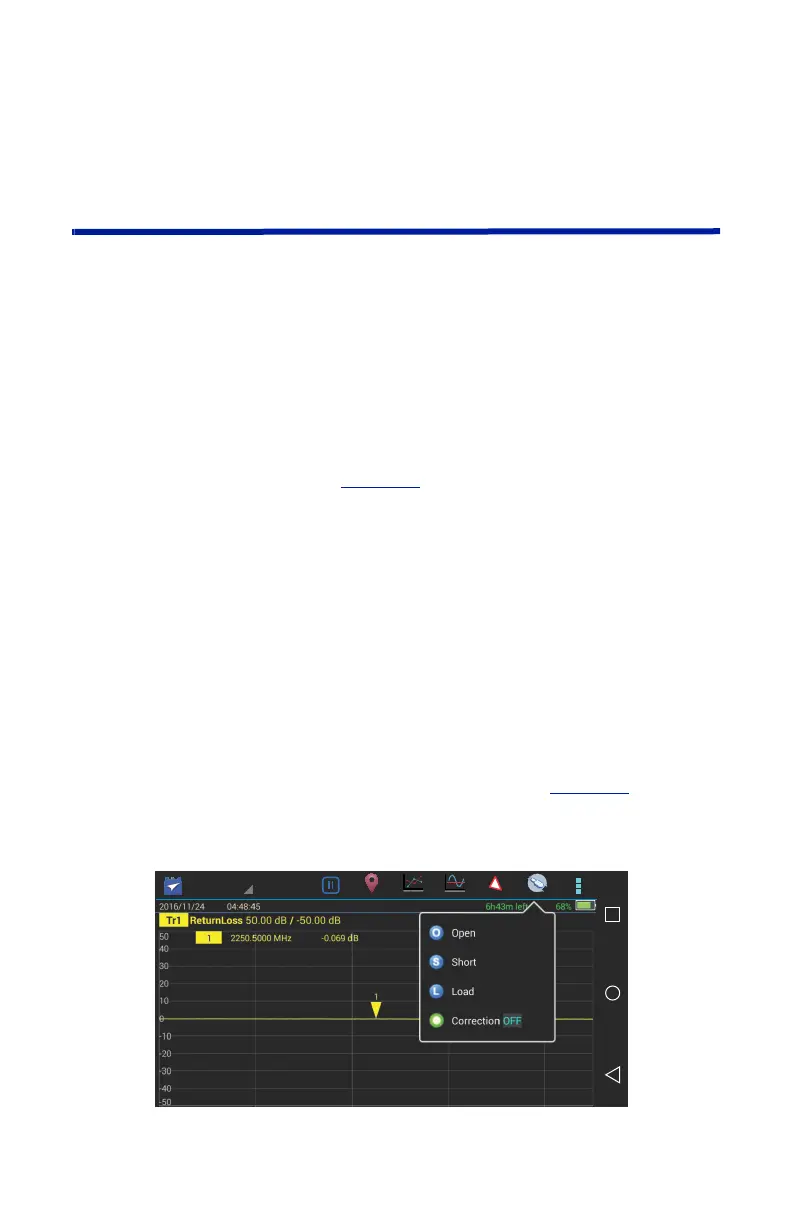
1. Press the Calibrate icon. See
Figure 27
.
2. Connect the Cal Combo “Open” connector to the unit antenna port.
3. Press the Open softkey.
4. Wait for the unit to sweep and a Green Check to display.
5. Connect the Cal Combo “Short” connector to the unit antenna port.
6. Press the Short softkey
7. Wait for the unit to sweep and a Green Check to display.
8. Connect the Cal Combo “Load” connector to the unit antenna port.
9. Press the Load softkey
10. Wait for the unit to sweep and a Green Check to display.
Note: During calibration, the color of the icon display is yellow.
Note: After calibration, the display will resemble
Figure 27
and
Correction will be set to On.
Figure 27 Calibration Display Screen



 To Next Page