RF Power Measurement
51
Sensor Displays and Menus
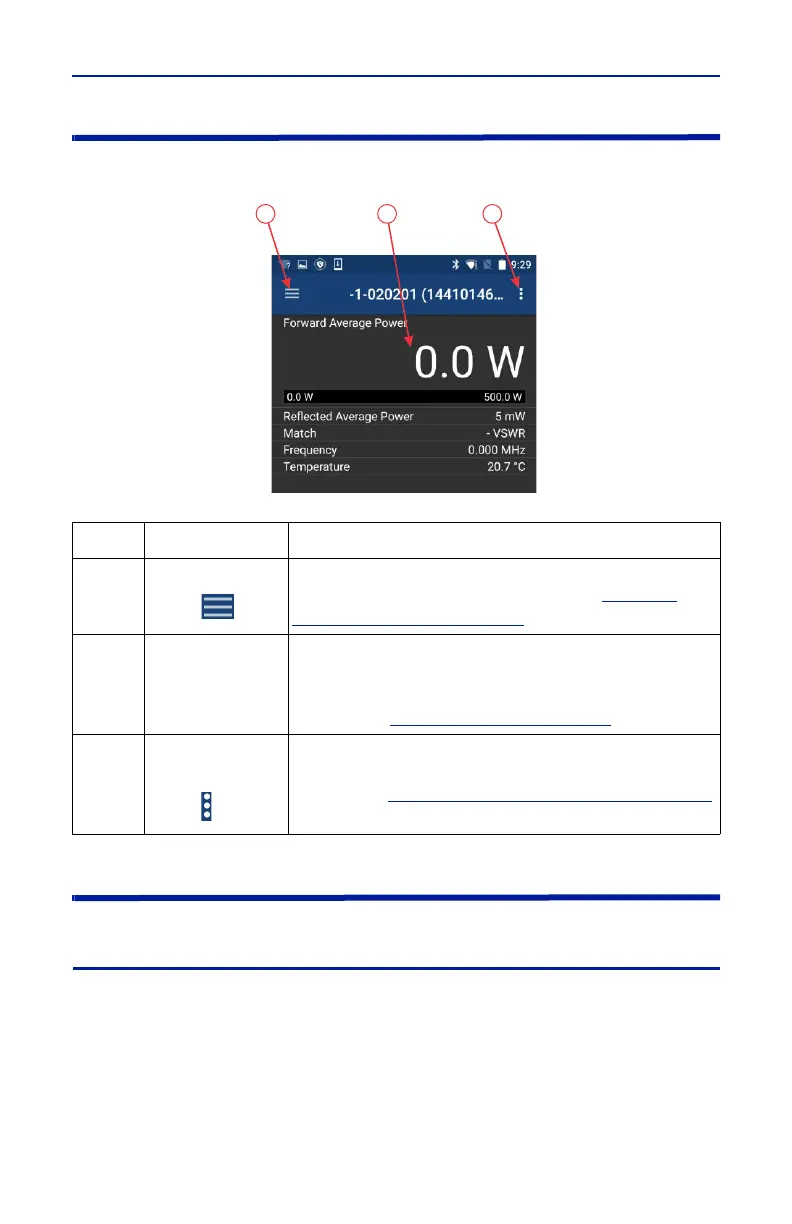
Figure 49 Power Meter Display
Display Area
Readings Menu
Sensor measurements are displayed on the reading menu in a list format. The
top reading is enlarged to aid visibility and an analog bar meter provides visual
reference of the signal level.
Graphical Displays — Any readings may be displayed in graphical or tabular
format by tapping the Display Controls Menu to display the graph options and
selecting a graph from the list. See Graph Displays for additional information.
Item
1
Display Controls
Menu
Used to configure the sensor and choose the format
for displaying measurement data. See
"Display
Controls Menu" on page 53
.
2
Display Area/
Readings Menu
Displays the numerical readings available/selected
device readings. The information on the readings
menu can also be displayed in table or graphical
format. See
"Display Area" on page 51
.
3
Sensor
Operations
Menu
Used to load Presets, select modes, send device
commends, start Logging and share measurement
results. See
"Sensor Operations Menu" on page 61
for detailed description of the available options.



 To Next Page