37
1.8 7 7. 87 7. 2 2 6 9 BLACKBOX.COM
NEED HELP?
LEAVE THE TECH TO US
LIVE 24/7
TECHNICAL
SUPPORT
1.8 77.87 7.2269
CHAPTER 4: VLAN APPLICATION
STEP 2: Select Configuration -> VLAN -> Static VLAN. Create a VLAN with VLAN ID 100. Enter a VLAN name in the Name field.
STEP 3: Assign VLAN tag setting to or remove it from a port by toggling the check box under an individual port number. The tag
settings determine if packets that are transmitted from the port tagged or untagged with the VLAN ID. The possible tag settings are:
Tag All Specifies that the egress packet is tagged for the port.
Untag port vlan Specifies that the egress packet is untagged for the port.
Untag All
Specifies that all frames, whether classified to the Port VLAN or not, are
transmitted without a tag.
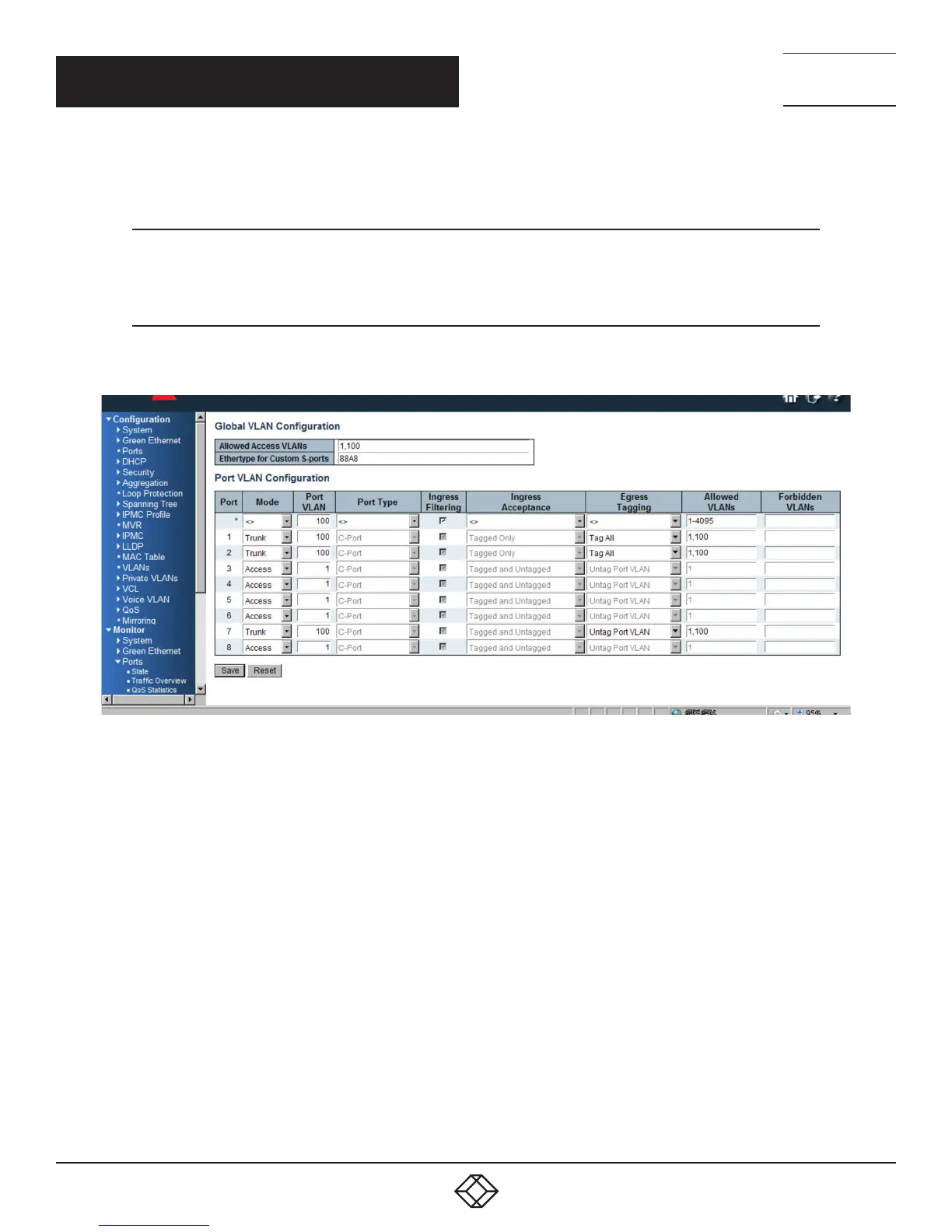
Here we set tagged VLAN100 on Port 1 and Port 2, untagged VLAN100 on Port7.
FIGURE 4-4. SET TAGGED AND UNTAGGED VLANS
STEP 4: Transmit untagged unicast packets from Port 1 to Port 2 and Port 7. The switch should tag it with VID 100. The packet has
access to Port2 and Port 7. The outgoing packet is stripped of its tag to leave Port 7 as an untagged packet. For Port 2, the outgoing
packet leaves as a tagged packet with VID 100.
STEP 5: Transmit untagged unicast packets from Port 2 to Port 1 and Port 7. The switch should tag it with VID 100. The packet has
access to Port1 and Port 7. The outgoing packet is stripped of its tag to leave Port 7 as an untagged packet. For Port 1, the outgoing
packet leaves as a tagged packet with VID 100.
STEP 6: Transmit untagged unicast packets from Port 7 to Port 1 and Port 2. The switch should tag it with VID 100. The packet has
access to Port1 and Port 2. For Port 1 and Port 2, the outgoing packet leaves as a tagged packet with VID 100.
STEP 7: Repeat step 4 using broadcast and multicast packets.













 To Next Page