60
1.8 7 7. 87 7. 2 2 6 9 BLACKBOX.COM
NEED HELP?
LEAVE THE TECH TO US
LIVE 24/7
TECHNICAL
SUPPORT
1.8 77.87 7.2269
CHAPTER 6: RING VERSION2 APPLICATION
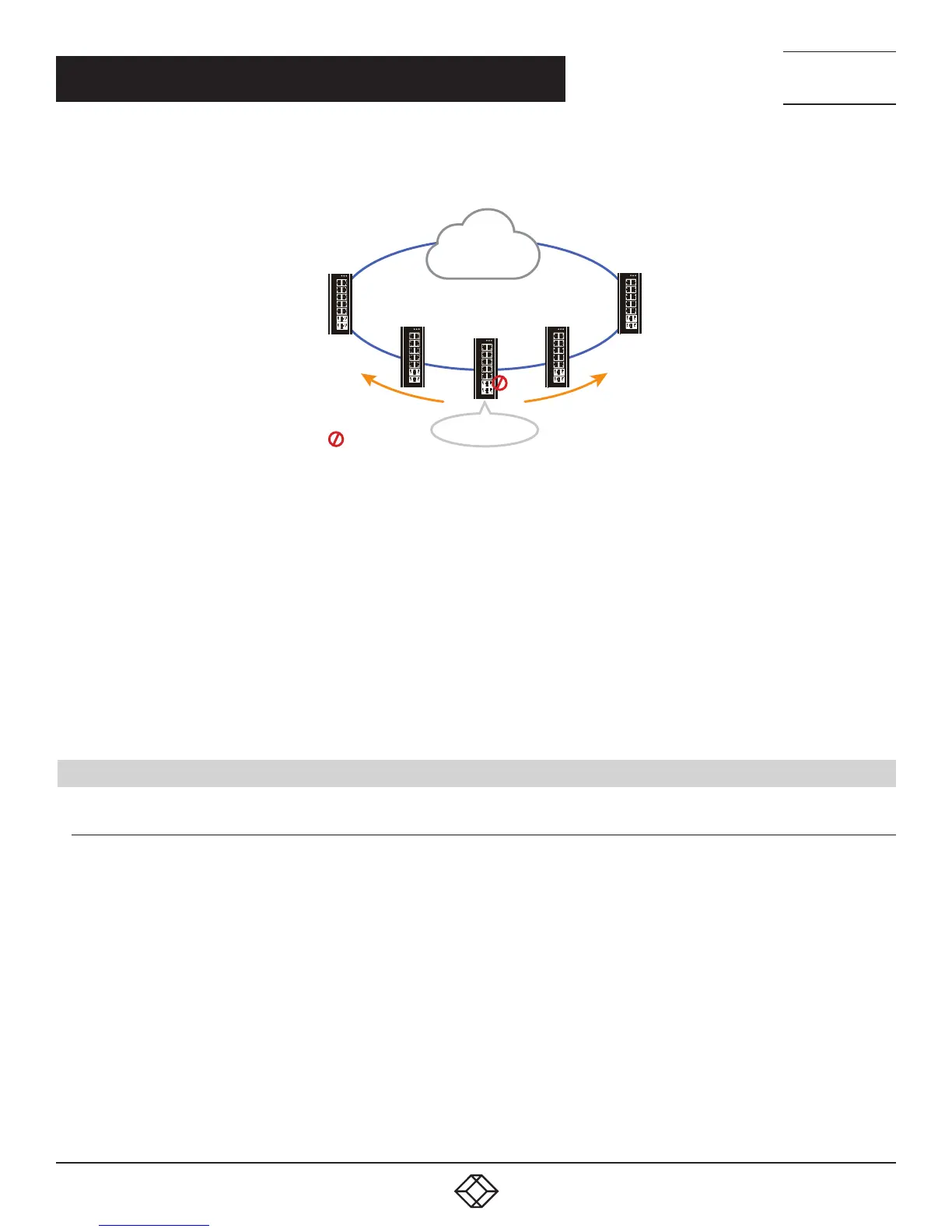
Balancing Chain - The switch can be central-block, terminal-1/2 or member.
1 2
3
P1
P2ALM
4
5 6
7
8
9
11
10
12
13
14
1 2
3
P1
P2ALM
4
5 6
7
8
9
11
10
12
13
14
1 2
3
P1
P2ALM
4
5 6
7
8
9
11
10
12
13
14
1 2
3
P1
P2ALM
4
5 6
7
8
9
11
10
12
13
14
1 2
3
P1
P2ALM
4
5 6
7
8
9
11
10
12
13
14
Terminal 1
L1
LAN network
Terminal 2
L6
L5
L4
L3
L2
Central block
Blocking port
FIGURE 6-6. BALANCING CHAIN
When the role is balancing-chain/central-block, one ring port is a member port and another is a block port. The block port is a
redundant port. It is blocked in normal state.
When the role is balancing-chain/terminal-1/2, one ring port is a terminal port and another is a member port. Both ring ports are
forwarded in normal state.
When the role is balancing-chain/member, both ring ports are member ports. Both ring ports are forwarded in normal state.
NOTE 1: It must enable group1 before configure group2 as coupling.
NOTE 2: When group1 or group2 is enabled, the configuration of group3 is invisible.
NOTE 3: When group3 is enabled, the configuration of group1 and group3 is invisible.
6.2 HOW TO CONFIGURE RINGV2
CONFIGURATION (CONSOLE)
To configure the ring protection in the switch:
1. Log in as “admin” account in the console.
2. Go to Configure mode by ”configure terminal.”
3. Go to configure ring protection group by command “ringv2 protect group1.”
4. Before configuring, disable ring protection status using the “mode disable” command.
5. Set all necessary parameters:
Node 1 and Node 2, choose the ports to connect to the other switch.
For example, choose PORT-1 and PORT-2 to connect to the other switch.
Then choose one of the ring connection devices to be “Master” on which the “Node 2 port” can be a blocking port.
node1 interface GigabitEthernet 1/1
node2 interface GigabitEthernet 1/2
role ring-master













 To Next Page