36
1.8 7 7. 87 7. 2 2 6 9 BLACKBOX.COM
NEED HELP?
LEAVE THE TECH TO US
LIVE 24/7
TECHNICAL
SUPPORT
1.8 77.87 7.2269
CHAPTER 4: VLAN APPLICATION
4.2 EXAMPLE 2: PORT-BASED VLANS
When the switch receives an untagged VLAN packet, it will add a VLAN tag to the frame according to the PVID setting on a port.
As shown in the following figure, the untagged packet is marked (tagged) as it leaves switch through Port 2, which is configured
as a tagged member of VLAN100. The untagged packet remains unchanged as it leaves the switch through Port 7, which is
configured as an untagged member of VLAN100.
8
7
5 3
1
6
4 2
UNTAGGED PACKET
UNTAGGED MEMBER OF VLAN 100
CRC
DA
SA
DATA
BEFORE
TAGGED MEMBER OF VLAN 100
PORT 1
PORT 1
PORT 2
FIGURE 4-2. VLAN EXAMPLE 2
CONFIGURATION
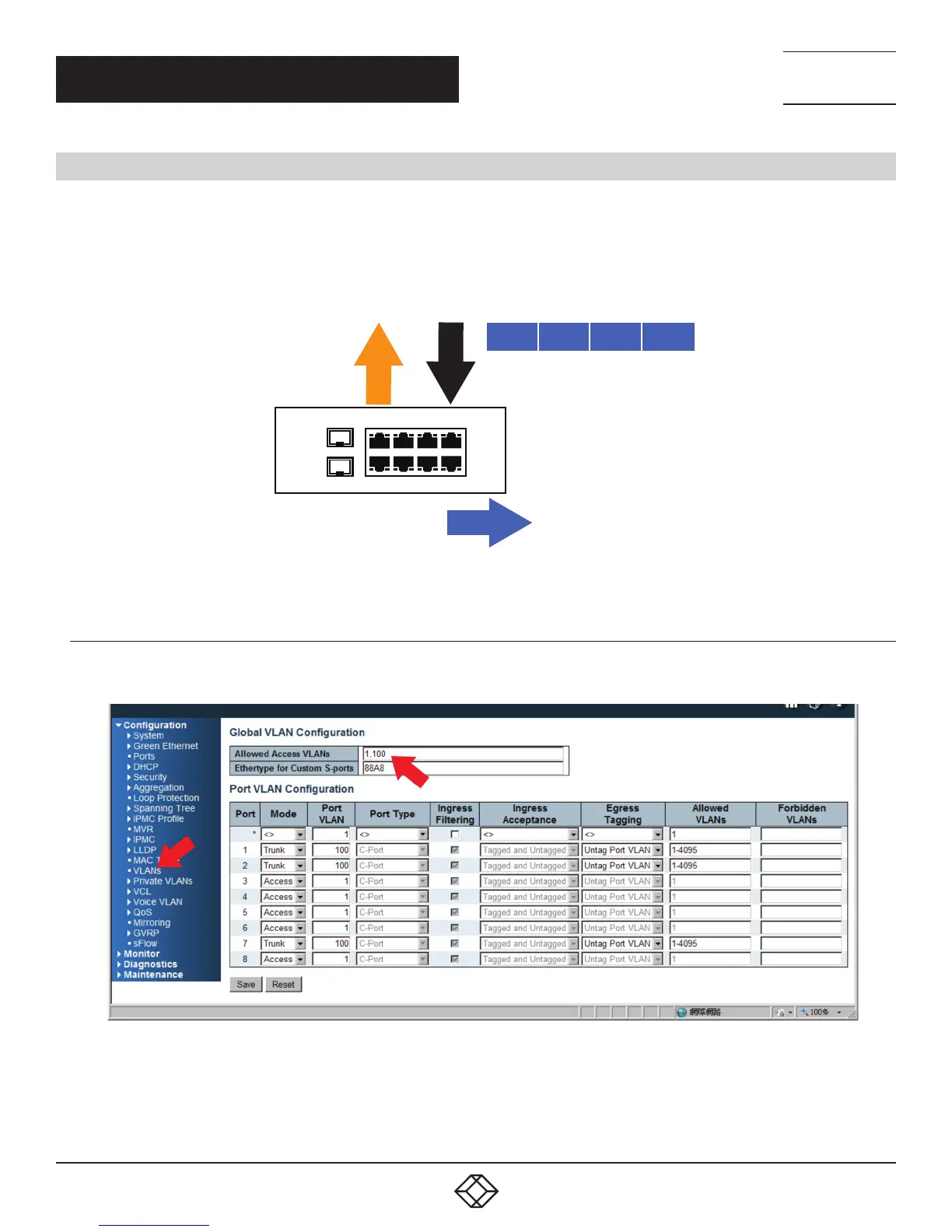
STEP 1: Go to Configuration -> VLANs -> Port VLAN configuration and configure PVID 100 on Port 1, Port 2 and Port 7.
FIGURE 4-3. PORT-BASED VLAN CONFIGURATION













 To Next Page