77
1.8 7 7. 87 7. 2 2 6 9 BLACKBOX.COM
NEED HELP?
LEAVE THE TECH TO US
LIVE 24/7
TECHNICAL
SUPPORT
1.8 77.87 7.2269
CHAPTER 8: IGMP APPLICATION
8.2 EXAMPLE 2
Multicast server
L3 switch querier
Industrial Ethernet Switch
P14
Client 1 Client 2 Client 3
FIGURE 8-3. EXAMPLE 2
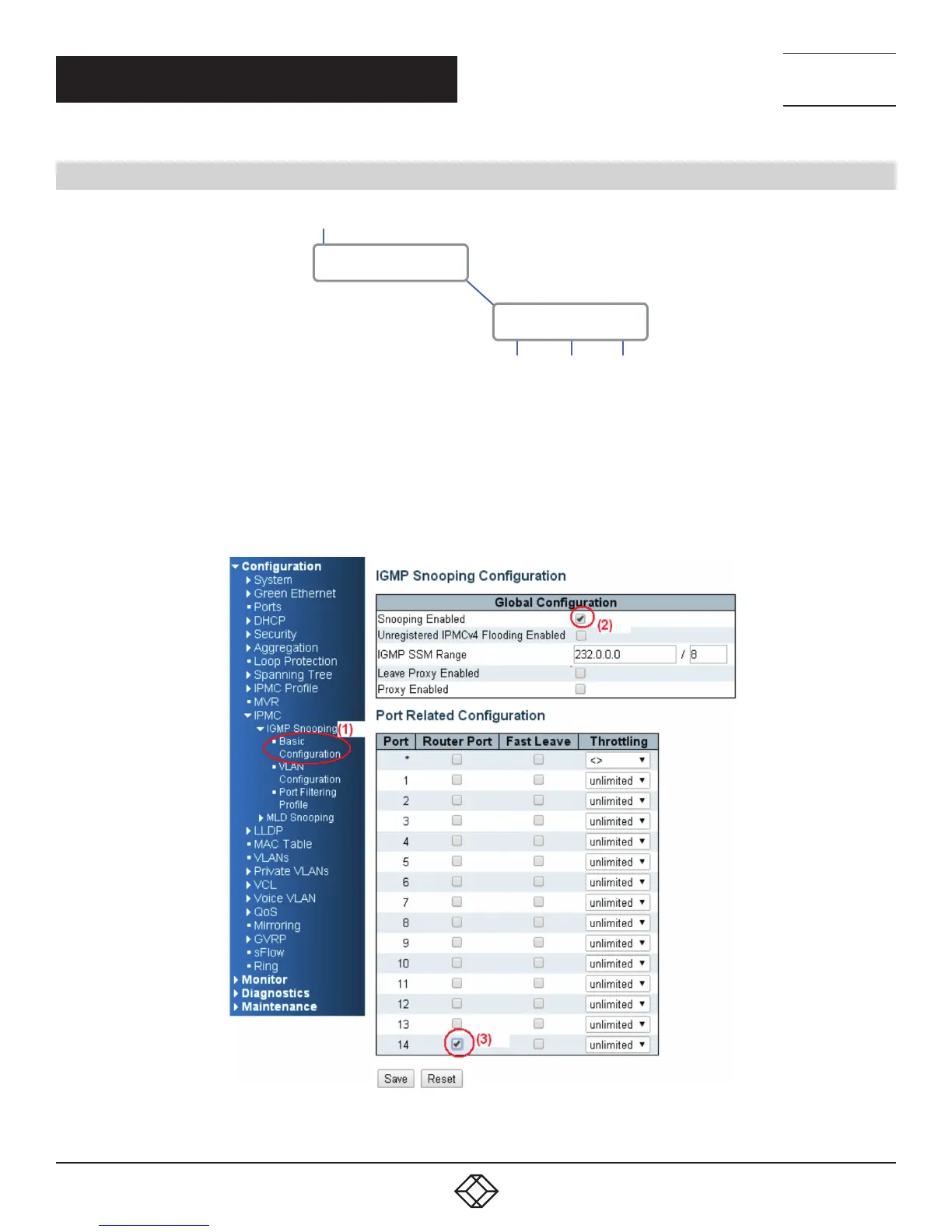
1. Go to “Configuration —> IPMC —> Basic Configuration” to select the “Snooping Enable” check box.
2. Un-select the ”Unregistered IPMCv4 Flooding Enabled” check box.
3. If Multicast stream is from an L3 switch, then the uplink port will have to be the “Router Port”.
NOTE: If an aggregation member port is selected as a router port, the whole aggregation will act as a router port.
FIGURE 8-4.













 To Next Page