88
1.8 7 7. 87 7. 2 2 6 9 BLACKBOX.COM
NEED HELP?
LEAVE THE TECH TO US
LIVE 24/7
TECHNICAL
SUPPORT
1.8 77.87 7.2269
CHAPTER 10: POWER OVER ETHERNET APPLICATION
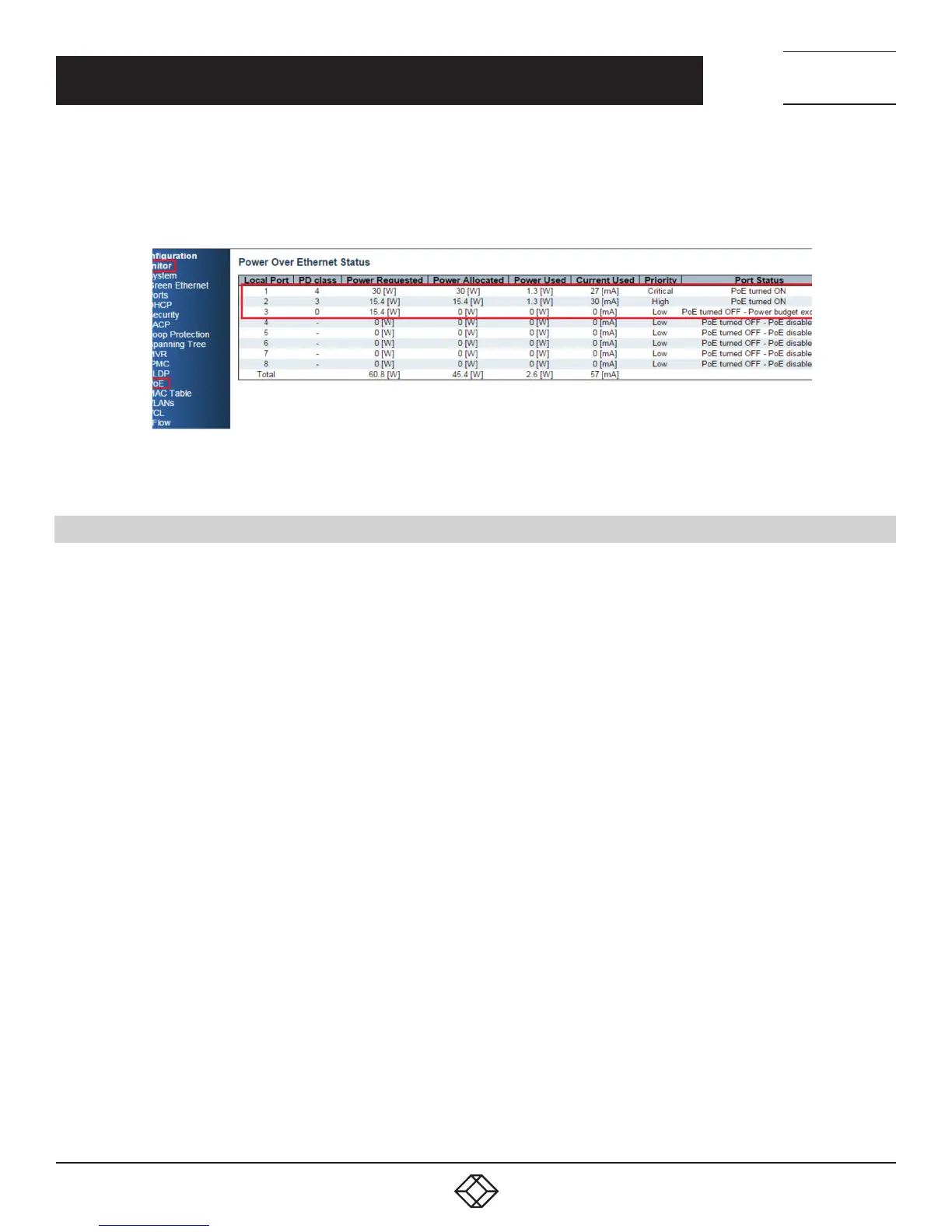
5. Test Result: PoE port status can be monitored by Web: Monitor —> PoE
The following table shows that if the system budget is not enough for all PoE devices, the port with higher priority port will be fed
power first. The last priority port (port 3) will not be powered.
FIGURE 10-4. TEST RESULT
10.6 EXAMPLE 2
1. Parameter Setting:
Reserved Power determined: Allocation
Power Management Mode: Reserved Power
Primary Power Supply: 138 W (> all ports reserved power)
2. Port Maximum Power
Port 1: 30 W
Port 2– Port 8: 15.4 W
Total: 137.8 W
3. PD Power Consumption
Port 1: 1.3 watt (PoE Splitter)
Port 2: 1.3 watt (PoE VoIP Phone)
Port 3: 3.8 watt (PoE WiFi AP)













 To Next Page