82
1.8 7 7. 87 7. 2 2 6 9 BLACKBOX.COM
NEED HELP?
LEAVE THE TECH TO US
LIVE 24/7
TECHNICAL
SUPPORT
1.8 77.87 7.2269
CHAPTER 9: 802.1X AUTHENTICATION APPLICATION
9.3 EXAMPLE
Here we take an example of 802.1x Authentication via the Industrial Ethernet Switch to be authenticated by RADIUS server. In a
basic example, we take port 1 as a testing port which enables 802.1x in the switch.
With the default configuration, use the following Web UI setting .
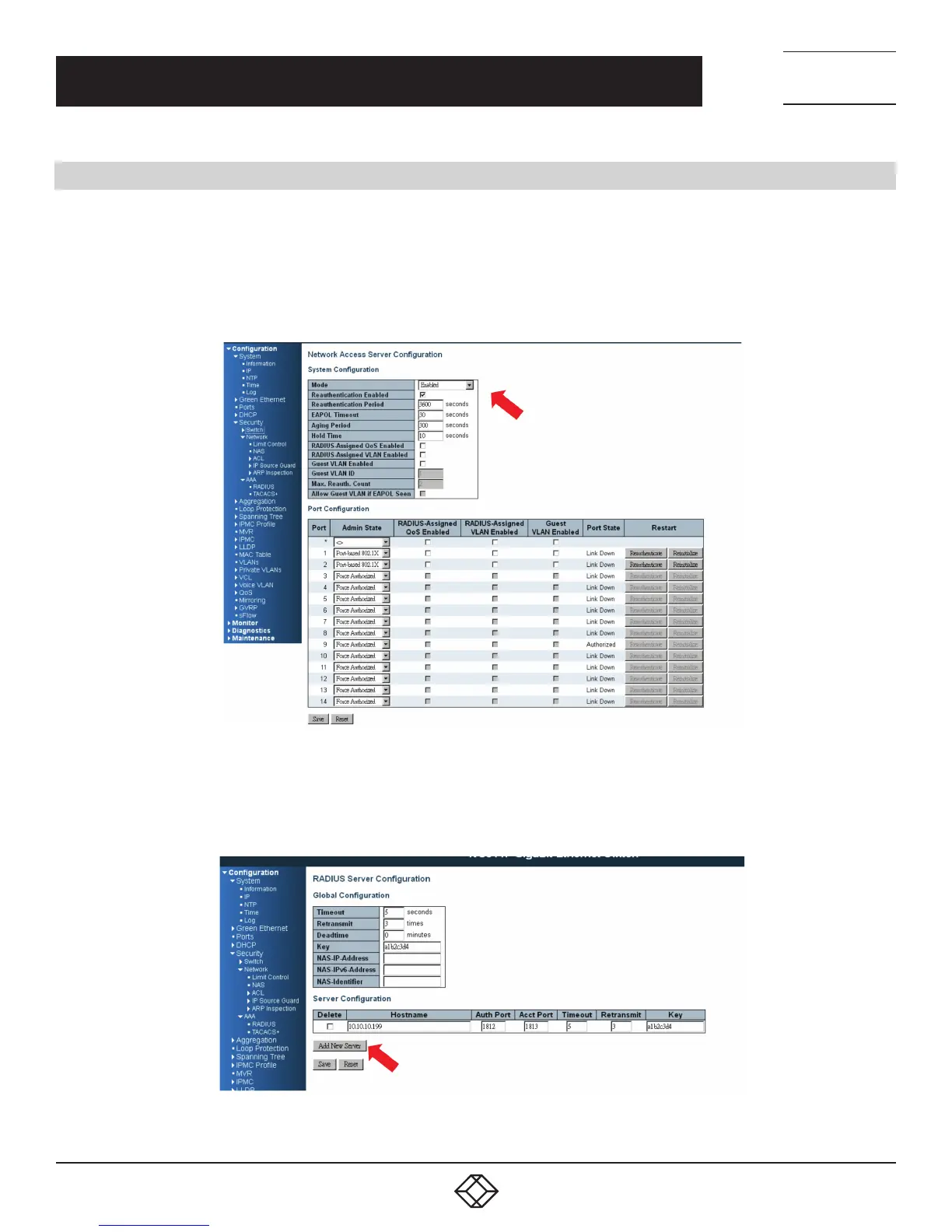
STEP 1: Go to Configuration —> Security —> Networks —> NAS.
Select “Enable” mode to enable authentication, and set port-1, port-2 to be “Port Base 802.1x”.
FIGURE 9-1. NAS SCREEN
STEP 2: Go to Configuration —> Security —> AAA —> Radius.
Click “Add New Server,” input “20.20.20.20” for server, and “a1b2c3d4” for secret key. Then click the “Save” button.
FIGURE 9-2. RADIUS SCREEN













 To Next Page