79
1.8 7 7. 87 7. 2 2 6 9 BLACKBOX.COM
NEED HELP?
LEAVE THE TECH TO US
LIVE 24/7
TECHNICAL
SUPPORT
1.8 77.87 7.2269
CHAPTER 8: IGMP APPLICATION
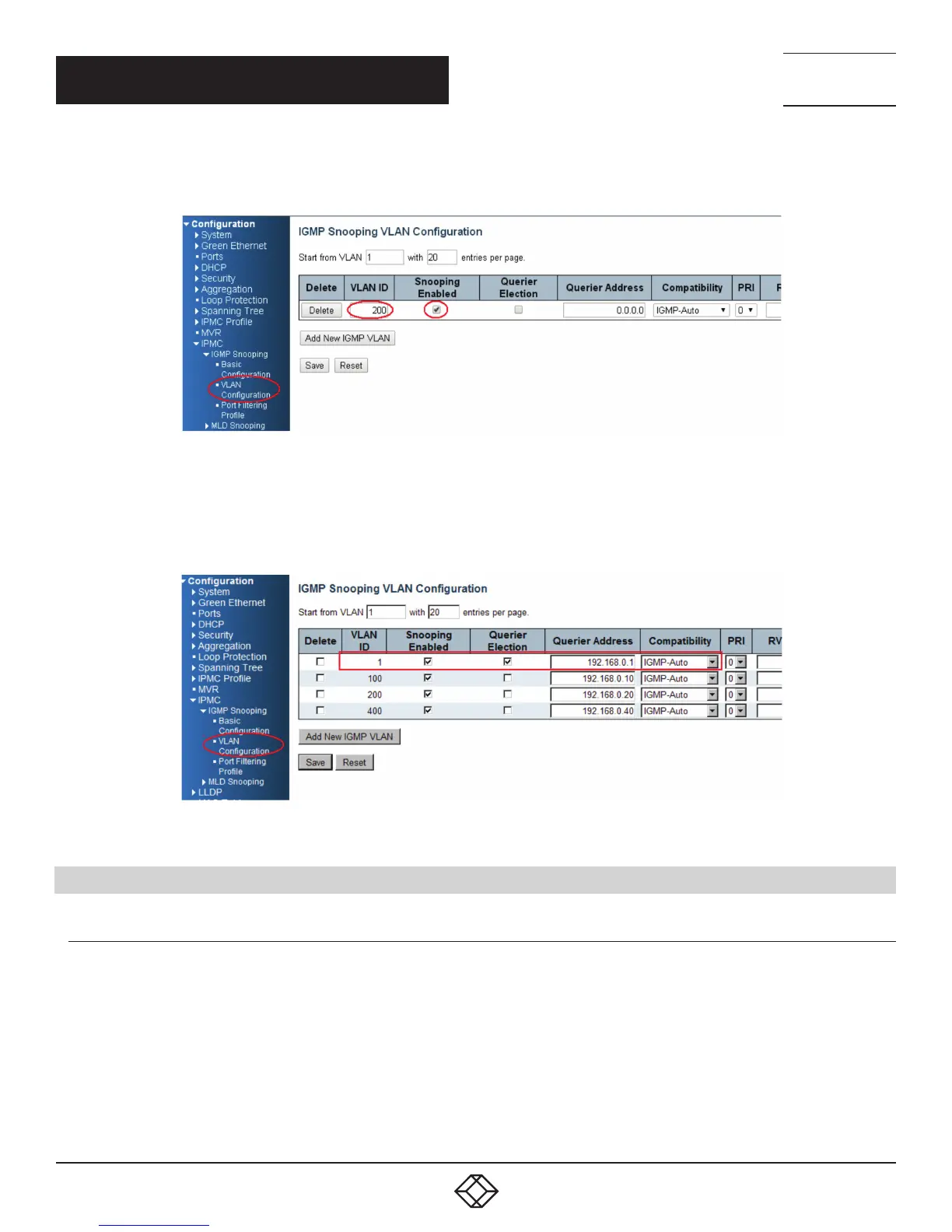
2. Go to “Configuration —> IPMC —> VLAN Configuration” to select the “Snooping Enable” check box and set the VLAN ID of port14.
FIGURE 8-8.
3. If there is no querier on the L3 switch, you have to select “Querier Election”, and set the “Querier Address.” The IP address is in the
same network as uplink interface.
4. Select the IGMP version as server.
FIGURE 8-9.
8.4 HOW TO CONFIGURE VLC
VLC CONFIGURATION ON AN IGMP SERVER
1. In the Media area of the top tool bar select “Stream.”
2. Select a video or audio file to play.
3. Confirm that the file is correct, then click “Next” twice.
4. Select the stream type as “UDP” and click the “Add” button.
5. Set the stream IP; the range is 224.0.0.1 to 239.255.255.254, and the protocol port is 1234.
6. Select ”Sort out all stream” and click then “Stream” button, then the stream will start sending to the switch.













 To Next Page