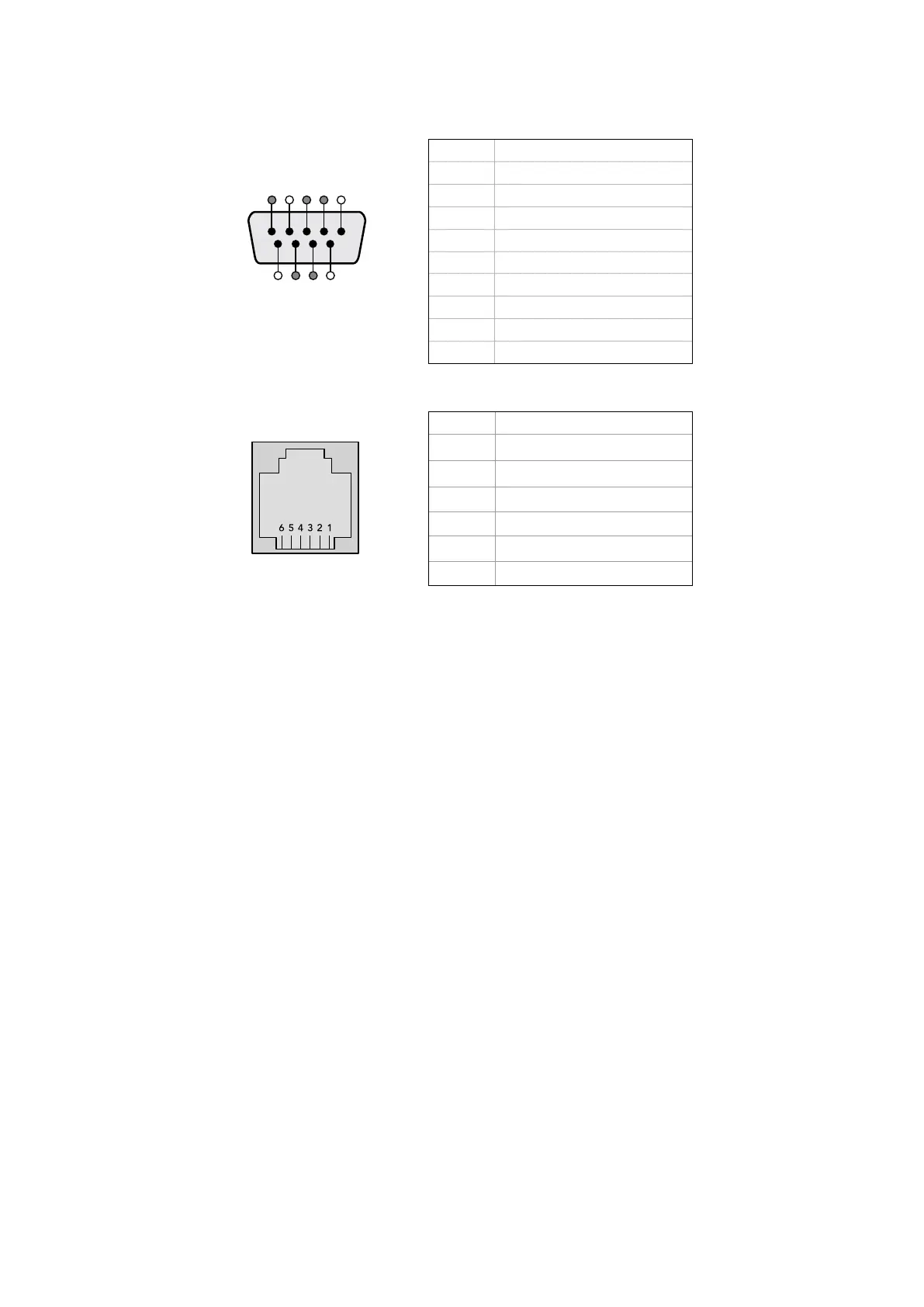
Pin Function
1 Ground
2 Tx- (Data sent by router)
3 Rx+ (Data received by router)
4 Ground
5 NC (No connect)
6 Ground
7 Tx+ (Data sent by router)
8 Rx- (Data received by router)
9 Ground
5 4 3 2 1
9 8 7 6
Videohub RS-422 Router Control DB9 pin connections.
Pin No. Function
Pin 1
TX +
Pin 2
TX -
Pin 3
GND
Pin 4
GND
Pin 5
RX -
Pin 6
RX +
Videohub RS-422 Router Control RJ11 pinout diagram.
This document describes the commands and parameters in the protocol that are relevant and
supported by Videohub. Other commands and parameters specified in the Leitch protocol are
accepted but ignored.
The RS-422 serial port is configured as 9600 N81.
The protocol is line-oriented, with a maximum length of 250 characters per command. Each
command from the client should be terminated with a carriage-return (\r). Each response from
the server will be terminated with a carriage-return and line-feed (\r\n).
Sources, destinations and levels are always specified in base-16, numbered from zero. Levels
are always between 0 and 15 (“F”) . Videohubs only have one valid level - level zero.
On connecting to the serial port, the client should send a carriage-return. The Videohub Server
will respond with a
> character prompt, which is not followed by a carriage-return or line-feed.
Receiving the prompt indicates that a connection has been established. The same prompt will
be issued after each command received by the Videohub Server.
In the following documentation, commands in
orange and values in blue must be typed
literally, including any spaces. In the following example of an immediate command using
destination port 7 and source port 3,
@ X:0/destination,source would be entered
as:
@ X:0/6,2
Notifications
Once connected, if status reporting is enabled, the client will receive a notification message
when a route changes on the Videohub Server. The notifications take one of two forms:
S:0destination,source Routing change
This message indicates that the specified source port is now routed to the specified destination.
V:0 destination,source Preset routing notification
This message indicates that the current preset includes a route from the specified source to the
specified destination.
83Developer Information



 To Next Page