DS7240-UK Reference Guide Copyright 2003 Bosch Security Systems P/N: 4998122677Cr1 Page 67
PART III: PANEL PROGRAMMING
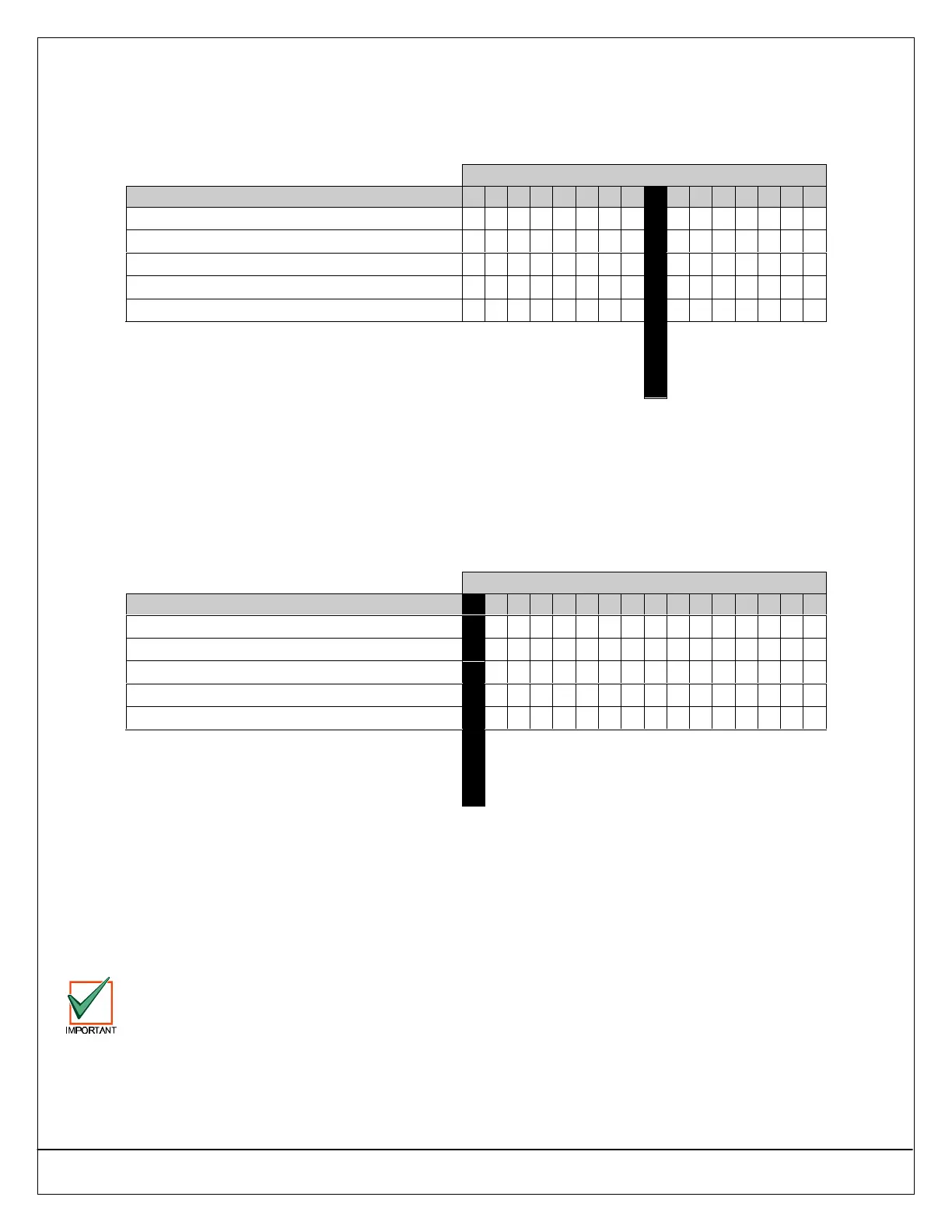
30.5 Authority Level Option 5: One-Time Disarm
• Address: 0368
• Default: See table below
• Selections: 0-15
Enter This Data Digit to Select Options
Authority Level Configuration 5 Options 0 1 2 3 4 5 6 7 8 9 10 11 12 13 14 15
One-Time Disarm Not Assigned
••
Assign to Authority Level 1
•• •• •• •• •• •• •• ••
Assign to Authority Level 2
•• •• •• •• •• •• •• ••
Assign to Authority Level 3
•• •• •• •• •• •• •• ••
Assign to Authority Level 4
•• •• •• •• •• •• •• ••
Default
30.5.1 Parameter Description
If an authority level can disarm the system, use this parameter to restrict that authority level to One-time Disarm (can only
disarm the system once).
30.6 Authority Level Option 6: Send Open/Close Reports
• Address: 0369
• Default: See table below
• Selections: 0-15
Enter This Data Digit to Select Options
Authority Level Configuration 6 Options 0 1 2 3 4 5 6 7 8 9 10 11 12 13 14 15
Send Open/Close Reports for Authority Levels 1-4
••
Authority Level 1 does not send Open/Close Reports
•• •• •• •• •• •• •• ••
Authority Level 2 does not send Open/Close Reports
•• •• •• •• •• •• •• ••
Authority Level 3 does not send Open/Close Reports
•• •• •• •• •• •• •• ••
Authority Level 4 does not send Open/Close Reports
•• •• •• •• •• •• •• ••
Default
30.6.1 Parameter Description
No Open/Close reports are sent for the Authority Level(s) selected at this parameter.
For example, if Open/Close Reports are enabled for an area and Open/Close reports are disabled for Authority Level 1 in this
parameter, the panel will send Open/Close reports for users assigned to Authority Levels 2, 3 and 4. It will not send
Open/Close reports for users assigned to Authority Level 1, even though Open/Close reports are enabled for the area.
See the following parameters to properly enable/disable Open/Close Reporting: “Routing Destinations,” page 32; Global
“Reporting Options,” page 38; “Open/Close Reporting Options,” page 57; and “Area # Open/Close Reporting Options,” page
63.
When Authority Level Config Option 6 is set to 15, Closing reports will be sent even if the arming key (On,
Perimeter Only, [#] + [2], [#] + [1], or [#] + [3]) does not require a PIN. Closing reports will send a user ID of 255.
Opening reports will not be sent.


 To Next Page