DS7240-UK Reference Guide Copyright 2003 Bosch Security Systems P/N: 4998122677Cr1 Page 83
PART III: PANEL PROGRAMMING
34.4 Help Function Key Reports, Ack Beep at Keypad Options
• Address: 0701
• Default: See table below
• Selections: 0-15
Enter This Data Digit to Select Options
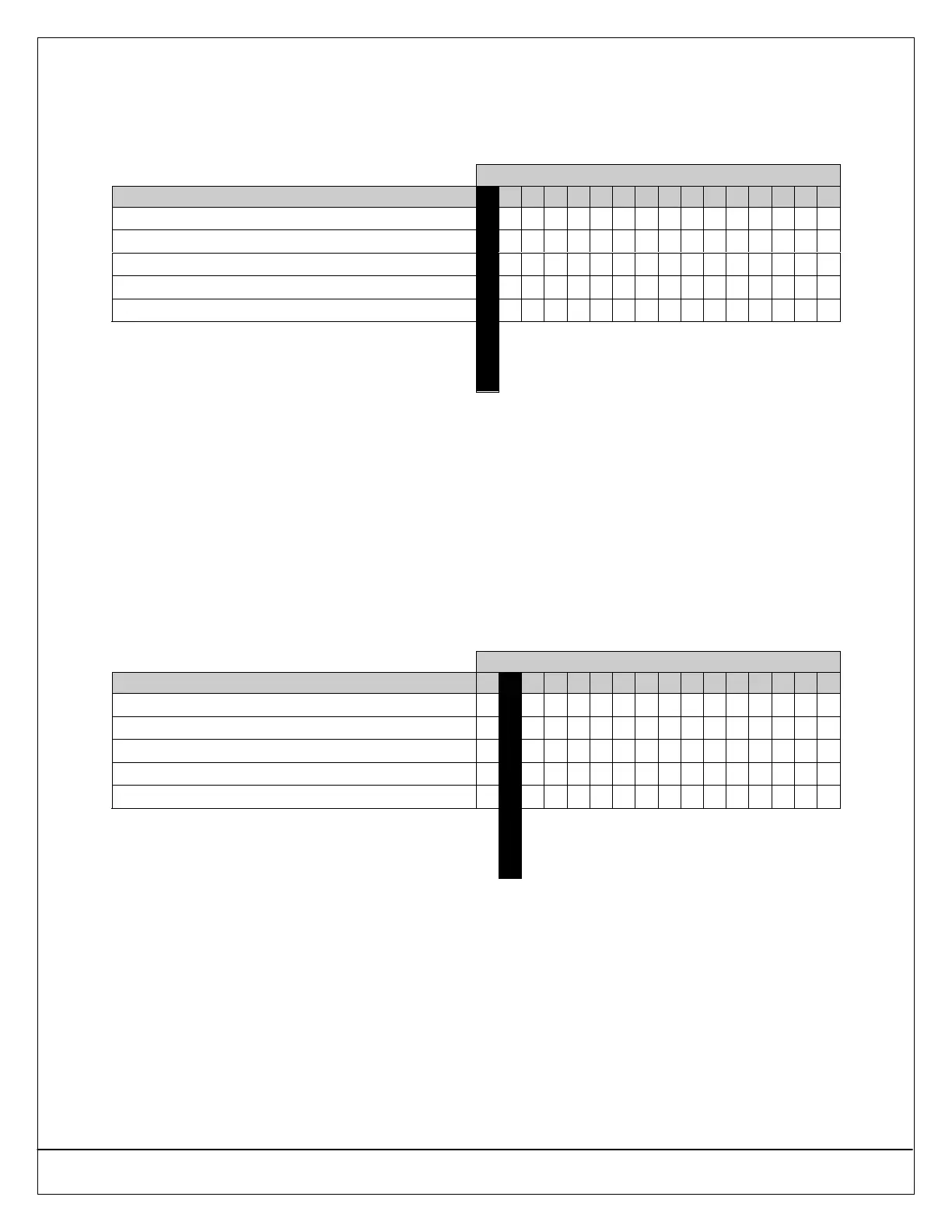
Help Function Keys Report & Ack Beep Options 0 1 2 3 4 5 6 7 8 9 10 11 12 13 14 15
No Alarm Report for Help Function Keys
••
Enable Help Function Keys Reporting
•• •• •• •• •• •• •• ••
Acknowledgement Beep for [1] + [3] Keys
•• •• •• •• •• •• •• ••
Acknowledgement Beep for [4] + [6] Keys
•• •• •• •• •• •• •• ••
Acknowledgement Beep for [7] + [9] Keys
•• •• •• •• •• •• •• ••
Default
34.4.1 Parameter Description
This is a global parameter that affects all areas.
34.4.2 Parameter Options
• Enable Help Function Keys Reporting: If enabled, the [1]+[3] Keys report as Zone 100, the [4]+[6] Keys report as Zone
101 and the [7]+[9] Keys report as Zone 102.
• Acknowledgement Beep for Help Function Keys: The keypad beeps when the Central Station receiver acknowledges a
report. If the key is not programmed for reports, the beep occurs on activation.
34.5 Duress Reporting Options
• Address: 0702
• Default: See table below
• Selections: 0-15
Enter This Data Digit to Select Options
Duress Reporting Options 0 1 2 3 4 5 6 7 8 9 10 11 12 13 14 15
No User Emergency Function Reporting
••
Make User 32 a Duress User
•• •• •• •• •• •• •• ••
Make User 31 a Duress User
•• •• •• •• •• •• •• ••
Make User 30 a Duress User
•• •• •• •• •• •• •• ••
Make User 29 a Duress User
•• •• •• •• •• •• •• ••
Default
34.5.1 Parameter Description
This parameter creates up to four (4) Duress users (and PINs). Creating a Duress user does not change any other
functionality programmed for that user.
Whenever a user enters a Duress PIN (PIN assigned to a Duress user), the panel sends a Duress [74] report and executes
functions per the Duress user’s authority level.
To create a unique Duress user (and PIN) for each area, select Option 15 and then assign each of the four users (User 29
through 32) to only one area.
To create one Duress user (and PIN) for all areas, select Option 1, 2, 4 or 8 and then assign that user (User 29 through 32) to
all four areas.


 To Next Page