1/05 | F01U002505B
EN | 24FPT-DACT | Operation & Installation Guide |
4.0 System Operation
4.4 Keypad Operation
While installing the FMR-DACT-KEYPAD,
the system does not monitor the input points
or the serial connection on the FACP.
4.4.1 FMR-DACT-KEYPAD
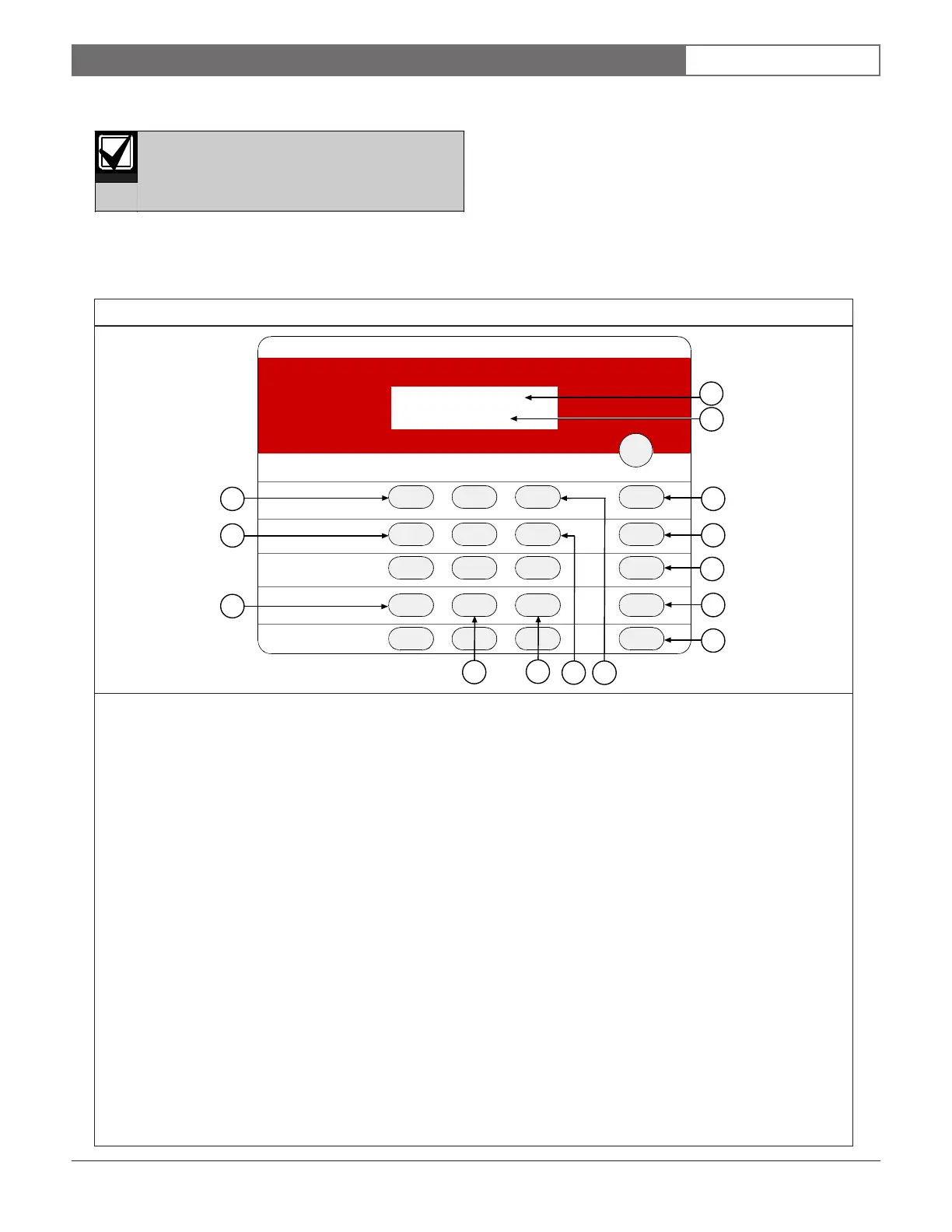
The FMR-DACT-KEYPAD (Figure 17) is an
alphanumeric LCD keypad used for programming and
debugging only while it is connected to the FPT-DACT.
This keypad has a two-line, 16-character display
showing information on various FPT-DACT
programming functions. In most cases, the first line
contains general system status information; the second
line describes the specific programming menus and
prompts. Figure 17 identifies and describes the FMR-
DACT-KEYPAD keys.
Refer to Figure 15 on page 17 to connect the FMR-
DACT-KEYPAD to the FPT-DACT.
DACT
PROGRAMMER
1 23
456
789
0
Program
*
#
Command
Disable
History
Test
Drill
Reset
Clear
Silence
SYSTEM NORMAL
0: PROGRAM
1
2
14
13
12
5
7
3
4
10
11
8
9
6
1 - First line of display.
2 - Second line of display.
3 - [Reset] key: Initiates a manual reset of the FPT-DACT. Refer to Section 4.5 Reset on page 26 for more
information. Clears the character selected by the cursor (Figure 18 on page 25).
4 - [Drill] key: Advances to the next programmable feature or character position (Figure 18).
5 - [Disable] key: Returns to the previous programmable feature or character position (Figure 18).
6 - [Test] key: Enters Test Mode. Pressing [Test] when entering a telephone number accesses three telephone
control code options. Refer to Section 5.5.4, 3-TEST on page 44 for more information.
7 - [History] key: Enters History Mode. Refer to Section 4.4.4 History on page 44 for more information.
8 - [3] key: Increases the FMR-DACT-KEYPAD backlight intensity. Press and hold [* Clear] first. Then press [3] to
adjust the intensity.
9 - [6] key: Decreases the FMR-DACT-KEYPAD backlight intensity. Press and hold [* Clear] first, then press [6] to
adjust the intensity.
10 - [# Command] key: Accepts programming entries into FPT-DACT. Press this key after every programming entry.
11 - [0 Program] key: Enters the Programming Mode menu. Refer to Section 5.0 Programming on page 28 for
programming instructions.
12 - [* Clear] key: Cancels any programming menu without making changes. Return to the message
SYSTEM
NORMAL
by pressing [* Clear] until
SYSTEM NORMAL
appears across the first line.
13 - [4] key: Decreases FMR-DACT-KEYPAD sounder volume. Press and hold [* Clear] first, then press [4] to adjust
the volume.
14 - [1] key: Increases FMR-DACT-KEYPAD sounder volume. Press and hold [* Clear] first, then press [1] to adjust
the volume.
Figure 17: FMR-DACT-KEYPAD



 To Next Page