11
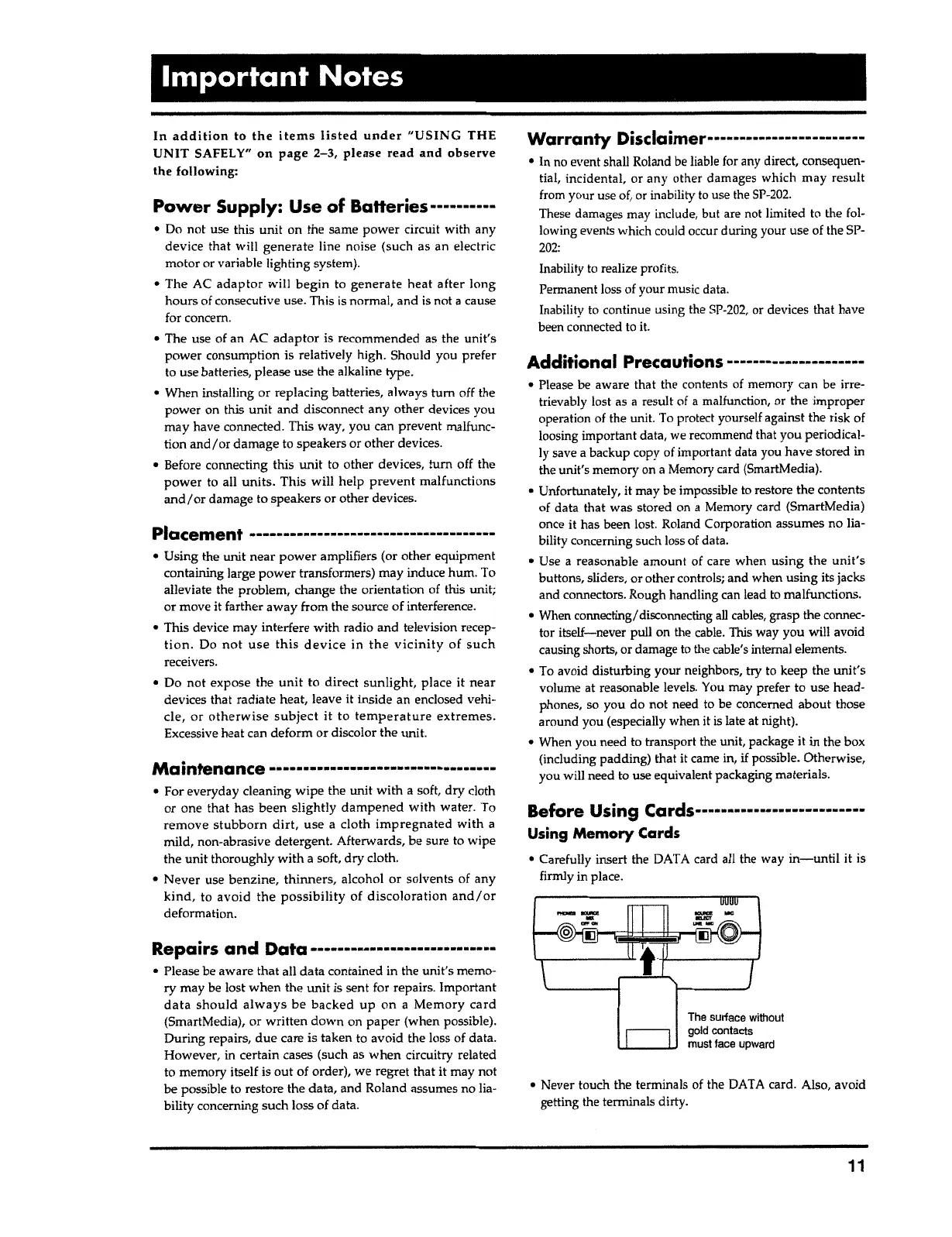
• Never touch the
term
i
nals of the DATA card.
Also
,
avo
i
d
getting the terminals dirty.
The surface
w
i
thout
gold contacts
must face upward
Before Using
Cards···
·
·········-········-···
Using
Memory
Cards
• Carefully insert the DAT A card all the way
in-until
i
t is
firmly
i
n
place
.
Additional Precautions---------------------
• Please
be
aware that
th
e
contents of memory can be irre-
trievably lost as
a
resu
l
t of
a
malfunction, or the improper
operation of the unit.
T
o protect yourself against the risk of
loosing important
data
,
we
rec
o
mmend that you
peri
o
dical-
ly save
a
backup copy of important data
y
ou have stored in
the unit's memory on
a
Memory card
(
SmartMedia)
.
•
Unfortunately, it may be impossible to restore the contents
of data that was stored on
a
Memory card (SmartMedia)
once
it
has been lost. Roland Corporation assumes no lia-
bility concerning such loss of data.
• Use
a
reasonable amount of care when
using the unit's
buttons, sliders, or other controls; and when using its jacks
and
connectors
.
Rough handling can lead to
malfunctions
.
• When connecting/ disconnecting
all
cables, grasp the connec-
tor
itself-never
pull on the
cable
.
This way you will avoid
causing
shorts
,
or damage to the
cable
'
s
internal
elements
.
• To avoid disturbing your
neighbors
,
try to keep the
uni
t'
s
volume at reasonable levels. You may prefer to use head-
phones, so you do not need to be concerned
about
those
around you (especially when it
is
late at night).
• When you need to transport the unit, package it in the
bo
x
(including padding) that it came in,
if
possible. Otherwise,
you will need to use equivalent packaging materials.
Warranty
Disclaimer----------·-············
• In no event shall Roland be liable for any direct, consequen-
tial, incidental, or any
o
ther damages which may
result
from your use of, or inability to use the
SP-202
.
These damages
ma
y
include
,
b
ut are not limited to
th
e fol-
lowing events which could occur during your use of the SP-
202:
Inability to realize
profit
s
.
Permanent loss of your
mu
s
ic
data
.
Inability to continue using the
SP-202
,
o
r
de
v
ices that have
been connected to
it.
Repairs and
Data·······················----·
• Please be aware
that
all
data
contained in the
unit's
memo
-
ry may be lost when the
unit
is sent for
repair
s
.
Important
data should always
be
backed up
on
a
Memory card
(SmartMedia}
,
or
written
down on
paper
(when
possible)
.
During
repairs
,
due
care is taken to avoid the loss of
data
.
Howe
v
er, in certain
case
s (such as when circuitry related
to
memo
ry itself is
out
of order), we regret that it may not
be possible
t
o restore the data, and Roland assumes no lia-
bility concerning such loss of data.
• For everyday cleaning
wipe
the unit
with
a
soft
,
dry cloth
or one that
ha
s been
s
lightl
y
dampened
with
water
.
T
o
remove stubborn
dirt
,
use
a
cloth
impregnated with
a
mild
,
non
-
abrasive
detergent
.
Afterwards, be sure to wipe
the unit thoroughly
w
i
th
a
soft,
dry
cloth.
•
Never
use
benzine
,
thinners,
alcohol or solvents of any
kind,
to
avo
i
d
the possibility
of
discolorati
o
n
and I
or
deformation
.
Maintenance --········-···-·······---------·--
Placement
-------------------------------------
• Using the unit
near power
amplifiers (or other equipment
containing large
power
transformers) may induce hum. To
alleviate the
problem
,
change the orientation of this
unit
;
or move it farther
away
from the source of interference.
• This device may interfere
with
radio and television recep-
tion
.
Do
not use
th
i
s
device
in
the
vicinit
y of
such
receivers
.
• Do not expose
the
un
i
t to
d
i
rect
sunlight,
place it
near
devices that
rad
i
ate heat, leave it inside an enclosed
v
ehi
-
cle, or otherwise subject it
to
temperatur
e
extremes.
Excessive heat can deform or discolor the unit.
Power
Supply: Use of Batteries··········
• Do not use
thi
s unit
o
n the same
power
circu
i
t with any
de
v
ice
th
a
t will
generate
line
no
i
se (such
a
s an electric
motor or
vari
a
ble lighting
s
ystem}
.
• The AC
adaptor
will
begin
t
o
gene
r
ate heat after
long
hours of con
s
e
c
utive
use
.
Thi
s
is
normal, and is not
a
cause
for concern.
• The use of an AC
adaptor
i
s recommended as the
unit's
power
consump
ti
on is relatively high. Should you prefer
to use
batteries
,
p
l
ease
use
the alkaline type.
• When installing or replacing batteries, always
tum
off the
power
on this
unit
and disconnect any
other
devices
y
o
u
may have
connected
.
Th
is way, you can
prevent
malfunc
-
tion
and
/
or
damage
to speakers or other
devices
.
• Before connecting
thi
s
unit
to other
devices
,
tum
off the
power
to all
units
.
This will help
prevent
malfunctions
and/or
damage to speakers or other devices.
In addition
to
the items listed under "USING
THE
UNIT
SAFELY"
on page
2-3,
please read and observe
the following:
Important Notes



 To Next Page