14
e,
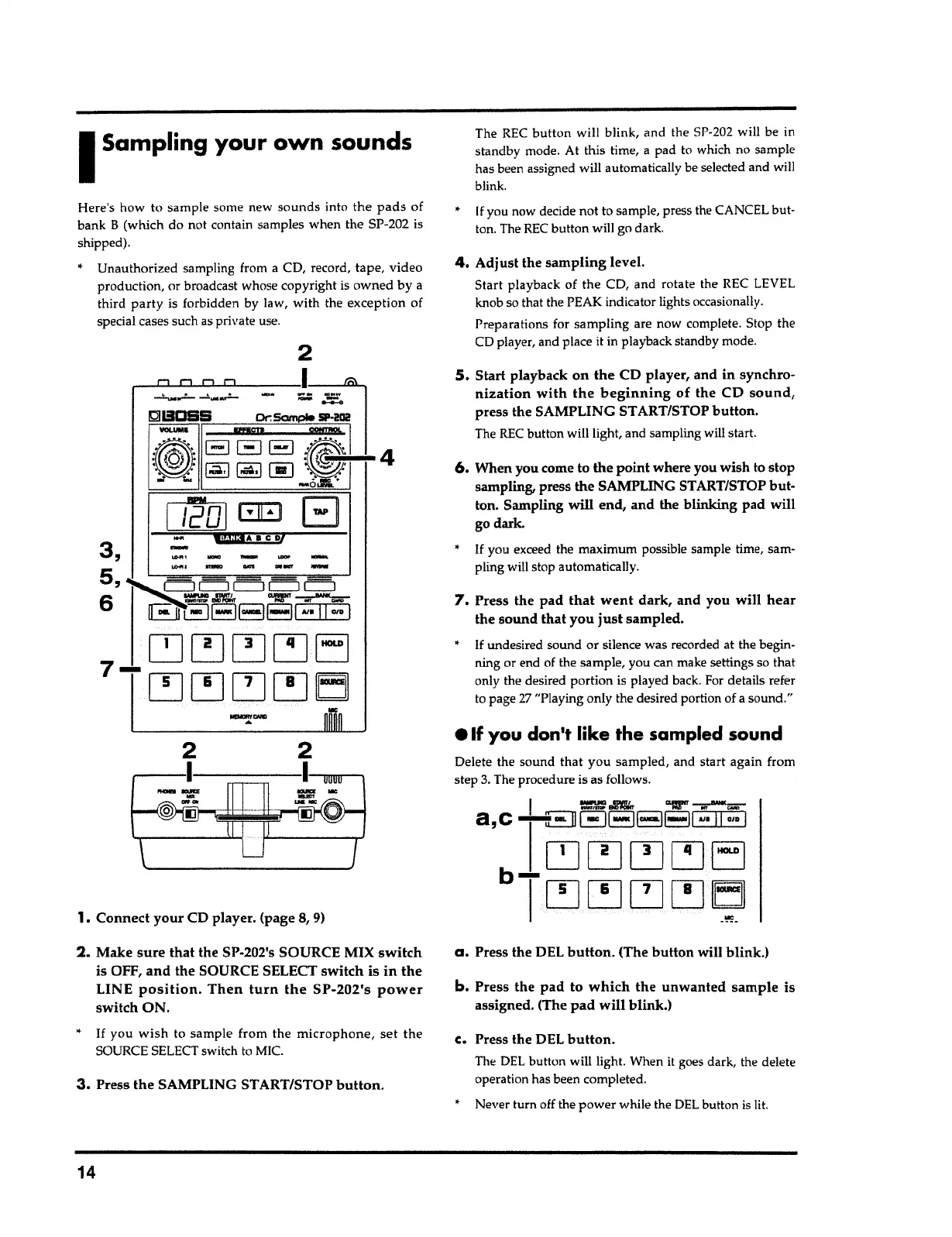
Press the DEL
button.
The DEL button will light. When
it
goes dark, the delete
operation has been completed.
•
Never turn off the power while the DEL button is
lit.
b.
Press the
pad
to
which the unwanted sample
is
assigned. (The
pad will
blink.)
a.
Press the DEL
button.
(The
button
will blink.)
I
==
8'llt\, "lr _.-.;;;.-
a,
c -i--llEJEJEJEJl
..
·
11
··DI
~~~~EJ
bT~[!J~~
~-
Delete the sound that you sampled, and start again from
step
3.
The procedure is as follows.
e If you don't like the
sampled sound
*
If undesired sound or silence was recorded at the begin-
ning or end of the sample, you can make settings so that
only the desired portion is played back. For details refer
to page
27
"Playing only the desired portion of
a
sound."
7.
Press the
pad that went
dark, and you
will hear
the
sound
that you
just
sampled.
*
If
you exceed the maximum possible sample time, sam-
pling will stop automatically.
6.
When you come to the
point
where you wish to stop
sampling, press the SAMPLING START/STOP but-
ton. Sampling
will
end, and the blinking pad will
go dark.
5.
Start playback
on the
CD player, and in synchro-
nization with the beginning
of the CD
sound,
press the SAMPLING ST ART/STOP
button.
The REC button will light, and sampling will start.
4.
Adjust the
sampling
level.
Start playback of the CD, and rotate the REC LEVEL
knob so that the PEAK indicator lights occasionally.
Preparations for sampling are now complete. Stop the
CD player, and place
it
in playback standby mode.
*
If
you now decide not to sample, press the CANCEL
but
-
ton. The REC button will go dark.
The REC
button
will blink, and the SP-202 will be in
standby mode. At this time,
a
pad to which no sample
has been assigned will automatically be selected and will
blink.
3.
Press
the
SAMPLING ST ART/STOP
button.
*
If
you
wish
to sample from the
microphone, set the
SOURCE SELECT switch to MIC.
2.
Make
sure that
the SP-202's SOURCE MIX
switch
is OFF,
and
the SOURCE SELECT switch is
in the
LINE
position. Then turn the SP-202's power
switch ON.
1.
Connect
your
CD player. (page 8,
9)
2
,--~~I~~~~~~-
--rnrrm-~
_.,.,...
...
2
,.,.
__
Jil""
--....~ -
...
---
-
~
~ISDSS Dr.Sample
SP-202
EJGEJ
:r@:
4
~
la,!
00
~
-aa·
*
Unauthorized sampling from
a
CD, record, tape, video
production, or broadcast whose copyright is owned by a
third
party
is forbidden by law, with the exception of
special cases such as private use.
Here's how to sample some new sounds into the
pads
of
bank
B
(which do not contain samples when the SP-202 is
shipped).
I
Sampling your own sounds



 To Next Page