21
10-2.
If
you
wish
to use Tap
Input,
playback the CD,
and press the
TAP
button
in time with the beat.
When you have pressed the button four times or more,
the value will be input (displayed).
A
tempo in the range of 40-200 can be specified. (When
PITCH is OFF)
10·1.
To
enter
a
numerical
value, press the
'Y
.6.
but-
tons to select the desired value.
If
you continue holding down
a
button, the value will
increase or decrease continuously.
9. Start playback of the
CD,
and rotate the
REC
LEVEL
knob
to
adjust
the sampling level so
that
PEAK
lights
occasionally.
When you finish making this adjustment, stop the CD
player, and
put
it once again in play-standby mode.
If
you make the BPM (tempo) setting before you begin
sampling, pressing the SAMPLING START /STOP but-
ton will cause the stop time (End Point) to automatically
be set to a beat of the BPM value that was in effect before
you pressed the button, and the
MARK
button will light.
(Refer to page 27 "Playing only the desired portion of
a
sound")
There are two ways to enter the BPM.
If
you already know
the desired setting, you can enter it numerically.
If
not,
press the TAP pad in time with the tempo (Tap input).
*
Even if you sample with a setting of STEREO, the same
sound will be recorded for both
L
and
R
if the input is
monaural. In this case, the sound will be the same as
if
you had sampled using MONO,
but
it will use two notes
of polyphony.
8. Press the MONO/STEREO button to make
STEREO
light.
7.
Press
pad
3.
6.
Press the BANK INT A/B
button
to make
B
light.
5.
Press the SAMPLING ST ART/STOP button.
The REC
button
will blink, and the SP-202 will
enter
standby mode.
If
at this
point
you wish to stop sampling, press the
CANCEL button. The REC button will go dark.
4. Turn
the
power
switch ON.
3.
Set the SOURCE SELECT switch to LINE.
2.
Turn on the
power
of
your
CD player,
and put
the
included
CD
in play-standby
mode.
1.
Connect
your
CD player. (page
8,
9)
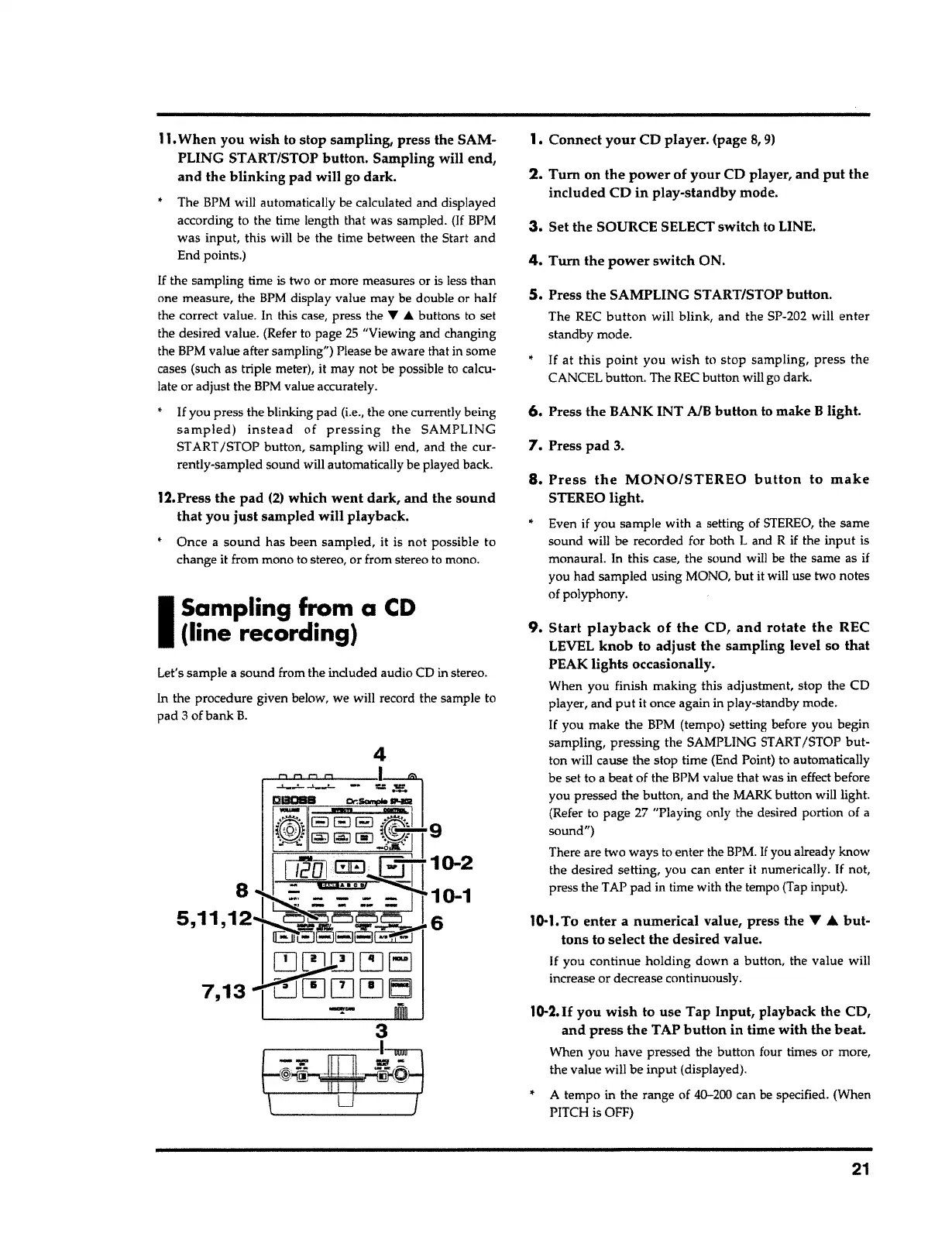
Let's sample a sound from the included audio CD in stereo.
In the procedure given below, we will record the sample to
pad
3
of bank
B.
I
Sampling from
a
CD
(line recording)
12.Press
the pad
(2)
which
went
dark, and the
sound
that
you
just
sampled will playback.
Once a
sound
has been sampled,
it
is not possible to
change it from mono to stereo, or from stereo to mono.
11.
When you wish to stop sampling, press the SAM-
PLING ST ART/STOP button. Sampling will
end,
and the
blinking
pad will go dark.
•
The BPM will automatically be calculated and displayed
according to the time length that was sampled.
(If
BPM
was input, this will be the time between the Start and
End points.)
If
the sampling time is two or more measures or is less than
one measure, the
BPM
display value may be double or half
the correct value. In this case, press the
'f' A
buttons to set
the desired value. (Refer to page
25
"Viewing and changing
the BPM value after sampling") Please be aware that in some
cases (such as triple meter), it may not be possible to calcu-
late or adjust the BPM value accurately.
If
you press the blinking pad
(i.e.,
the one currently being
sampled) instead
of
pressing
the SAMPLING
START /STOP button, sampling will end, and the cur-
rently-sampled sound will automatically be played back.



 To Next Page