19
8.
Stereo
playback
from a memory card x
1
=
4
7.
Normal
mono playback
x
2
+
normal
source
pad
playback x
1
=
4
6.
Mono
filter
(not HI-FI) x
1
+
mono ring modulator
(not HI-Fl)
x
1
=
4
5.
Mono
filter
(HI-Fl) x
1
+
normal mono playback x
1
=
4
4.
Mono
filter
(not HI-FI)
x
1
+
normal
mono playback
x
2
=
4
3.
Mono time
stretch
x
1
+
normal
mono
playback x
1
=
4
2.
Normal
stereo playback
x
2
=
4
1. Normal
mono playback
x 4
=
4
•
Examples
of maximum simultaneous
notes
Up to
a
total of
4
voices can be used
simultaneously
.
Not
available
.
'
:
Will be
3
in the case of HI-Fl.
(4)
(-)
(4)
2*
Ring modulator
(4)
(-)
4
4
(4)
2·
Filter (1/2)
(-)
.
.......
.
....
. .
...
....
.
..
.
....
.
.
.
.
..
(-)
(4)
...
. . . .
.
.
.
..
. .
..
. .
..
. . . .
.
.
.
.
......
.
...
(-)
(-)
2
3
3
Delay
(2)
(-)
(-)
(-)
(4)
(-)
3
(2)
Normal playback
Reverse playback
Time stretch
Source pad
(STEREO)
Memory card
MONO (STEREO)
Internal memory
MONO (STEREO)
• Number of
voices used
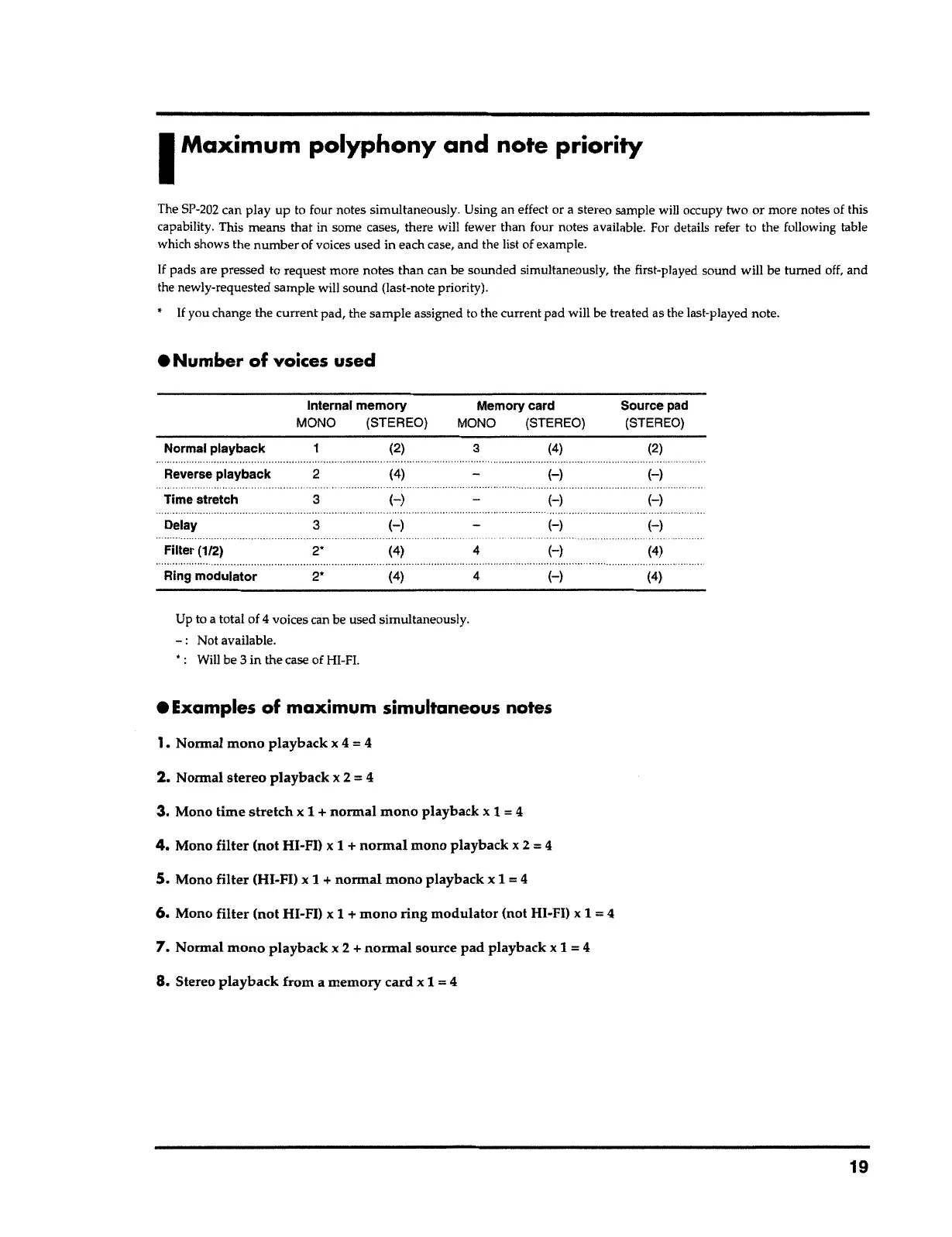
The SP-202 can play up to four notes
simultaneously
.
Using an effect or
a
stereo sample
wilJ
occupy two or more notes of this
capability. This means that in some cases, there will fewer than four notes
available
.
For details refer to the following table
which shows the number of voices used in each case, and the list
o
f
example
.
If pads are pressed to request more notes than can be sounded simultaneously, the first-played sound will be turned off, and
the newly-requested sample will sound (last-note priority).
•
If
you change the current pad, the sample assigned
t
o
the current pad will be treated as the last-played note.
I
Maximum polyphony and note priority



 To Next Page