15
If
you wish to use an
e
x
ternal microphone, connect it to
the MIC jack. The
externa
l
microphone will automatical-
ly take priority over the internal
microphone
.
It
is not possible to use two or more FILTER
1
/2
or RING
effects
simultaneousl
y
.
If
yo
u press another pad while the SOURCE pad is
lit,
the sound of the microphone may be
interrupted
.
Also,
pressing the SOURCE pad while the sound of a pad
1-8
is playing may cause the sound of
pads
1-8 to be inter-
rupted. This can occur when the maximum polyphony
i
s
exceeded
.
For
details refer
to
page
19
"Maximum
polyphony and note
pri
o
rity
.
"
When the SOURCE SELECT switch
is
in the LINE
p
o
si-
tion, an effect can be applied to the audio from the line
input.
If
the TRIGGER/GATE
butt
o
n has been pressed to make
TRIGGER light, pressing a pad will
alternate
between
starting the sound (pad lit) and stopping the sound (pad
dark), so that the sample will continue to sound while
the pad is lit. For
details
refer to
page
29 "Make the
sound continue playing even if you release the
pad
.
"
If
distortion occurs because the input level is too
high
,
or
noise is
a
problem because the input level
is
too low, you
can adjust the input
le
vel
according to
"If
noise is
a
prob-
lem
"
on page 34.
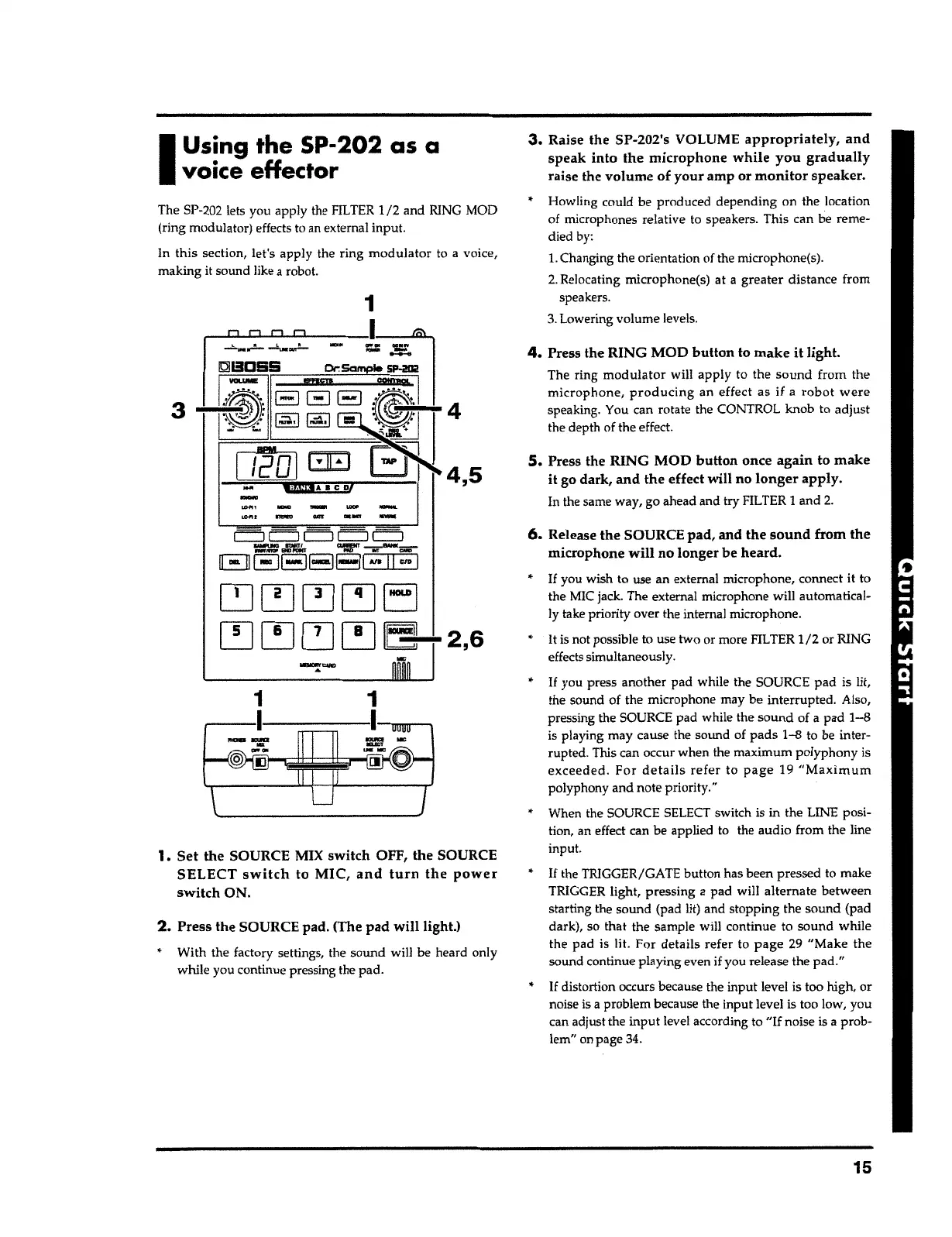
6.
Release the SOURCE
pad,
and the
sound
from the
microphone
will
no longer be heard.
S.
Press the RING MOD
button
once again to
make
it
go dark,
and
the effect will no
longer
apply.
In the same
way
,
go ahead and try FILTER
1
and
2
.
4.
Press the RING MOD
button
to
make it
light.
The ring
modulator
will apply to the
sound
from the
microphone, producing
an effect as
if
a
robot were
speaking. You can r
o
tate the CONTROL knob to adjust
the depth of the effect.
Howling could b
e
produced depending on the location
of microphones r
elati
v
e to
s
peakers. This can be reme-
died by:
l.
Changing the orientation
o
f the microphone(s).
2
.
Relocating microphone(s) at
a
greater
distance from
speakers
.
3
.
Lowering
vo
lume
level
s
.
3.
Raise the SP-202's VOLUME
appropriately, and
speak
into
the
microphone while you gradually
raise the volume of
your
amp or
monitor
speaker
.
2.
Press the SOURCE pad. (The
pad will
light.)
With the factory settings, the sound will be heard only
while you
continu
e pressing the pad.
1.
Set the SOURCE MIX switch OFF, the SOURCE
SELECT
switch
to MIC,
and turn the power
switch
ON.
1
,----1------- --m,nm---,
c::J c::J
c::::J
c::J C::J
=~ ~~--
E] EJEJEJBI
.,.
11
CID
I
~[!J~~EJ
~~~[!]~ 2,6
1
The SP-202 lets
yo
u
appl
y
the FILTER
1/2
and RING MOD
(ring
modulato
r
)
effect
s to an
e
x
ternal input.
In
this
section
,
let's apply the r
i
ng
modulator
to
a
v
o
ice
,
making it sound like a
robot
.
I
Using
the
SP-202 as a
voice effector



 To Next Page