17
6.
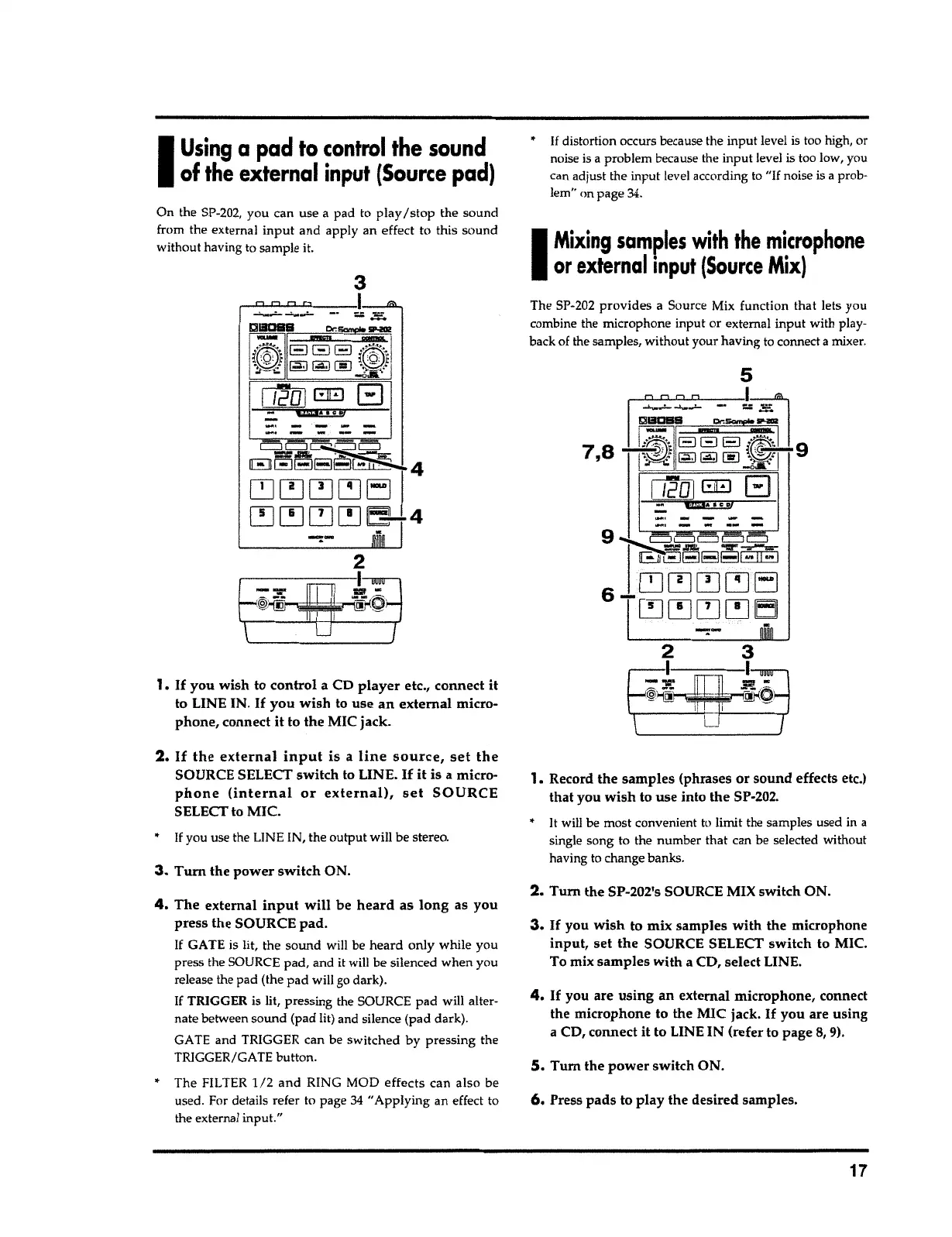
Press
pads
to play the desired samples.
5.
Tum
the
power
switch ON.
4. If
you are
using
an external microphone, connect
the microphone to the MIC jack.
If
you are using
a CD, connect it to LINE IN (refer to page
8,
9).
3. If
you
wish
to mix samples with the microphone
input,
set
the
SOURCE SELECT switch to MIC.
To mix samples
with
a CD, select LINE.
2.
Turn the SP-202's SOURCE MIX switch ON.
1. Record the samples (phrases or
sound
effects etc.)
that you wish to use into the SP-202.
•
It
will be most convenient
t
o
limit the samples used in
a
single song to the number that can be selected
with
o
ut
having to change
banks
.
7,8
5
The SP-202
provides
a
S
o
urce Mix function that lets you
combine the
mi
c
rophone
i
nput or external input with play-
back of the samples, without your having to connect
a
mixer.
I
Mixing
samples
with
the microphone
or external input
(Source
Mix)
•
If
distort
i
on occurs because the input level is too high,
o
r
noise is a problem because the input level
is
too low,
yo
u
can adjust the input level according to
"If
noise is
a
prob-
lem" on page
34
.
4.
The external
input will
be
heard
as
long
as you
press the SOURCE pad.
If GATE is lit
,
the sound will be
heard
only while you
press the SOURCE
pad
,
and it will be silenced when y
o
u
release the pad (the
pad
will go dark).
If
TRIGGER is
lit,
pressing the SOURCE pad will alter-
nate
betwee
n sound (pad lit) and silence (pad
dark
}
.
GATE and TRIGGER can be switched
b
y pressing the
TRIGGER/GATE
button
.
• The FILTER
1
/2 and
RING MOD
effects
can
als
o be
used. For
deta
i
ls refer to page
34
"Applying an effect to
the external
input.
"
3
.
Turn the power
switch
ON.
If
you use the LINE IN, the output will be
stereo
.
2.
If the external input is
a
line source, set the
SOURCE SELECT switch to LINE.
If it
is a micro-
phone (internal or external), set SOURCE
SELECT to MIC.
1.
If
you wish to control a CD
player
etc., connect it
to LINE IN.
If
you wish to use
an
external micro-
phone, connect it to the MIC jack.
-
·
-
·
-
· ·
-
-
-·----
On the SP-202,
y
ou can use
a
pad to play
I
stop the sound
from the
externa
l
input
and apply an effect to
thi
s
s
ound
without ha
v
ing to sample it.
I
Using
a
pad to control the sound
of
the
external input
(Source
pad)



 To Next Page