36
3.
Press the REC button.
The REC
button
will light, and loading will begin. While
this button is lit, do not
tum
the power off or remove the
card from the slot.
When loading has been finished, the REC button will go
dark.
2.
Press a
pad
to specify
the
card area
that
you wish
to load
into
internal memory.
The pad you pressed will blink.
If
you
decide
to cancel the Load
operation,
press the
CANCEL button.
1.
Hold
down
CANCEL
and press the
BANK INT
A/B
button.
The REC
button
will blink, and
pads
corresponding to
card areas which contain data will light.
Load
When this operation is performed, the internal data of
the SP-202 will be overwritten.
Be
sure to make
a
backup
of important data before you do this.
*
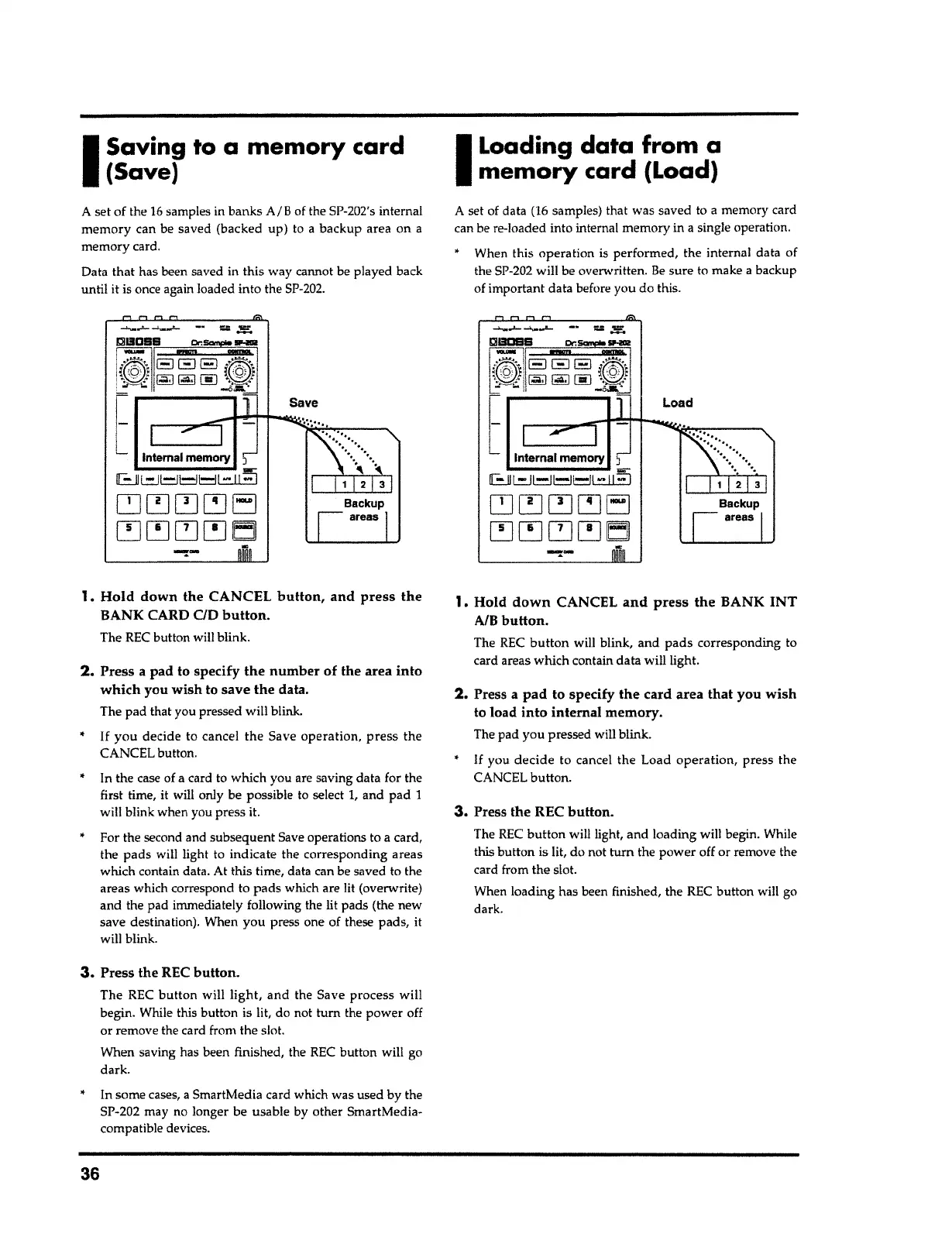
A set of data (16 samples) that was saved to
a
memory card
can be re-loaded into internal memory in
a
single operation.
I
Loading data from
a
memory card
{Load)
In some cases,
a
SmartMedia card which was used by the
SP-202 may no longer be usable by other SmartMedia-
compatible devices.
*
3.
Press the REC button.
The REC
button
will
light,
and the Save process will
begin. While this button is lit, do not
tum
the power off
or remove the card from the slot.
When saving has been finished, the REC button will go
dark.
In the case of a card to which you are saving data for the
first time, it will only be possible to select I, and pad
1
will blink when you press it.
For the second and subsequent Save operations to a card,
the
pads
will light to indicate the corresponding areas
which contain data. At this time, data can be saved to the
areas which correspond to
pads
which are lit (overwrite)
and the pad immediately following the lit pads (the new
save destination). When you press one of these pads, it
will blink.
If you
decide to cancel the Save operation,
press the
CANCEL button.
2.
Press a pad to specify
the
number of the area into
which
you wish to save
the
data.
The pad that you pressed will blink.
1.
Hold
down the CANCEL
button, and press the
BANK CARD
ao button.
The REC button will blink.
!:ill!IOBB er, -
-
Ii@\
a El a i~j
:~@@@\~
t
--
Internal memory
'.J
8 L=-ll=.l!=l~l -
11
!!j
~~~~EJ
~~~~EJJ
A set of the
16
samples in banks A/B of the SP-202's internal
memory can be saved (backed up) to
a
backup area on a
memory card.
Data
that
has been saved in this way cannot be played back
until it is once again loaded into the
SP-202.
I
Saving to a memory card
{Save)



 To Next Page