5 Operation
36 Operating Manual ARC 350 900-351_IFU_V2.0.0_20221-S0-20150520-EN
2. Select the type of connected electrode by selecting the icon for split or non-
split neutral electrodes.
3. In the selection of split neutral electrodes there is also a reduced power mode
for children electrodes available
The maximum power output of monopolar current types is reduced to
50 W when a children’s electrode is selected.
4. Confirm your selection by pressing the "OK" button.
- or -
To return to the main screen without changing the selection, tap any button
outside the selection menu.
The selected type of neutral electrode in connection with a colour-indicator for
the contact quality is shown in the status bar.
When using the "EASY" and "BABY" mode, no non-split electrodes are
accepted. Using the "MONO" mode, no split electrodes are accepted.
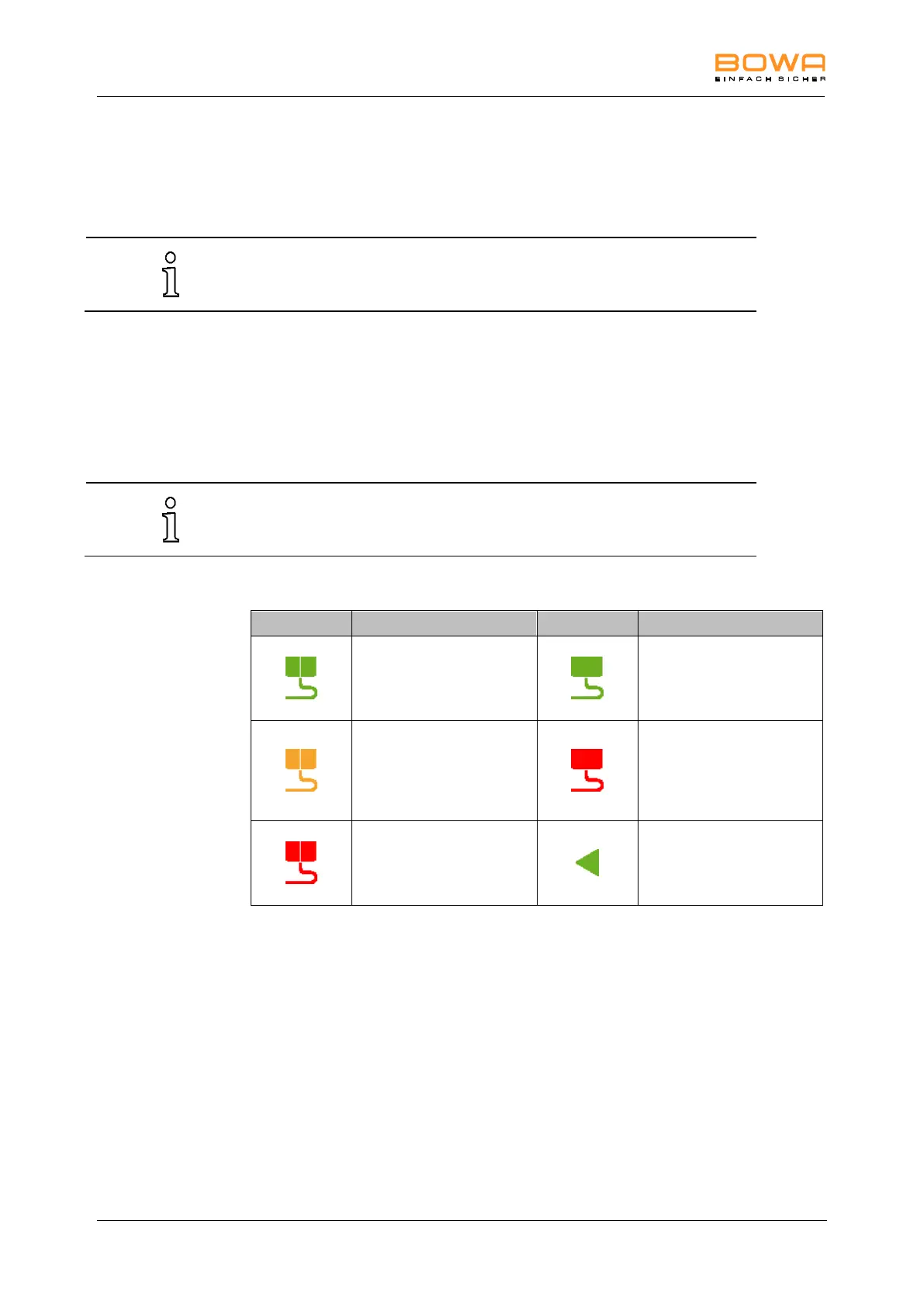
According to the contact quality, several icons are shown for neutral electrodes:
Split neutral electrode
contact quality OK
Non-split neutral
electrode
contact quality OK
Split neutral electrode
contact quality not
optimum
Not Detected non-split
neutral electrode
or connected
or contact quality
insufficient
Split neutral electrode
not connected
or contact quality
insufficient
Display the contact
quality.



 To Next Page