XY Cutting (BBP
®
37 ONLY)
Rev A 99 BBP
®
35/37 User’s Manual
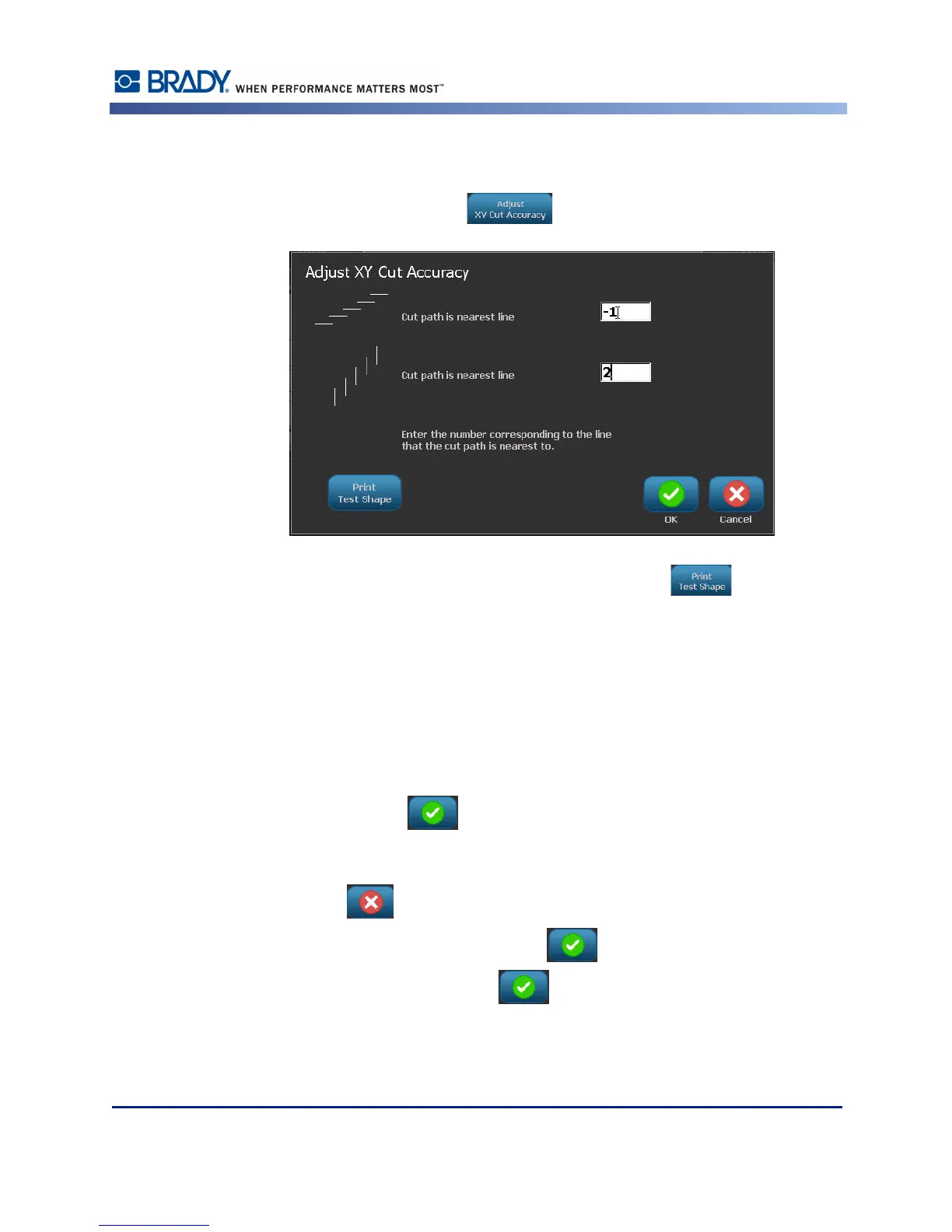
Overtime, the plotter cutter accuracy may drift. Use the Adjust XY Cut Accuracy feature to
bring the offset back to factory settings. To adjust the cut accuracy:
8. Touch Adjust XY Cut Accuracy .
9. On the Adjust XY Cut Accuracy screen, touch Print Test Shape .
The printer cuts a rectangle passing through a vertical and horizontal scale. Make a note of the
numbers representing the nearest pass to the cut path.
10. Enter the number where the cut path intersects the print line.
11. Press OK to save the adjustment.
Depending on how the shape is cut, you can change the numbers in the horizontal and/or
vertical cutting guides data fields for more accuracy.
12. When ready, touch OK .
You are returned to the XY Cut Settings screen.
13. Touch Cancel to exit the XY Cut Settings screen.
14. On the Advanced Settings screen, touch OK .
15. On the Print screen, touch Start Print .
The label prints out with the shape cut out.



 To Next Page