Labels
Rev A 103 BBP
®
35/37 User’s Manual
Label Width
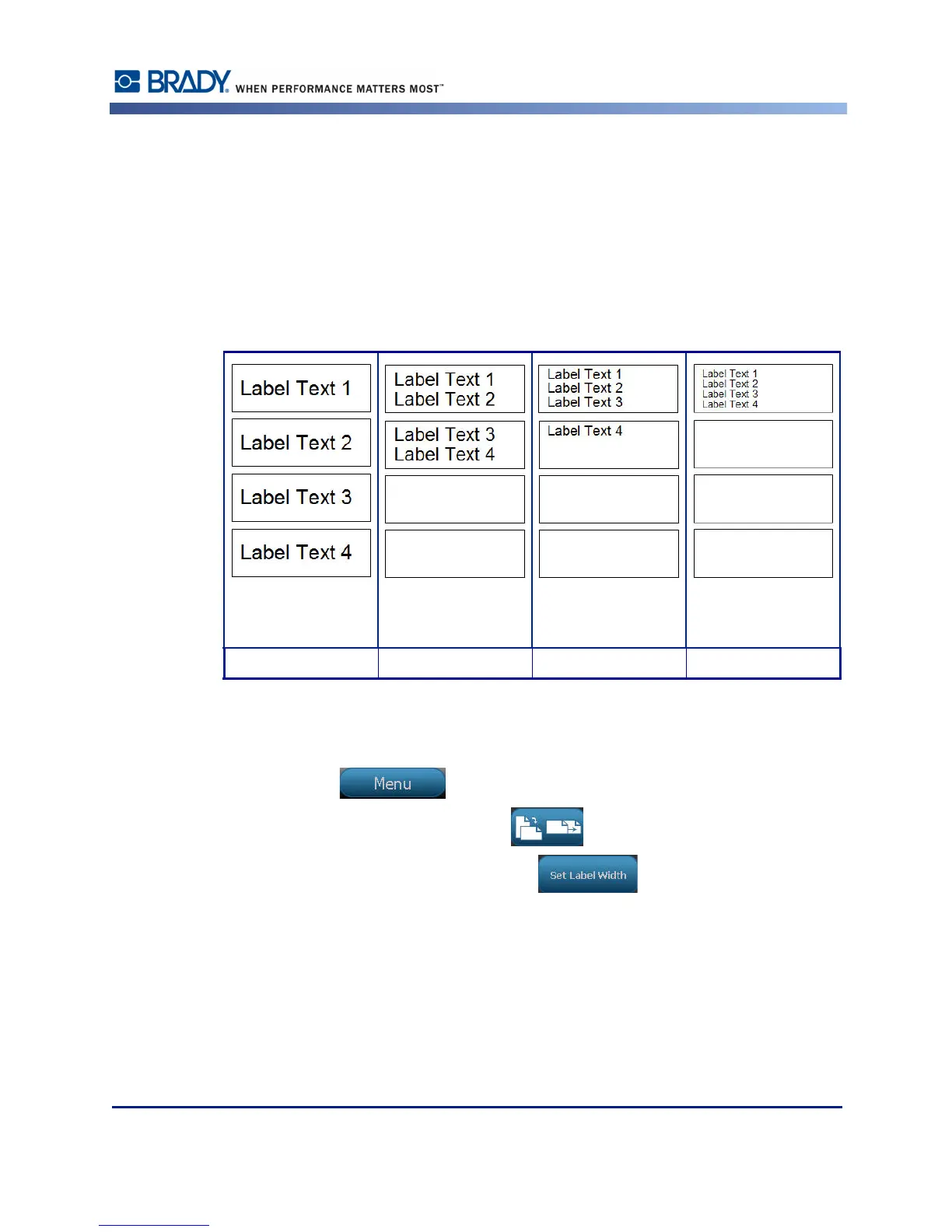
You can adjust the width of the installed media to accommodate up to 4 labels printed in the
space of the adjusted width. Adjusting the width automatically changes the size of the font and
the margins (boundaries). In this function, label width also addresses the height of the label,
measured from top to bottom. For instance, if using 4-inch tape, when you select 2 Up, two
labels would be 'stacked' and printed on the tape, each taking up 2 inches. If you selected 3 up,
three labels would be 'stacked' and printed on the tape, each taking up approximately 1.333
inches. The fourth label would be printed trailing the first label.
Figure 12 • Stacking labels using 2-, 3-, or 4-Up label width
To adjust the width:
1. Touch Menu .
2. Under Label, touch Size & Orientation .
3. Under Label Width, touch Set Label Width .
Match media size Label width - 2 UP Label width - 3 UP Label width - 4 UP



 To Next Page