Application Label Types
BBP
®
35/37 User’s Manual 120 Rev A
4. In the Operating Range Angle, touch the desired angle you want the range to display on
the gauge.
5. If the desired angle is not present, touch Custom .
6. In the Custom data field (in the middle of the gauge pictogram), enter the custom angle
degree.
7. When ready, touch Next .
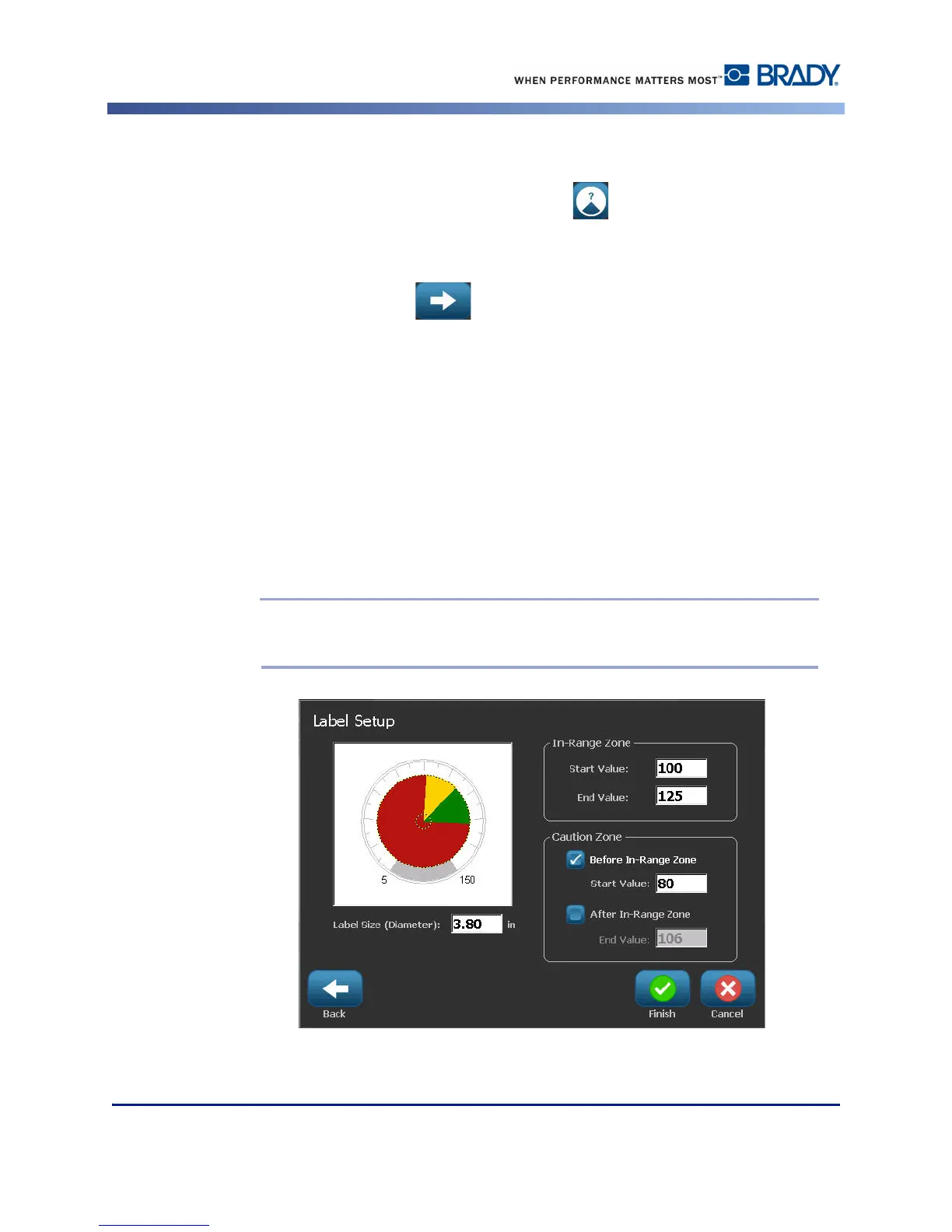
The In-Range Zone provides a visual element on the gauge to show when a system is entering
its optimal value or detrimental value. For example, the temperature gauge in a car indicating
when the engine is getting too hot; or a bicycle pump indicating when you have pumped the
optimal amount of air for the type of tire you are inflating.
On the Label Setup screen, you are still describing parameters for the gauge (not the label).
8. On the Label Setup dialog box, under In-Range Zone, touch the Start Value data field and
enter the starting value for the range that you want displayed on the gauge. (This In-Range
Zone is depicted by the green area in the figure below.)
9. Touch the End Value data field and enter the ending value for the range that you want
displayed on the gauge.
Note: The Start and End Value of the In-Range Zone must fall within the Start and
End Value of the overall gauge range, previously set in My Gauge Range.



 To Next Page