4-10
Replacement:
1. See ACCESS FOR SERVICE.
2. OPEN cover. Drain cooking oil from
cooking well.
3. Note where wires are connected.
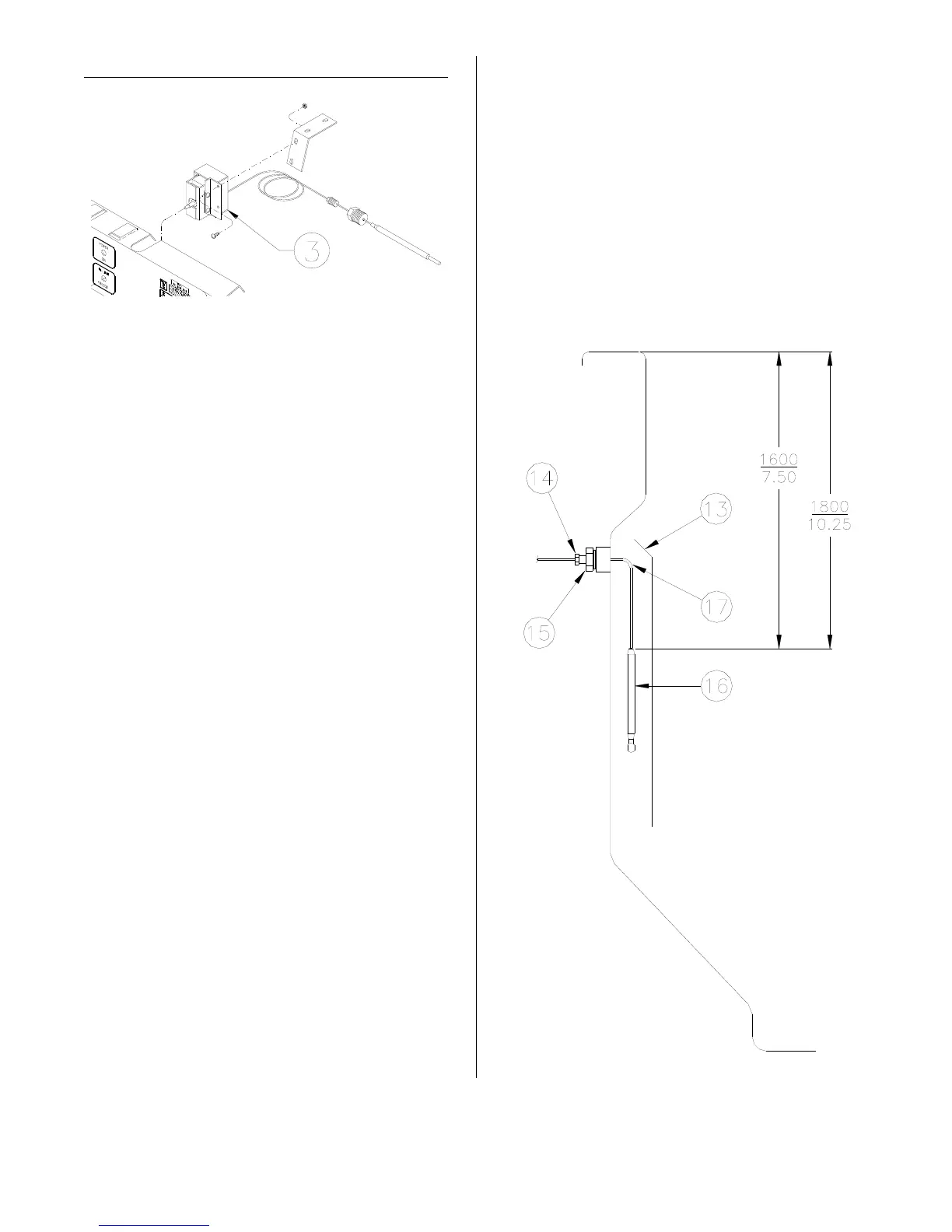
Remove wires from control (3).
4. Remove capillary guard (13) from
inside cooking well.
5. Remove small nut (14) then large capil-
lary nut (15) from outside cooking well.
6. Pull control bulb (16) out of cooking
well then remove control from control
panel.
7. Insert control bulb as shown in picture
at right. Pull excess capillary (17) out
of cooking well. Bend in capillary must
be large and smooth as possible.
8. Install large capillary nut securely after
applying teflon tape on threads.
9. Install small capillary nut finger tight
then tighten 1/4 turn with a wrench.
DO NOT over tighten. Capillary may
collapse or be cut in two.
10. Reconnect wires then mount new con-
trol.
11. Replace capillary guard.
12. Return cooking oil to cooking well.
13. Cook a load and check for leaks.
14. Tighten smaller nut (14) if necessary.
broaster.com Manual #14680 3/99 Rev 5/14



 To Next Page