5-4
2. Disconnect one wire (7) from sus-
pected element (8).
3. Check across two connections of ele-
ment with an ohmmeter. Meter should
indicate a closed circuit. If not, ele-
ment is faulty.
Replacement:
1. See ACCESS FOR SERVICE.
2. Drain cooking oil from the cooking
well.
1600:
1800E:
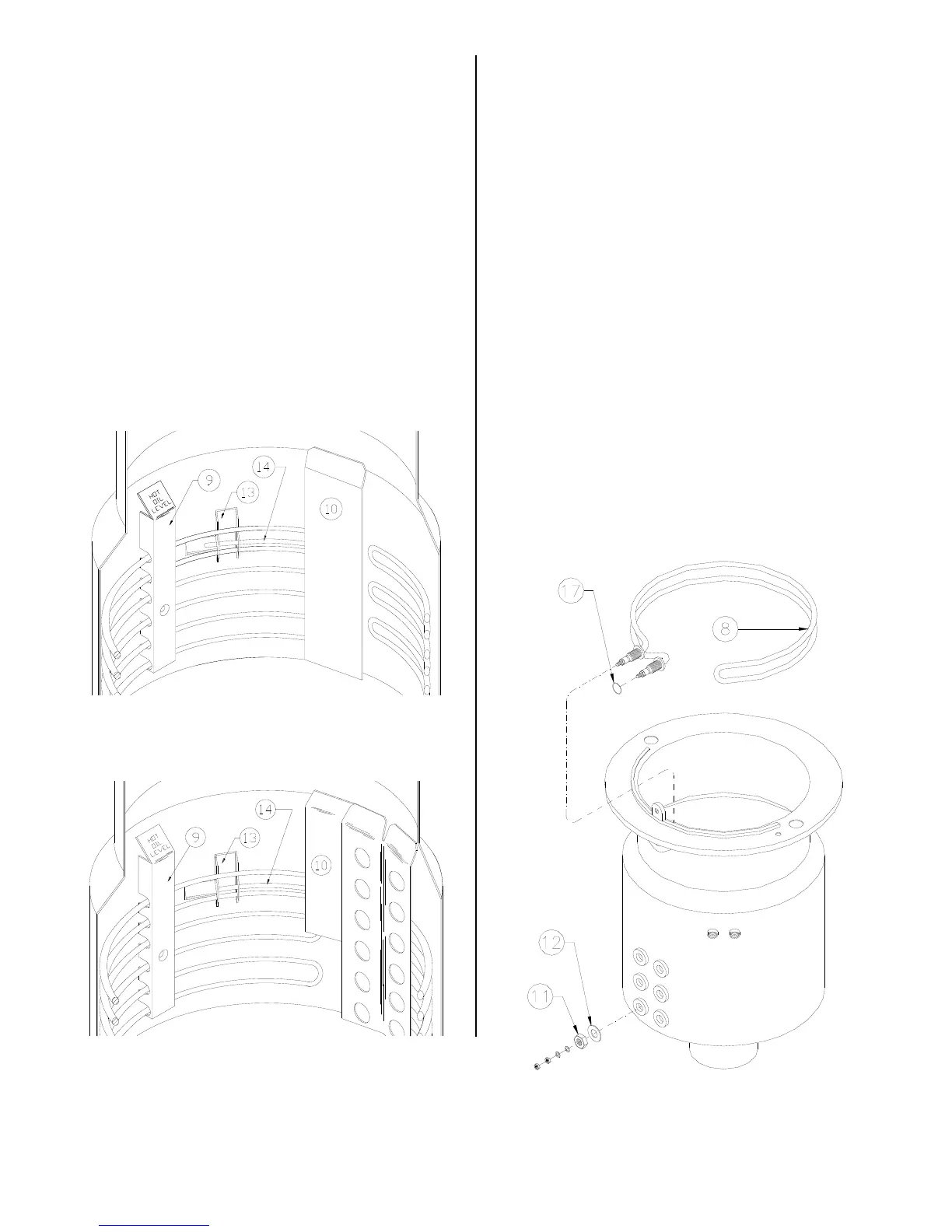
3. Remove three brackets (9) from inside
cooking well that secure elements to
the cooking well.
4. Remove capillary guard (10).
5. Remove element wires (7), large nut
(11) and washer (12) from element(s).
6. To remove bottom or center element,
remove element or elements above it.
7. Position element to allow removal of
probe bracket (13). Lightly pry inward
on top element if necessary. Slide
probe bracket off the temperature sen-
sor probe (14).
8. From inside the cooking well, slide ele-
ment out and lift on end to remove.
Squeeze slightly to clear neck of cook-
ing well.
broaster.com Manual #14680 3/99 Rev 5/14



 To Next Page